Computers / Storage
User Guide for Seagate Expansion Desktop Drive
Quick guide for the Seagate Expansion Desktop Drive. Learn about connection requirements, Mac formatting for Time Machine, safe removal procedures, and warranty information.
Table of contents
Quick guide from the manual
This document provides essential safety, regulatory, and usage information for the Seagate Expansion Desktop Drive. Key points include:
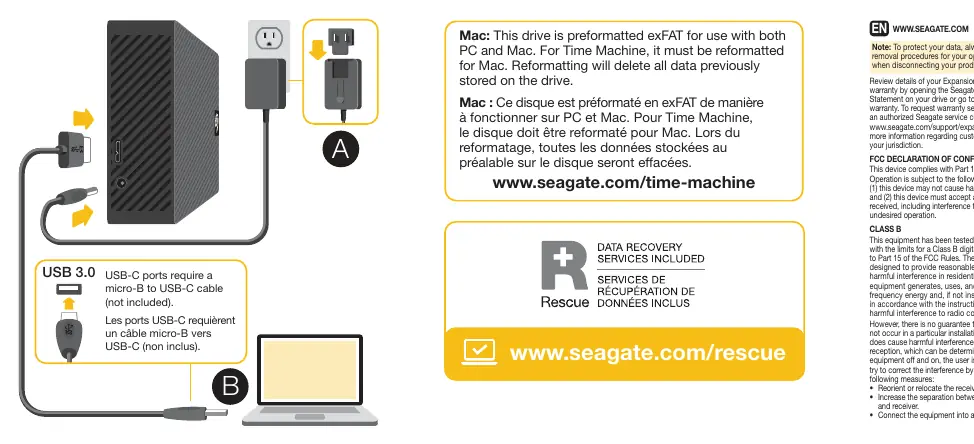
- USB-C Connection: USB-C ports require a micro-B to USB-C cable (not included).
- Mac Compatibility: The drive is preformatted as exFAT for use with both PC and Mac. To use with Time Machine, the drive must be reformatted for Mac, which will delete all data previously stored on the drive.
- Data Protection: Always follow your operating system's safe removal procedures before disconnecting the drive.
Connection
Connect the drive to your computer using the provided cable. If your computer uses a USB-C port, you must use a micro-B to USB-C cable, which is not included with the drive.
Mac Usage and Time Machine
The drive comes preformatted in exFAT, which allows it to work with both Windows and macOS. If you intend to use the drive with Apple Time Machine, you must reformat the drive specifically for Mac. Warning: Reformatting the drive will erase all data currently stored on it. Ensure you have backed up any important files before proceeding.
Safe Removal
To prevent data corruption or loss, always use the "Safely Remove Hardware" or "Eject" function provided by your operating system before physically disconnecting the USB cable from your computer.
Warranty and Support
Details regarding the Seagate Limited Warranty can be found by opening the warranty statement file on your drive or by visiting www.seagate.com/warranty. For warranty service, contact an authorized Seagate service center or visit the support page at www.seagate.com/support/expansion-desktop/.
Regulatory and Safety
This device complies with Part 15 of the FCC Rules. The product should not be disposed of with household waste; please follow local recycling regulations for electrical and electronic equipment.
Official resources from the manual
Manufacturer information
Seagate Technology LLC
Practical help
Common problems
Drive not recognized or usable for Time Machine
The drive is preformatted as exFAT. You must reformat it for Mac, which will erase all existing data.
USB-C connection issues
Ensure you are using a micro-B to USB-C cable (not included with the drive) if connecting to a USB-C port.
Before use
- Check your operating system's safe removal procedure.
- Verify you have the correct cable (micro-B to USB-C) if using a USB-C port.
- Back up existing data before reformatting for Time Machine.
Show more Show less
Specs in practice
- Operating Temperature
- Recommended operating temperature range is 5 - 40 °C.
Images and diagrams
- The diagram illustrates the connection of the USB cable to the drive and the power adapter.
Model compatibility
- Compatible with both PC and Mac.
- Requires reformatting for Time Machine usage.

Manual page author
Emily Carter
User documentation editor