Computers / Storage
Seagate USM Update Tool User Guide
Official user guide for the Seagate USM Update Tool. Learn how to update firmware on Seagate JBOD enclosures, understand command-line parameters, and interpret exit codes for troubleshooting.
Quick answers from the manual
Quick answer
- The Seagate USM Update Tool is a command-line utility used to update firmware on Seagate JBOD enclosures via a SAS host connection. p. 4
Key actions
- Run update p. 6
- Check firmware versions p. 7
- Simulate update p. 8
First start
- Ensure the package file has execute permissions and run with superuser privileges. p. 6
Show 3 more answers Show less
Problems and fixes
Operation failed
Check the exit code returned by the tool against the 'Tool exit codes' table.
p. 14Error codes
| Code | Meaning | Action | Pages |
|---|---|---|---|
| 4 | Upgrade to be performed is disruptive in nature | Proceed with caution | p. 14 |
Where to find it in the PDF
- Tool overview p. 4
- Command line parameters p. 7, 8, 9, 10
- Exit codes p. 14
Table of contents
Manual images
Click an image to enlargeQuick guide from the manual
The Seagate USM Update Tool (UUT) is a command-line utility designed to update firmware on Seagate JBOD enclosures from an attached SAS host. It identifies compatible enclosures, determines if an update is required, and sequences the update process. Ensure the package file has execute permissions and is run with superuser privileges on Linux-based platforms.
Tool overview
The tool is distributed as a standalone executable package. It extracts firmware components to a temporary location, performs the update, and cleans up temporary files. It functions over primary enclosure management interfaces, specifically supporting SCSI for in-band access to update firmware components.
Usage
The update process involves discovering Seagate enclosure SES targets within the SCSI topology. The tool constructs an enclosure map and updates detected Field Replaceable Units (FRUs) in a specific sequence. If multiple paths to the enclosure exist, the tool handles IOM 0 and IOM 1 components sequentially. The update script compares current component versions against the package versions; if they match, the update is skipped.
Command line parameters
The tool supports various command-line options to control the update process:
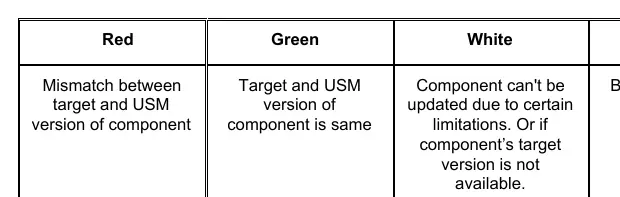
- -t/--target: Specify a comma-separated list of target devices (e.g., /dev/sg*).
- --stages: Display information for all update stages, including execution time and I/O impact.
- --list: Compare firmware versions on the target with the USM package.
- -d/--dryrun: Simulate the update process without executing changes.
- --skip: Skip specific update stages.
- --force: Force execution of specific stages regardless of version matching.
- -l/--logfile: Specify an alternative log file location.
- -c/--continueonfail: Continue the update process even if an intermediate stage fails.
- -ivc/--ignore_version_check: Ignore N/N+1 firmware version checks.
Tool exit codes
The tool returns specific exit codes to indicate the result of the operation. Common codes include:
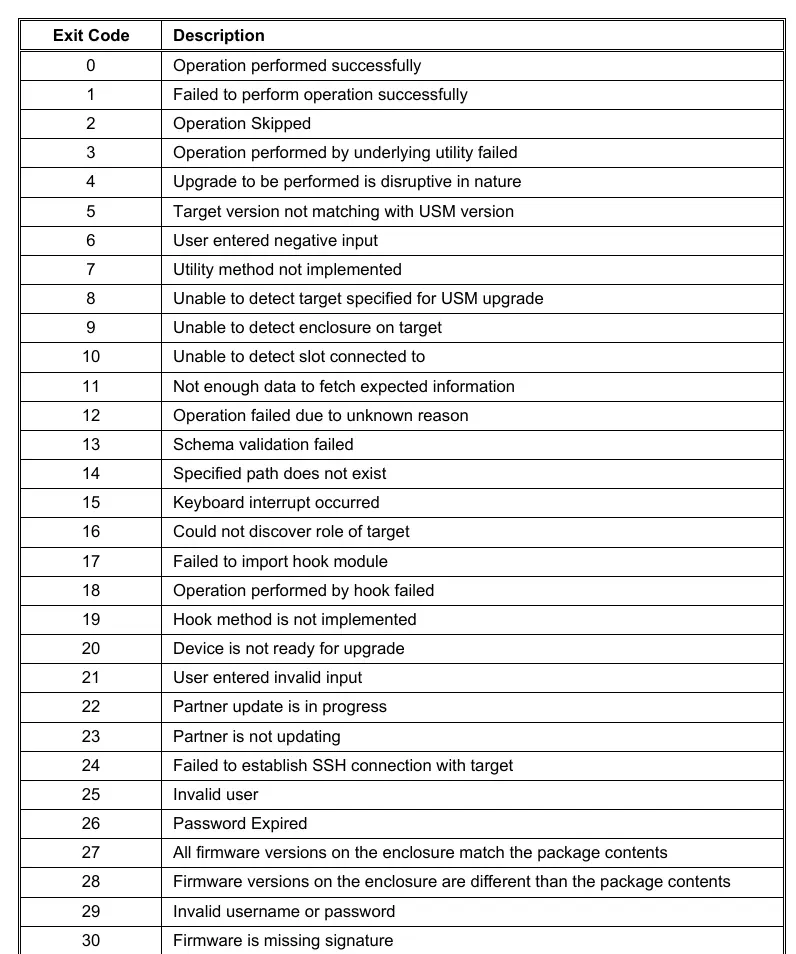
- 0: Operation performed successfully.
- 2: Operation skipped.
- 4: Upgrade is disruptive in nature.
- 27: All firmware versions on the enclosure match the package contents.
- 28: Firmware versions on the enclosure are different than the package contents.
Manufacturer information
Seagate Technology LLC
Practical help
Common problems
Operation failed
Check the exit code returned by the tool and refer to the 'Tool exit codes' section to identify the specific cause.
Target not detected
Verify the SAS host connection to the JBOD enclosure and ensure the correct SCSI target is specified if using the -t option.
Firmware update skipped unexpectedly
Use the --list command to verify if the current firmware versions already match the package contents (Exit Code 27).
Before use
- Ensure the package file has execute permissions.
- Run the tool with superuser privileges on Linux-based platforms.
- Verify the SAS host connection to the JBOD enclosure.
- Identify the target device handle (e.g., /dev/sg*) if necessary.
Show more Show less
Specs in practice
- Exit Code 27
- All firmware versions on the enclosure match the package contents; no update needed.
Model compatibility
- Supports Seagate JBOD enclosures.
- Requires SAS host connection for in-band access.

Manual page author
Emily Carter
User documentation editor