Computers / Storage
LaCie Mobile Drive Secure User Manual
Quick installation and setup guide for the LaCie Mobile Drive Secure. Learn how to connect your drive, install the Toolkit software, create a password, and format for Mac or PC.
Quick answers from the manual
Quick answer
- The LaCie Mobile Drive Secure is an external portable hard drive. To set it up, connect it to your computer, run the 'Start_Here' application to install the Toolkit software, and create a password to protect your files. p. 1
Key actions
- Connect the drive to your computer. p. 1
- Run the Start_Here application. p. 1
- Create a password via Toolkit. p. 1
First start
- Connect the drive, run Start_Here, install Toolkit, and set a password. p. 1
Show 3 more answers Show less
Problems and fixes
Data loss prevention
Always follow safe removal procedures for your operating system.
p. 1Maintenance and reset
- Reformatting for Time Machine p. 1
Where to find it in the PDF
- Installation and Setup p. 1
- Regulatory and Compliance p. 2
Table of contents
Manual images
Click an image to enlargeQuick Guide
To get started with your LaCie Mobile Drive Secure, follow these three simple steps:
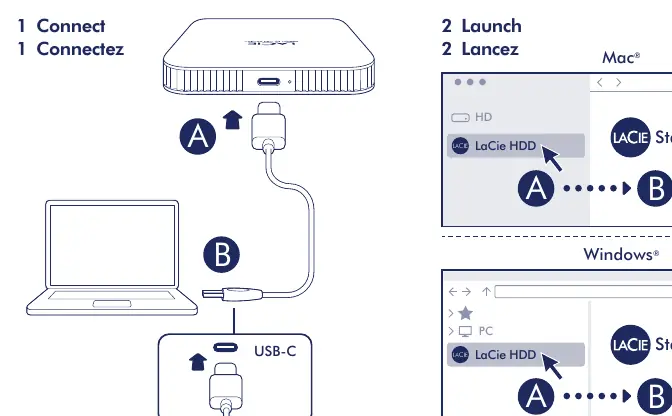
- Connect: Use the provided USB-C cable to connect the drive to your computer.
- Launch: Open the drive on your computer and run the Start_Here application.
- Redeem/Create Password: Follow the on-screen instructions to download and install the Toolkit software, then create a password to secure your files.
Setup and Installation
The drive comes pre-formatted in exFAT, which allows it to work with both Windows and macOS computers immediately. To ensure your data remains secure, always follow the safe removal procedures of your operating system before disconnecting the drive.

Mac and PC Compatibility
The drive is compatible with both PC and Mac out of the box. However, if you intend to use the drive with Apple Time Machine, you must reformat the drive for Mac. Warning: Reformatting the drive will delete all data previously stored on it.
Safety and Maintenance
To protect your data and the integrity of the drive, observe the following:
- Always use the safe removal procedure in your operating system before unplugging the USB cable.
- Do not expose the device to moisture.
- Keep the product within the specified operating temperature range.
- Ensure the voltage is correct before connecting to a power source.
- Do not attempt to repair or adjust the device while it is powered on.
Regulatory Information
This device complies with Part 15 of the FCC Rules. Operation is subject to the condition that the device does not cause harmful interference and must accept any received interference. For EU safety concerns regarding GPSR (EU) 2023/988, please contact Seagate through their official legal contact page.
Manufacturer information
Seagate Technology LLC
Practical help
Common problems
Drive not recognized by Time Machine
The drive must be reformatted for Mac. Note that this action will erase all existing data on the drive.
Data corruption or loss
Always use the operating system's 'Safe Removal' or 'Eject' function before physically disconnecting the USB cable.
Before use
- Connect the drive using the included USB-C cable.
- Locate the 'Start_Here' icon on the drive volume.
- Download and install the Toolkit software.
- Create a password to enable file security.
Show more Show less
Images and diagrams
- The connection diagram illustrates connecting the drive to a computer using the USB-C cable.
- The software launch diagram shows the 'Start_Here' application icon on both Mac and Windows interfaces.
Model compatibility
- Compatible with PC and Mac.
- Requires reformatting for Time Machine usage.

Manual page author
Michael Turner
Technical manual editor