Software / Apps Services
User Guide for Seagate Lyve Mobile Mount + PCIe Adapter
Quick start guide for the Seagate Lyve Mobile Mount and PCIe Adapter. Includes installation steps, device connection, software authorization, and safe removal procedures.
Quick answers from the manual
Quick answer
- The Seagate Lyve Mobile Mount and PCIe Adapter is installed by securing the mount to a structure, attaching the adapter, connecting power and data cables, and authorizing the host computer via the Lyve Client software. p. 1, 2
Key actions
- Install adapter onto guide pins and secure with shoulder screw. p. 1
- Connect power cable and secure with locking bracket. p. 1
- Authorize host computer using Lyve Client. p. 1
First start
- Install Lyve Client, connect device, and enter Lyve Management Portal credentials. p. 1, 2
Show 4 more answers Show less
Problems and fixes
Device remains locked
Ensure Lyve Client is running and user is signed in.
p. 2Maintenance and reset
- Always eject device volumes from the computer before physical removal. p. 2
Technical specifications
| Parameter | Value | Meaning | Pages |
|---|---|---|---|
| Operating Temperature | 5 - 40 °C | Safe operating range | p. 2 |
| Input | 20VDC 13A | Power requirements | p. 2 |
Where to find it in the PDF
- Installation and Setup p. 1
- Operation and Safety p. 2
Table of contents
Manual images
Click an image to enlargeQuick guide from the manual
This document provides instructions for installing and operating the Seagate Lyve Mobile Mount and PCIe Adapter. Key requirements include a stable mounting surface, an internet connection for initial host authorization, and the Lyve Client software installed on the host computer.
Installation and mounting
Before installing the Lyve Mobile PCIe Adapter, ensure the Lyve Mobile Mount is securely fixed to a vehicle, apparatus, or structure to avoid excessive motion. When using mounting screws, ensure the cylindrical socket cap does not exceed 8mm in height to avoid damaging the Lyve Mobile Array enclosure.
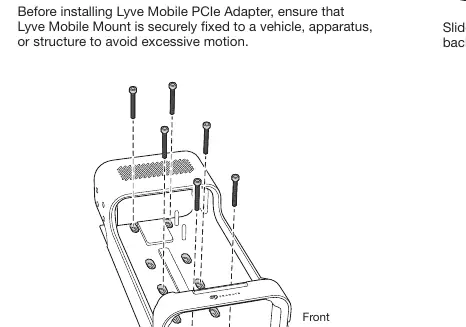
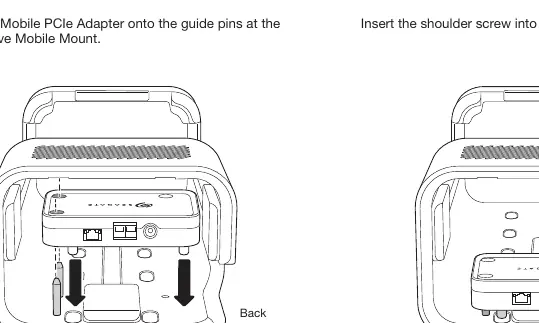
- Insert adapter: Slide the Lyve Mobile PCIe Adapter onto the guide pins at the back of the Lyve Mobile Mount.
- Attach shoulder screw: Insert the shoulder screw into the hole and tighten it.
Connecting power and cables
Follow these steps to connect the power and data cables:
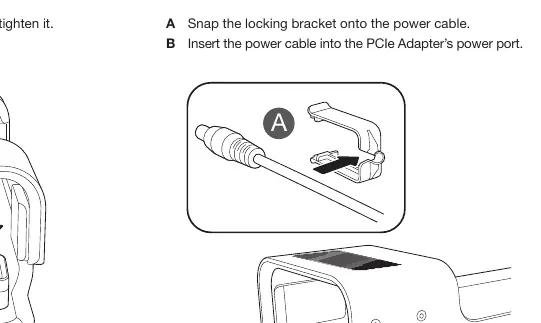
- Snap the locking bracket: Attach the locking bracket onto the power cable.
- Insert power cable: Plug the power cable into the PCIe Adapter’s power port.
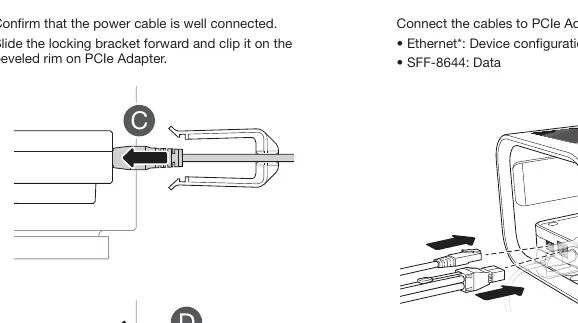
- Secure connection: Confirm the power cable is well connected, then slide the locking bracket forward and clip it onto the beveled rim on the PCIe Adapter.
- Connect cables: Connect the Ethernet cable (for device configuration) and the SFF-8644 cable (for data) to the PCIe Adapter. Note that the Ethernet cable is not included.
Software authorization
An internet connection is required to authorize a host computer:
- Open the Lyve Client on the computer intended to host the Lyve Mobile Array.
- Enter your Lyve Management Portal username and password when prompted.
- The host computer remains authorized for up to 30 days. After 30 days, you must open the Lyve Client and re-enter your credentials.
Operation and unlocking
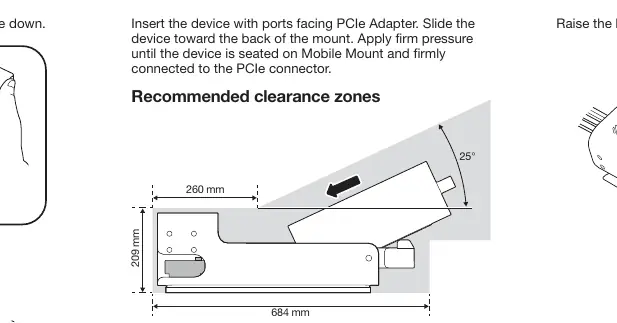
To insert the device, press the green release button and pull the handle down. Insert the device with ports facing the PCIe Adapter and slide it toward the back of the mount until it is firmly connected. Raise the handle to lock the device in place.
When the device is inserted, the LED will blink white during the boot process and turn solid orange, indicating it is ready to be unlocked. Ensure the Lyve Client app is running; it will automatically unlock the device if previously authorized. Once validated, the LED turns solid green.
Safe removal
Always eject the device volumes from your computer before physically removing the device to avoid file corruption. Use proper lifting techniques when removing devices from the Lyve Mobile Mount to avoid injury.
Manufacturer information
Seagate Technology LLC
Practical help
Common problems
Device not unlocking
Ensure the Lyve Client app is running and you are signed in. If the host computer has never unlocked the device, you must enter your Lyve Management Portal credentials.
Host computer authorization expired
Authorization lasts for 30 days. After this period, you must open the Lyve Client on the computer and re-enter your credentials while connected to the internet.
Before use
- Ensure the Lyve Mobile Mount is securely fixed to a structure.
- Download and install the Lyve Client from www.seagate.com/support/lyve-client.
- Have your Lyve Management Portal username and password ready.
- Verify that mounting screws do not exceed 8mm in height.
- Ensure you have an Ethernet cable (not included) for configuration.
Show more Show less
Specs in practice
- Operating Temperature
- 5 to 40 °C.
- Input Voltage/Current
- 20VDC 13A.
- Mounting Screw Height
- Maximum 8mm to prevent enclosure damage.
Images and diagrams
- Mounting slots: Shows the guide pins and screw hole locations for attaching the adapter.
- Cable locking: Illustrates how to snap the locking bracket onto the power cable and secure it to the adapter rim.
- Clearance zones: Indicates the required space around the device for proper installation.
Model compatibility
- Ethernet cable is not included.
- Requires Lyve Client software for operation.
- Host computer requires internet connection for initial authorization.

Manual page author
David Miller
Documentation analyst