Computers / PC Components
User Manual for Sealevel PC-COMM+2.ULTRA 3623 Serial Interface Module
Comprehensive user guide for the Sealevel PC-COMM+2.ULTRA (3623) serial interface module. Includes installation instructions, hardware specifications, DIP switch configuration, pinout diagrams, and troubleshooting tips.
Quick answers from the manual
Quick answer
- The PC-COMM+2.ULTRA (3623) is a dual-port serial card. Configure it using rear DIP switches for RS-232, RS-422, or RS-485 modes. Install SeaCOM drivers before inserting the card. p. 3, 6, 10
Key actions
- Install SeaCOM drivers p. 6
- Configure DIP switches p. 10
First start
- Install SeaCOM software, reboot, then insert the card. p. 6
Problems and fixes
Port not working
Use WinSSD diagnostic tool to verify port functionality.
p. 6, 14Technical specifications
| Parameter | Value | Meaning | Pages |
|---|---|---|---|
| Supply Voltage | 3.3V or 5V | Operating voltage requirements. | p. 9 |
| Max Baud Rate | 921.6K bps | Maximum supported data rate. | p. 3, 9 |
Where to find it in the PDF
- Installation p. 6
- DIP Switch Settings p. 10
Table of contents
Quick Guide
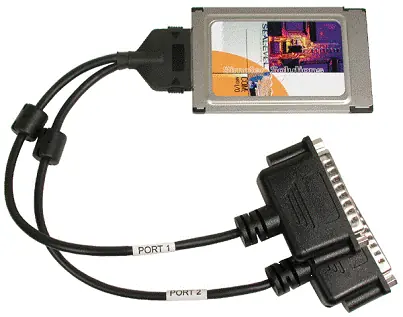
The Sealevel PC-COMM+2.ULTRA (3623) is a dual-port multi-interface asynchronous serial card designed for PCMCIA slots. It supports RS-232, RS-422, and RS-485 protocols with baud rates up to 921.6K bps. The card features ESD protection, 16-byte FIFOs, and hardware-configurable DIP switches for mode selection.
Installation
Before inserting the card into your computer, you must install the necessary drivers:
- Download and install the SeaCOM for Windows software.
- Reboot your PC after installation to allow the operating system to assign COM port numbers.
- The card is compatible with Windows 95, 98, ME, 2000, and XP. It is not compatible with Windows CE or PocketPC due to hardware limitations.
- Use the 'WinSSD' diagnostic tool located in the SeaCOM folder to verify that the ports are functional after installation.
Hardware Configuration
The card features a bank of 8 DIP switches on the rear, which must be set before the card is inserted into the host system. These switches control:
- Mode Selection: RS-232 or RS-422/485 (Switches 1 and 8).
- Duplex Selection: Full or Half-Duplex in RS-485 mode (Switches 2 and 7).
- TX Enable: Auto-TX or RTS-override-TX (Switches 3 and 6).
- Local TX Echo: Enable/Disable (Switch 5).
- Baud Rate Multiplier: x1 or x8 (Switch 4).
Pinout and Wiring
The card includes a 12-inch Y-cable with two DB-25M connectors. Pinouts vary depending on the selected mode:
- RS-232 Mode: Standard serial port pinout.
- RS-422/485 Mode: Uses differential signals (TXD+/-, RXD+/-, RTS+/-, CTS+/-).
- Termination: For RS-422/485 networks, a 120-Ohm terminating resistor is recommended between the appropriate signal pairs (e.g., RXD+/- or TXD+/-) to prevent data reflections.
Technical Specifications
- Supply Voltage: 3.3V or 5V.
- Form Factor: Type II PC-Card.
- Operating Temperature: 0-50°C (32-122°F).
- Humidity: <80% R.H. (non-condensing).
- ESD Protection: 2kV on all signal lines.
Troubleshooting
If you encounter issues with the device:
- Ensure there are no I/O address or IRQ conflicts with other installed adapters.
- Verify the card is securely installed.
- If 'No Echo' mode is selected, data loopback will not function.
- Always use the Sealevel WinSSD diagnostic software to isolate software issues.
- For further assistance, contact Sealevel Systems Technical Support at (864) 843-4343 or email [email protected].
Practical help
Common problems
Device not functioning or port not detected
Check for I/O address or IRQ conflicts with other hardware. Use the WinSSD diagnostic tool to verify port functionality.
Data loopback failure
Ensure 'No Echo' mode is not selected, as this prevents data loopback.
Communication errors in RS-485/422
Ensure proper termination (120-Ohm resistor) is installed at the ends of the network.
Before use
- Identify all currently installed I/O adapters to avoid resource conflicts.
- Configure DIP switches on the rear of the card before insertion.
- Install SeaCOM drivers for Windows.
- Reboot the PC after driver installation.
- Ensure the card is securely seated in the PCMCIA slot.
Specs in practice
- Baud Rate Multiplier
- Allows software baud rates to be multiplied by 1 or 8, supporting up to 921.6K bps.
- RS-485 Half-Duplex
- Requires internal or external linking of TXD and RXD signals.
Images and diagrams
- DIP Switch Settings: Located on the rear of the card; controls mode, duplex, echo, and baud rate.
- Pinout Tables: Defines signal mapping for DB-25M connectors in RS-232 and RS-422/485 modes.
Model compatibility
- Compatible with Windows 95, 98, ME, 2000, and XP.
- Not compatible with Windows CE or PocketPC.

Manual page author
David Miller
Documentation analyst
Organizes user manual content into clear summaries, with attention to model details, product context, and everyday usability.