Industrial / Communication Modules
User Manual for Sealevel COMM+16.PCI Serial Adapter
Quick guide for the Sealevel COMM+16.PCI 16-port RS-232 serial adapter. Includes installation steps for Windows and Linux, pin assignments, and troubleshooting tips.
Table of contents
Manual images
Click an image to enlargeQuick Guide
The Sealevel COMM+16.PCI is a PCI interface adapter that provides sixteen RS-232 asynchronous serial ports for industrial automation and control applications. It utilizes the 16C854 UART, featuring programmable baud rates and 128-byte transmit/receive FIFOs.
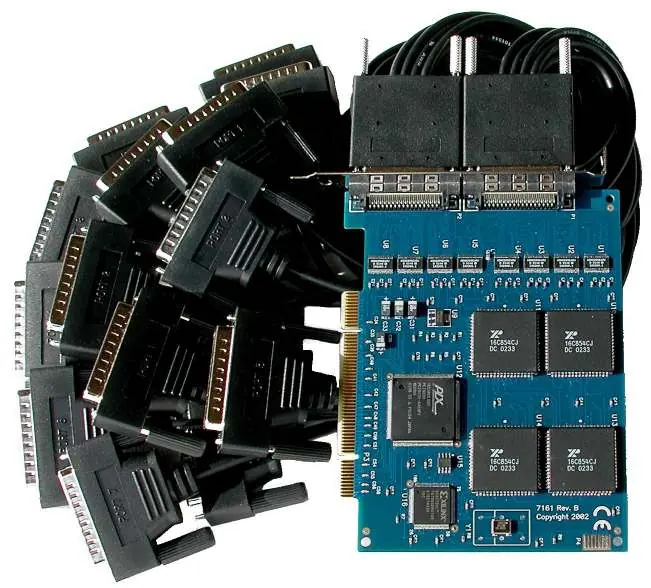
What's Included
- COMM+16.PCI Serial I/O Adapter
- (2) Micro MDB-68 to eight DB-25 'Spider Cable' (P/N CA202)
Software Installation
Windows Installation
Important: Do not install the adapter in the machine until the software has been fully installed.
- Locate and install the correct software from the Sealevel software driver database.
- Select part number #7161 for the adapter.
- Download and run the SeaCOM for Windows installer.
- Follow the on-screen prompts. If a warning about the publisher appears, click 'Yes' to proceed.
- The software will configure the necessary registry entries.
Linux Installation
Note: You must have 'root' privileges to install software and drivers. The syntax is case-sensitive.
- Download SeaCOM for Linux from the Sealevel website.
- Use a utility like 7-Zip to extract the tar.gz file.
- Refer to the README and Serial-HOWTO files included in the download for specific implementation details.
- Interface settings can be accessed via seacom/utilities/7161mode.
Physical Installation
- Install the software first (as described above).
- Turn off PC power and disconnect the power cord.
- Remove the PC case cover.
- Locate an available PCI slot (5V or 3.3V) and remove the blank metal slot cover.
- Gently insert the COMM+16.PCI into the slot, ensuring it is seated properly.
- Secure the adapter with the screw.
- Replace the cover and reconnect the power cord.
Technical Description
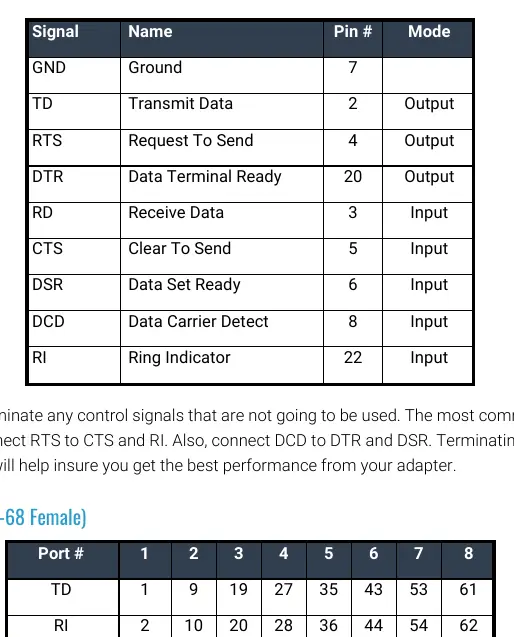
The adapter uses the 16C854 UART. The provided cables are interchangeable; the top connector supports ports 1-8, and the bottom connector supports ports 9-16. Please terminate unused control signals (e.g., connect RTS to CTS and RI; connect DCD to DTR and DSR) to ensure optimal performance.
Troubleshooting
If you encounter issues, follow these steps:
- Identify all I/O adapters currently installed in your system to avoid conflicts.
- Ensure the adapter is using a unique IRQ.
- Verify the adapter is securely installed in the motherboard slot.
- Use the Sealevel 'SSD' diagnostic software to verify configuration.
- For DOS/Windows 3.x, ensure the 'Use Plug-n-Play' option is turned 'OFF' in your BIOS.
Specifications
- Operating Temperature: 0° to 50° C (32° to 122° F)
- Storage Temperature: -20° to 70° C (-4° to 158° F)
- Humidity: 10 to 90% R.H. Non-Condensing
- Power Consumption: +5 VDC, 450 mA
- Board Dimensions: 5.5 inches (13.97 cm) length; 4.2 inches (10.668 cm) height
Official resources from the manual
Practical help
Common problems
Conflict with other adapters
Ensure no two adapters share the same I/O address. Identify all installed I/O adapters and their IRQs.
Erratic operation in DOS/Windows 3.x
Ensure the 'Use Plug-n-Play' option is set to 'OFF' in your system BIOS.
Driver installation warning
If a 'publisher cannot be determined' warning appears during Windows installation, click 'Yes' to proceed; this is normal for the driver.
Before use
- Verify all items are included (Adapter, 2x Spider Cables).
- Install software drivers before inserting the hardware.
- Identify existing I/O addresses and IRQs in your system.
- Ensure you have root privileges for Linux installation.
- Check that your PC has an available 5V or 3.3V PCI slot.
Specs in practice
- Power Consumption
- Requires +5 VDC at 450 mA.
Images and diagrams
- The pin assignment tables detail the signal, name, pin number, and mode (Input/Output) for DB-25 and Micro MDB-68 connectors.
Model compatibility
- Compatible with 5V or 3.3V PCI slots.
- Requires Windows 7 or newer for standard driver installation; contact support for older OS.

Manual page author
Michael Turner
Technical manual editor
Reviews PDF manuals for structure, safety notes, and practical product details so readers can find the right information quickly.