Computers / PC Components
User Manual for Sealevel COMM+232.PCI Serial I/O Adapter
Comprehensive user guide for the Sealevel COMM+232.PCI serial I/O adapter. Includes installation instructions, jumper settings for clock modes, technical specifications, and troubleshooting steps.
Quick answers from the manual
Quick answer
- The COMM+232.PCI is a two-channel PCI bus serial I/O adapter providing two RS-232 ports. It supports data rates up to 460.8K bps and is compatible with standard OS serial drivers. p. 3
Key actions
- Install the card by turning off the PC, inserting the card into an available PCI slot, and securing it. p. 8
- Configure clock modes using jumpers E1 and E2. p. 6
First start
- Locate and install the correct software from the Sealevel software driver database before installing the hardware. p. 8
Problems and fixes
Hardware conflicts
Use the 'SSD' (DOS) or 'WinSSD' (Windows) diagnostic software to verify port functionality and identify conflicts.
p. 12Technical specifications
| Parameter | Value | Meaning | Pages |
|---|---|---|---|
| Operating Temperature | 0°C to 50°C | Safe operating range | p. 11 |
| Max Data Rate | 460.8K bps | Maximum speed in DIV1 mode | p. 3, 6 |
Where to find it in the PDF
- Card Setup p. 6
- Installation p. 8
- Specifications p. 11
Table of contents
Quick guide from the manual
The Sealevel COMM+232.PCI is a two-channel PCI bus serial I/O adapter designed for PCs and compatible systems. It provides two RS-232 serial ports supporting data rates up to 460.8K bps. Before installation, ensure you have downloaded the latest drivers from the Sealevel software driver database.
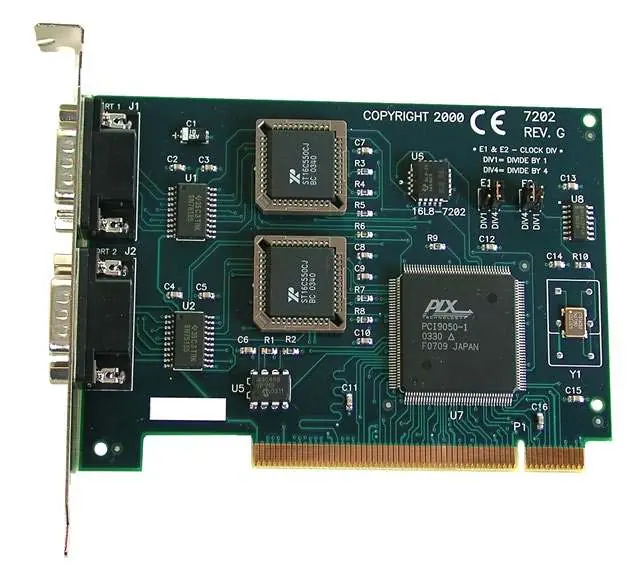
Card Setup
The card features two clock modes, selectable via jumpers at headers E1 and E2:
- DIV4 (Factory Default): Used for standard COM port baud rates (e.g., 2400, 9600, 115.2K bps).
- DIV1: Used for maximum data rates up to 460.8K bps.
Ensure the jumpers are placed in the correct position according to your communication requirements.
Installation
- Turn off the PC and disconnect the power cord.
- Remove the PC case cover.
- Locate an available PCI slot and remove the blank metal slot cover.
- Gently insert the COMM+232.PCI into the slot, ensuring it is seated properly.
- Secure the card with the screw.
- Replace the cover and reconnect the power cord.
Technical Description
The card utilizes the 16550 UART, which features programmable baud rates, data format, interrupt control, and a 16-byte input/output FIFO. The Interrupt Status Port (ISP) at Base+7 allows software to efficiently determine if an interrupt is pending, reducing polling overhead.
Troubleshooting
If you encounter issues, use the supplied Sealevel diagnostic software:
- DOS: Use the 'SSD' diagnostic program found in the dos\diag directory.
- Windows: Use the 'WinSSD' tool installed in the Sealevel folder on the Start Menu.
Always identify I/O address conflicts with other hardware before troubleshooting.
Specifications
- Operating Temperature: 0°C to 50°C (32°F to 122°F).
- Humidity: 10% to 90% R.H. (Non-Condensing).
- Power Consumption: +12VDC (50mA), -12VDC (50mA), +5VDC (480mA).
- Dimensions: 5.0 inches (12.7 cm) length; 3.5 inches (8.89 cm) height (including Goldfingers).
Practical help
Common problems
Card not detected or configuration conflict
Identify I/O address conflicts with other hardware. Use the provided diagnostic software (SSD/WinSSD) to verify configuration.
Incorrect baud rates
Ensure the jumper settings at E1 and E2 match the required clock mode (DIV1 for max speed, DIV4 for standard COM rates).
Before use
- Verify the package contains the COMM+232.PCI adapter.
- Identify existing I/O adapters and their IRQ/address settings.
- Download the latest drivers from the Sealevel website.
Specs in practice
- Clock Mode DIV1
- Supports maximum data rate of 460.8K bps.
- Clock Mode DIV4
- Supports standard COM port baud rates (e.g., 115.2K bps).
- Power Consumption
- Requires +12VDC, -12VDC, and +5VDC from the PCI bus.
Images and diagrams
- Figure 1 & 2: Jumper settings for E1 and E2 to select clock modes.
- Figure 3: Asynchronous communications bit diagram.
Model compatibility
- Designed for PC and compatible systems with PCI expansion slots.
- Compatible with standard OS serial drivers.

Manual page author
David Miller
Documentation analyst
Organizes user manual content into clear summaries, with attention to model details, product context, and everyday usability.