Automotive / Garage Equipment
User Manual for Sealey 1050CXLE.V3 2 Tonne Trolley Jack
Quick guide for the Sealey 1050CXLE.V3 2 Tonne Low Entry Short Chassis Trolley Jack. Includes assembly, operation, maintenance, and troubleshooting steps.
Table of contents
Manual images
Click an image to enlargeQuick Guide from the Manual
The Sealey 1050CXLE.V3 is a 2-tonne low-entry trolley jack designed for lifting vehicles. Important: This device is for lifting only and must not be used to support the load. Always use correctly rated axle stands to support the vehicle once lifted.
- Ensure the jack is used on level, solid ground (preferably concrete).
- Always engage the vehicle handbrake and put the transmission in gear or 'PARK'.
- Place wedges under the vehicle wheels to prevent movement.
- Ensure a minimum distance of 0.5m between the vehicle and static objects.
Assembly
Before use, the handle must be correctly installed:
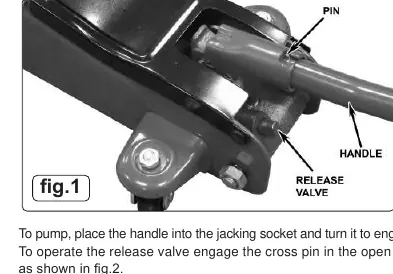
- To pump: Insert the handle into the jacking socket and turn it to engage the external pin.
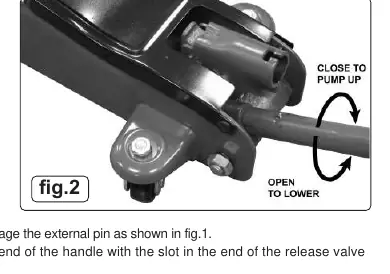
- To operate the release valve: Engage the cross pin in the open end of the handle with the slot in the end of the release valve.
Operation
Before First Use
Purge the hydraulic unit to eliminate air:
- Place the handle onto the release valve nut and open the valve by turning anti-clockwise.
- Place the handle into the jacking socket and pump for 30 to 40 seconds.
- Close the release valve by turning the nut clockwise.
- Apply a few drops of hydraulic jack oil to the pump piston and lubricate all moving parts.
Raising and Lowering
To raise the vehicle, close the release valve and pump the handle until the saddle reaches the lifting point. Ensure the lifting point is centrally located on the saddle. To lower, place the handle on the release valve nut and turn anti-clockwise very slowly. The lowering speed is controlled by how much you turn the handle.
Maintenance
Regular maintenance is essential for safety and longevity:
- Cleaning: Keep the jack clean and lubricate all moving parts regularly.
- Inspection: Before each use, check for broken, cracked, bent, or loose parts. Do not use the jack if it has been subjected to abnormal or shock loads.
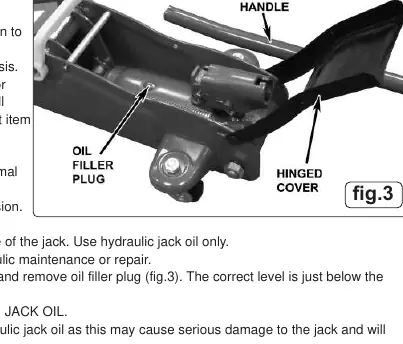
- Oil Level: To check the oil, fully lower the jack, open the hinged cover, and remove the oil filler plug. The correct level is just below the bottom of the plug.
- Oil Replacement: Replace the oil after one year using only high-quality hydraulic jack oil. Do not use brake fluid.
Troubleshooting
If the jack fails to perform correctly, check the following:
- Jack will not lift: Check for overload, low oil level, or air in the system. Ensure the release valve is fully closed.
- Jack feels 'spongy': Usually indicates air in the system. Open the release valve and pump the handle several times to purge air.
- Jack will not hold load: May be caused by dirt on valve seats or a partially open release valve.
Manufacturer information
Sealey Group
Practical help
Common problems
Jack will not lift the load
Check for overload, low oil level, or air in the system. Ensure the release valve is fully closed.
Jack feels 'spongy'
Air is likely in the system. Open the release valve and pump the handle several times to purge air.
Jack will not hold load
Check for dirt on valve seats or a partially open release valve. Lower the jack and clean the valve.
Jack will not lower completely
Check for lack of lubrication, bent piston rod, or a partially closed release valve.
Before use
- Ensure the jack is in sound condition with no visible damage.
- Verify the ground is level and solid (avoid tarmacadam).
- Engage the vehicle handbrake and put the transmission in gear.
- Place wheel chocks under the vehicle wheels.
- Ensure axle stands are available to support the load after lifting.
Images and diagrams
- Fig 1: Shows how to insert the handle into the jacking socket and engage the pin for pumping.
- Fig 2: Shows how to engage the handle with the release valve nut to control lowering.
- Fig 3: Shows the location of the oil filler plug under the hinged cover for maintenance.
Model compatibility
- Use only high-quality hydraulic jack oil.
- Do not use brake fluid or any other fluid as it will damage the jack and invalidate the warranty.

Manual page author
Emily Carter
User documentation editor
Prepares concise manual descriptions and highlights the most useful setup, operation, and maintenance information for readers.