Automotive / Garage Equipment
Sealey 115WH Lithium AC Power Pack 160W SPB160W.V2 User Manual
Quick guide for the Sealey 115WH Lithium AC Power Pack 160W (SPB160W.V2). Learn how to charge the unit, operate AC/DC/USB outputs, use the LED work light, and follow safety guidelines.
Table of contents
Quick guide from the manual
The Sealey 115WH Lithium AC Power Pack (SPB160W.V2) is a portable power source designed for charging smartphones, tablets, laptops, and powering Sealey 20V, 14V, and 12V power tools. It features multiple outputs including AC, DC, and USB. Always inspect the unit and cables for damage before use and ensure the battery is fully charged before the initial use.
Safety Instructions
- Electrical Safety: Ensure the risk of electric shock is minimized. Inspect cables and connectors for wear before use. Do not use if damaged.
- Battery Safety: Do not attempt to open, disassemble, or modify the battery pack. Do not expose to temperatures above 60°C (140°F). Recharge the battery immediately if discharged and at least every three months if not in use.
- General Safety: For indoor use only. Keep away from flammable liquids, gases, and metal objects (coins, keys, jewelry) to prevent short circuits. Do not drop the unit.
Product Overview
The unit features a power button, LED charge indicator, and various output ports. Refer to the diagram in the manual (Fig. 1) to identify the following:
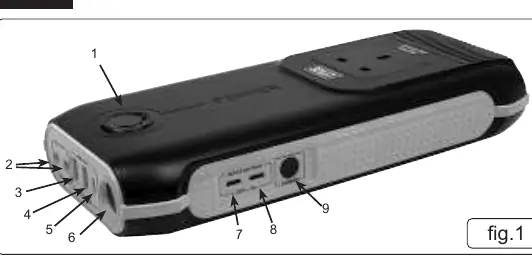
- LED Charge Indicator
- Dual 12V DC Output
- 5V/2.1A USB Output
- USB QC3.0 Output
- TYPE-C Output
- LED Light
- Bi-Directional TYPE-C ports (1 & 2)
- Power button
Charging the Power Pack
- Use the included Type-C charging cable.
- Insert the cable into either of the Bi-Directional Type-C ports (Fig 1.7 or 1.8).
- Connect the other end to a USB-A plug adapter (not supplied), car accessory charger, or wall-mounted USB-A output.
- The LED charge indicator will display the battery level. One light indicates 0-20%, and all five lights indicate 80-100%.
- The unit will switch off automatically when fully charged.
Operation
USB and DC Outputs
- USB Devices: Select the appropriate cable for your device and plug it into any of the 2 USB-A outputs or 3 USB Type-C outputs. Disconnect after use.
- 12V DC Output: Plug the car accessory socket cable into the DC output port (Fig 1.2) and insert the charger (not supplied) into the accessory socket. Disconnect after use.
- AC Output: Insert a suitable 3-pin plug into the AC output. Ensure the device is within the recommended wattage. Press and hold the power button for 3 seconds to turn on the AC output. Press and hold again to turn it off.
LED Work Light
- Double press the power button to turn the LED on.
- When the LED is lit, press the power button to cycle through three modes: Normal, SOS, and Strobe.
- Double press the power button to turn the LED off.
Maintenance
- Recharge the unit after usage.
- Remove all cables and connections after charging or usage.
- Wipe the unit with a clean, dry cloth.
- Store in a clean, dry environment with an ambient temperature between 4°C and 30°C.
Specifications
- Model No: SPB160W.V2
- Capacity: 115Wh Lithium Battery
- Inputs: 2 x Bi-Directional Type-C (5V/2A, 9V/2A, 12V/1.5A)
- Outputs: 230V~50Hz AC (100W Max), 2 x 12V 8A DC, Standard USB 5V/2.1A, QC3.0 USB, Type-C
- Charge Time: 8 hours with 18W fast charger
- Dimensions: 263 x 115 x 40mm
Manufacturer information
Sealey Group
Practical help
Common problems
Unit not charging
Ensure you are using an 18W fast charger (not included) and the cable is connected to one of the Bi-Directional Type-C ports.
AC output not working
Ensure the device is within the recommended wattage and press and hold the power button for 3 seconds to activate the AC output.
LED light not turning on
Double press the power button to activate the LED light.
Before use
- Inspect Power Pack, charge cables, and connectors for wear or damage.
- Ensure the internal battery is fully charged before initial use.
- Check with the vehicle manufacturer for specific instructions if using in a vehicle.
- Uncoil cables between the Power Pack and devices when in use.
Images and diagrams
- Fig 1 identifies the port layout: 1. LED Charge Indicator, 2. Dual 12V DC Output, 3. 5V/2.1A USB Output, 4. USB QC3.0 Output, 5. TYPE-C Output, 6. LED Light, 7 & 8. Bi-Directional TYPE-C ports, 9. Power button.
Model compatibility
- Compatible with Sealey 20V, 14V, and 12V power tool ranges.
- For indoor use only.
- Do not operate within the vicinity of flammable liquids or gases.

Manual page author
Emily Carter
User documentation editor
Prepares concise manual descriptions and highlights the most useful setup, operation, and maintenance information for readers.