Lighting / Work Lights
Sealey LED18WFL Rechargeable Flexible Floodlight User Manual
Quick guide for the Sealey LED18WFL 18W COB & SMD LED Rechargeable Flexible Floodlight. Learn how to operate the 5 light modes, charge the battery, and maintain your floodlight safely.
Quick answers from the manual
Quick answer
- The Sealey LED18WFL is a rechargeable flexible floodlight with 5 light modes, magnetic feet, and power bank functionality. Charge via USB-C and operate using the button on the back. p. 1, 2
Key actions
- Charge the floodlight p. 2
- Select light mode p. 2
First start
- Charge fully before first use. p. 2
Problems and fixes
Battery capacity loss
Charge properly before first use and condition regularly.
p. 2Maintenance and reset
- Recharge every three months if not in use. p. 2
Technical specifications
| Parameter | Value | Meaning | Pages |
|---|---|---|---|
| Battery | 3.7V Li-ion 4400mAh | Internal battery capacity | p. 1 |
| Charging time | 9hr | Time to fully charge | p. 1 |
| Lumen Output | 1500 (COB) / 600 (SMD) | Brightness output | p. 1 |
Where to find it in the PDF
- Operation p. 2
- Maintenance p. 2
Table of contents
Manual images
Click an image to enlargeQuick Guide
The Sealey LED18WFL is a rechargeable floodlight featuring a 18W COB LED and two adjustable 18W SMD side lights. Before using the device for the first time, ensure it is fully charged. The floodlight is operated via a single button on the back, which cycles through five different light modes. The unit includes magnetic feet for mounting and a USB output for use as an emergency power bank.
Safety Instructions
- Electrical Safety: Use only the supplied USB cable for charging. Ensure the floodlight is unplugged before cleaning or storage.
- Battery Safety: Do not disassemble, modify, or service the battery. Do not expose to temperatures above 60°C (140°F). Do not crush, puncture, or dispose of in fire or water.
- General Safety: Do not cover or block the lens during use. Do not shine the light directly into eyes. Do not allow children to use the floodlight. Do not immerse in water.
Operation
Battery Charging
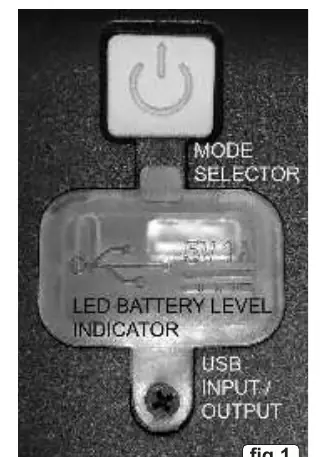
Ensure the floodlight is turned off before charging. The LED display indicates the charge level; four lights will illuminate when fully charged. Lights will flash during the charging process. Once fully charged, unplug the cable from the power supply.
Using the Floodlight
The floodlight features five working modes selected by pressing the button on the rear of the lamp:
- First press: Strongest centre light illuminates.
- Second press: Dimmer version of the centre light illuminates.
- Third press: Right-hand light illuminates on its own.
- Fourth press: Both left and right-hand lights illuminate (no centre light).
- Fifth press: All lights illuminate.
- Sixth press: Switches everything off.
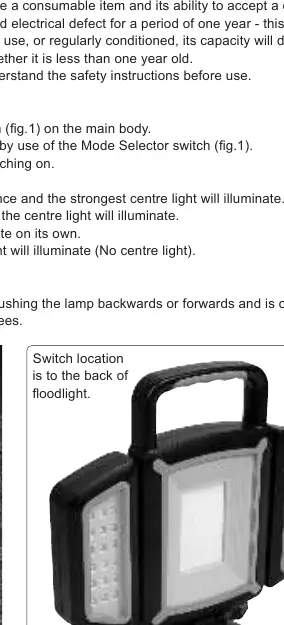
The lamp can be adjusted backwards or forwards using the ratchet mechanism, and the stand can be rotated 360 degrees.
Maintenance and Storage
- Wipe dirty surfaces with a damp cloth. Do not use abrasive or caustic cleaning materials.
- Do not fully discharge the batteries before recharging.
- Do not leave batteries in a discharged state; recharge immediately.
- If the floodlight is not in use, recharge the batteries every three months.
- Dispose of broken units in accordance with local authority battery regulations.
Manufacturer information
Sealey Group
Practical help
Common problems
Battery capacity diminishing
Ensure the battery is properly charged before first use and regularly conditioned. Failure to do so will reduce capacity.
Floodlight not turning on
Ensure the unit is not being charged while trying to turn it on, as it will not operate during the charging state.
Before use
- Fully charge the unit before initial use.
- Inspect the USB cable and connector for wear or damage.
- Ensure the floodlight is turned off before connecting to a power supply.
- Check that the lens is not covered or blocked.
- Ensure the floodlight is placed on a stable surface or attached via magnetic feet.
Specs in practice
- 3.7V 4400mAh Li-ion
- Internal battery type and capacity.
Images and diagrams
- Fig 1 shows the mode selector button, LED battery level indicator, and USB input/output ports.
- Fig 2 shows the floodlight unit with adjustable side lights and the stand.
Model compatibility
- Supplied with screw adaptor to fit Sealey Tripod TRI01.

Manual page author
Michael Turner
Technical manual editor
Reviews PDF manuals for structure, safety notes, and practical product details so readers can find the right information quickly.