Tools / Hand Tools
Sealey STW307 Digital Torque Wrench User Guide
Quick guide for the Sealey STW307 digital torque wrench. Learn how to set torque values, switch between Peak and Track modes, change units, and maintain your tool for accurate performance.
Quick answers from the manual
Quick answer
- The Sealey STW307 is a digital torque wrench with a 2-24Nm range. It features Peak/Track modes, 5 memory presets, and audible/visual alerts for target torque. p. 1
Key actions
- Turn the wrench on/off p. 2
- Change units p. 3
- Set target torque p. 3
First start
- Insert batteries p. 2
Problems and fixes
Low battery
Replace batteries; accuracy is affected.
p. 2, 3
Erro on screen
Adjust torque to be within 10%-100% range.
p. 3Maintenance and reset
- Recalibration p. 3
Technical specifications
| Parameter | Value | Meaning | Pages |
|---|---|---|---|
| Range | 2-24Nm | Torque measurement range | p. 1 |
| Drive | 3/8" Sq | Drive size | p. 1 |
| Battery | 2 x AAA | Power source | p. 1 |
Where to find it in the PDF
- Safety and Specifications p. 1
- Operation and Controls p. 2, 3
- Maintenance and Calibration p. 3, 4, 5
Table of contents
Quick guide from the manual
The Sealey STW307 is a digital torque wrench designed for workshop and factory use. It features a 2-24Nm range, 5 memory presets, and both audible and visual alerts. Important: Do not use the wrench if damaged, do not use as a hammer, and avoid over-torquing beyond 110% of the maximum range. Always remove batteries if the tool is not used for long periods.
Display and Controls
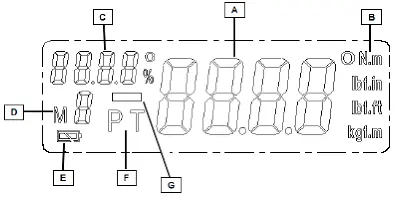
The display provides real-time torque values, unit indicators (Nm, lb.in, lb.ft, kg.m), battery status, and mode indicators (Peak/Track). The control panel consists of five buttons:
- Power ON/OFF: Turns the system on or off.
- Memory selection: Used to select between M1-M5 presets.
- Memorise: Saves the current torque setting.
- Zero: Resets torque values.
- Illumination/Digit select: Hold for 3 seconds to toggle display light; used to select digits during programming.
Preparation and Battery
To prepare the tool for use:
- Open the battery compartment cover by turning it counter-clockwise.
- Insert two AAA batteries, ensuring the positive end goes in first.
- Push the cap against the spring and screw clockwise to lock.
Note: Do not mix battery types or new/used batteries. If the battery symbol appears, replace the batteries immediately to maintain accuracy.
Operation Modes
The wrench operates in two primary modes:
- Track Mode: The default mode. Displays the real-time torque reached during operation.
- Peak Mode: Saves the maximum value reached. The value flashes for approx. 2 seconds after release.
To switch modes, press the mode selection button after turning the wrench on.
Programming Torque
The wrench allows you to save up to five target torque presets:
- Turn the wrench on.
- Hold the memory button for 5 seconds to select a memory slot (M1-M5).
- Press the memory button again to access programming.
- When "SET" appears, use the buttons to adjust the digits. Use the digit select button to move between ones, tens, etc.
- Press the memory button to save the value.
Caution: If the set value is below 10% or above 100% of the torque range, "Erro" will appear on the screen.
Operating the Wrench
- Select the appropriate socket for your work.
- Place the tool on the bolt or nut.
- Grip the handle and pull steadily, avoiding jerky movements.
- The LED will flash green when you reach 50%-98% of the target.
- When you reach 98%-100%, the red light will illuminate, and you will feel a vibration in the handle.
- If you exceed 102%, a continuous buzzer will sound.
Maintenance and Recalibration
Keep the wrench in its storage case in a dry, childproof location. Do not use organic solvents like alcohol or thinners for cleaning. Recalibration is recommended every 12 months or 5,000 cycles, whichever comes first, or after any repair, overload, or impact.
Official resources from the manual
Manufacturer information
Sealey Group
Practical help
Common problems
Low battery indicator on screen
Replace batteries immediately. Low voltage affects torque accuracy.
"Erro" displayed on screen
The programmed torque is outside the 10%-100% range of the tool.
Inaccurate readings
Ensure you are not using adaptors/extensions if possible, avoid jerky movements, and check if the tool requires recalibration.
Before use
- Check that the wrench is not damaged or faulty.
- Ensure batteries are fresh (2x AAA).
- Select the correct socket for the application.
- Set the desired torque value and mode (Peak/Track).
- Ensure the floor is not slippery and wear appropriate safety gear.
Images and diagrams
- Display: Shows real-time torque (A), units (B), target indicator (C), memory number (D), battery status (E), mode (F), and counter-clockwise symbol (G).
- Control Panel: Buttons for Power (1), Memory selection (2), Memorise (3), Zero (4), and Illumination/Digit select (5).
Model compatibility
- Do not use on live electrical circuits; the handle is not insulated.
- Keep away from magnets.

Manual page author
Michael Turner
Technical manual editor
Reviews PDF manuals for structure, safety notes, and practical product details so readers can find the right information quickly.