HVAC / Thermostats & Controls
User Manual for Secure C-Stat 17-B Programmable Room Thermostat
Quick guide for the Secure C-Stat 17-B programmable room thermostat. Learn how to set schedules, adjust temperatures, use overrides, and configure advanced settings.
Table of contents
Manual images
Click an image to enlargeQuick guide from the manual
The Secure C-Stat 17-B is a 7-day programmable room thermostat designed to control central heating. It features a large display and intuitive interface. Key operations include adjusting temperatures, setting time schedules, and using override modes. Ensure the thermostat is not covered by curtains or furniture, as it requires a free flow of air to sense temperature accurately. Keep it away from heat sources like lamps or electric fires.
Display and buttons
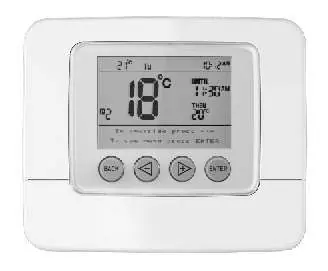
The display shows the actual room temperature, set temperature, day of the week, and time of day. Use the four buttons below the screen to operate the unit:
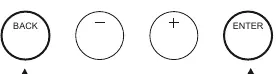
- BACK: Returns to the previous screen or cancels an action.
- - Button: Decreases values or navigates menus.
- + Button: Increases values or navigates menus.
- ENTER: Confirms selections and accesses menus.
Press any button to illuminate the back-lit display for 10 seconds.
Temperature overrides
You can temporarily or permanently override the programmed temperature:

- Temporary Override: Press the '-' or '+' buttons to adjust the temperature. The new setting will remain until the next scheduled time change.
- Temporary Override with Time Extension: Adjust the temperature, press ENTER, then use the '+' button to set the duration (up to 4 hours) and press ENTER again.
- Permanent Override (Hold): Adjust the temperature, press ENTER, then press '+' repeatedly until 'HOLD' appears on the display. Press ENTER to confirm. To cancel, press BACK then ENTER.
Programming
The thermostat allows for six time and temperature settings per day. To program:
- Press ENTER twice to access the MAIN MENU.
- Select 'Programme' and press ENTER.
- Follow the on-screen prompts to select the day, time period (P1-P6), and desired temperature.
- Adjust hours and minutes using the '-' and '+' buttons, confirming each step with ENTER.
- You can copy settings to other days by following the 'To copy the same programmes' process on the display.
Menu options
Access the MAIN MENU by pressing ENTER twice. Options include:
- Programme: Adjust time and temperature settings.
- Standby: Puts the unit into frost protection mode.
- Holiday: Sets a temporary standby mode with specific start and end dates.
- Time / Date: Adjusts the internal clock and calendar.
- Set Up: Accesses advanced configuration options.
Advanced settings
The SET UP menu allows configuration of:
- Clock format: Switch between 24-hour and AM/PM.
- Daylight saving: Enables automatic adjustment for GMT/BST.
- Temperature limits: Sets the minimum and maximum allowable temperatures.
- LC cycles: Configures energy-saving software based on heating type (Oil, Gas, Electric).
- Optimum start: Anticipates heating needs to reach the target temperature by the set time.
- Tamper setting: Allows setting a 4-digit PIN to prevent unauthorized adjustments.
Maintenance and troubleshooting
If the display becomes frozen or scrambled, press both the BACK and ENTER buttons simultaneously to reset the unit to factory settings. The C-Stat 17-B uses 2 standard AA alkaline batteries. When the 'Low Battery' warning appears, replace the batteries promptly. The C-Stat 17-M is mains-powered and does not require batteries.
Practical help
Common problems
Display is frozen or scrambled
Press both the BACK and ENTER buttons simultaneously to reset the unit.
Low battery warning
Replace the 2 AA batteries immediately when the 'Low Battery' message appears to prevent the unit from switching off.
Unauthorized adjustments
Use the 'Tamper setting' in the SET UP menu to lock the unit with a 4-digit PIN.
Holiday mode not activating
Ensure the start and end dates are set correctly. If the start date matches today, the unit will enter standby immediately.
Before use
- Ensure the thermostat is not covered by curtains or furniture.
- Keep the unit away from heat sources like lamps, TVs, or electric fires.
- Check that the correct day and time are set.
- For C-Stat 17-B, ensure fresh AA batteries are installed.
- Verify the heating system type (Oil, Gas, Electric) and set LC cycles accordingly.
Specs in practice
- Optimum start
- Anticipates heating needs to ensure the room reaches the target temperature by the scheduled time.
- Standby temperature
- The temperature maintained when the unit is in Standby or Holiday mode (default 5°C).
Images and diagrams
- The display shows the actual room temperature, set temperature, day of the week, and time.
- Buttons: BACK, -, +, and ENTER are used for all navigation and programming.
Model compatibility
- C-Stat 17-B is battery-powered (2x AA).
- C-Stat 17-M is mains-powered and does not require batteries.

Manual page author
Emily Carter
User documentation editor
Prepares concise manual descriptions and highlights the most useful setup, operation, and maintenance information for readers.