Automotive / Motorcycle Communication
User Manual for SENA 10C EVO Motorcycle Bluetooth Camera and Communication System
Quick start guide for the SENA 10C EVO. Learn how to operate the Bluetooth intercom, manage camera settings, pair devices, and troubleshoot common issues.
Table of contents
Manual images
Click an image to enlargeQuick guide from the manual
The SENA 10C EVO is a motorcycle Bluetooth camera and communication system. This guide provides essential instructions for setup and operation. Before using the device, ensure you download the latest firmware via the Sena Device Manager and install a compatible microSD card. Use the Sena Motorcycles App and Sena Camera App for advanced configuration and live previews.
Product Overview
The device features a Jog Dial, Camera Button, and Phone Button for control. Key ports include the DC Power Charging & Firmware Upgrade Port, MicroSD Card Slot, and Speaker/Microphone Port. The status LED provides visual feedback for battery levels and pairing status.
Installation
Follow the numbered steps in the installation diagram to securely mount the device to your helmet. Ensure the antenna and camera lens are positioned correctly for optimal performance.
Basic Operations
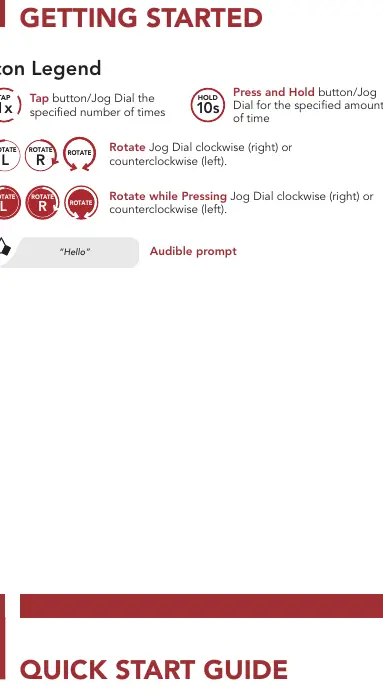
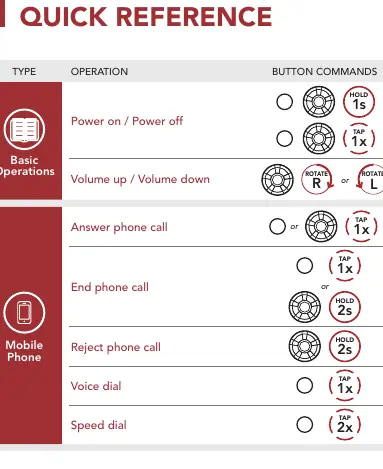
- Powering On: Hold the Phone Button for 1 second.
- Powering Off: Tap the Phone Button once.
- Volume Up: Rotate the Jog Dial clockwise.
- Volume Down: Rotate the Jog Dial counterclockwise.
Bluetooth Pairing
To pair with a mobile phone, hold the Phone Button for 5 seconds until the LED flashes alternating blue and red. The device will be discoverable. For intercom pairing, hold the Jog Dial for 5 seconds with another headset, or tap the button to initiate pairing.
Camera Controls
- Camera On/Off: Tap the Camera Button once.
- Start/Stop Recording: Hold the Camera Button for 1 second.
- Taking Photos: Tap the Camera Button once.
- Format SD Card: Hold the Camera Button for 5 seconds.
Note: You cannot record videos without a microSD card. MicroSD cards up to 128 GB and U3 or higher cards are compatible.
WiFi Settings
To change the WiFi channel, hold the Camera Button for 10 seconds. The default is 5 GHz. If your smartphone or region does not support 5 GHz, you must change the WiFi channel to 2.4 GHz by selecting the appropriate option.
Troubleshooting
- Factory Reset: Hold the Phone Button for 10 seconds. The LED will turn solid red.
- Fault Reset: Tap the button to perform a fault reset. Note that this does not restore factory default settings.
Manufacturer information
SENA
Practical help
Common problems
Cannot record video
Ensure a microSD card is inserted and formatted. Cards up to 128 GB and U3 or higher are required.
5 GHz WiFi not supported
Change the WiFi channel to 2.4 GHz if your smartphone or region does not support 5 GHz.
Intercom pairing fails
Ensure both headsets are in pairing mode by holding the Jog Dial for 5 seconds until the LED flashes blue.
Before use
- Update the device firmware using the Sena Device Manager.
- Insert a compatible microSD card (up to 128 GB, U3 or higher).
- Download the Sena Motorcycles App.
- Download the Sena Camera App.
- Charge the device fully.
Specs in practice
- Field of View
- 125 degrees
- MicroSD Compatibility
- Up to 128 GB, U3 or higher cards
Images and diagrams
- The Jog Dial is used for volume and navigation.
- The Camera Button controls recording and photo capture.
- The Phone Button handles calls and power functions.
Model compatibility
- Supports up to 3 other people for Bluetooth intercom conversations.
- Compatible with Android and iOS via Sena apps.

Manual page author
Michael Turner
Technical manual editor
Reviews PDF manuals for structure, safety notes, and practical product details so readers can find the right information quickly.