Automotive / Motorcycle Communication
User Manual for Fodsports FX 10C Motorcycle Communication System
Quick guide for the Fodsports FX 10C Bluetooth Mesh Intercom. Learn how to pair devices, use intercom functions, share music, install the unit on your helmet, and understand technical specifications.
Table of contents
Manual images
Click an image to enlargeQuick Guide from the Manual
The Fodsports FX 10C is a Bluetooth Mesh Intercom system designed for motorcycle communication. This guide covers essential operations including device pairing, intercom usage, music sharing, and installation. Ensure the device is fully charged before first use. The system supports universal pairing with non-Fodsports headsets and features a dedicated Mesh Intercom mode for group communication.
Device Controls and Indicators
The device features several buttons for intuitive control:
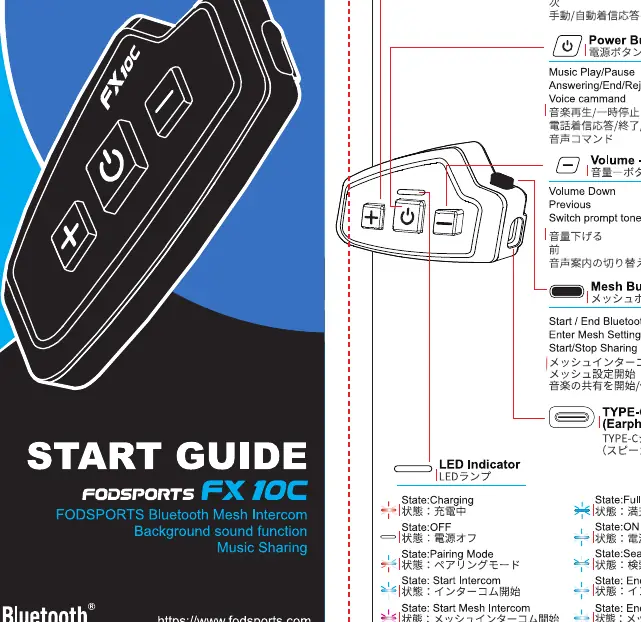
- Power Button: Hold to power on/off, play/pause music, or reject calls.
- Volume Buttons (+/-): Adjust volume, skip tracks, or switch languages.
- Mesh Button: Start/End Mesh Intercom and enter Mesh settings.
- LED Indicator: Provides status updates (Charging, Pairing, Standby, Intercom active).
Pairing and Connectivity
To connect the device to your mobile phone:
- Power on the device.
- Enter pairing mode by holding the Power button for 3 seconds.
- Select 'FODSPORTS FX 10C' on your phone's Bluetooth settings.
For Universal Pairing with other headsets:
- Ensure the device is in pairing mode.
- Follow the specific instructions for the other headset to initiate pairing.
Intercom and Music Sharing
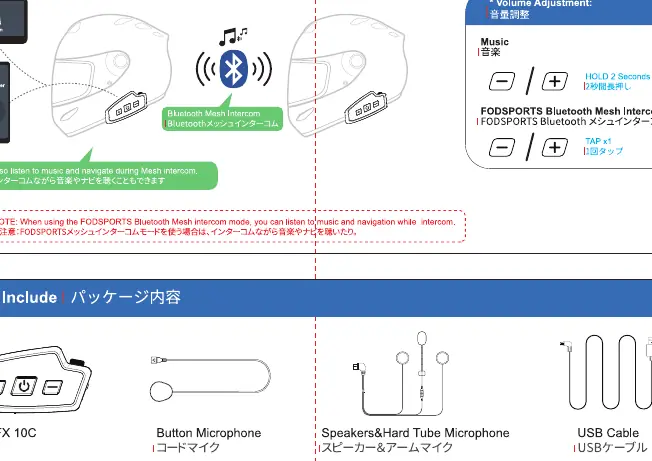
The FX 10C supports Bluetooth Mesh Intercom for group communication. Ensure all devices are set to the same Mesh channel. To share music, ensure the devices are paired, then use the Mesh button to initiate sharing. Note that the best music sharing quality is achieved when one device is connected to the phone and the other is connected to the intercom.
Installation Instructions
The device can be installed using two methods:
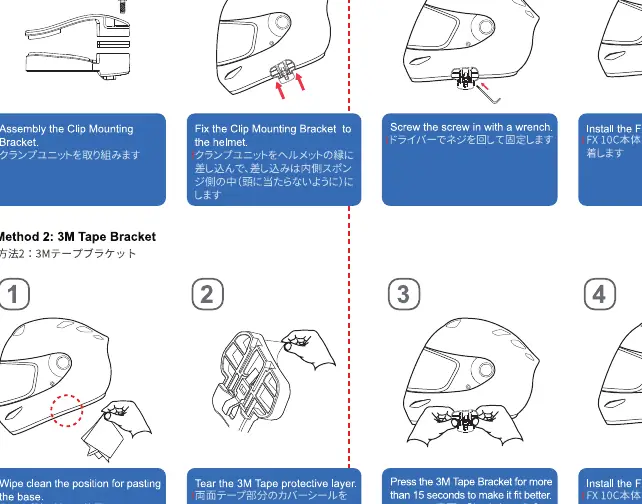
- Clamp Bracket: Attach the bracket to the helmet edge and secure it with the provided screws.
- 3M Tape Bracket: Clean the helmet surface thoroughly, peel the tape backing, and press firmly for at least 15 seconds.
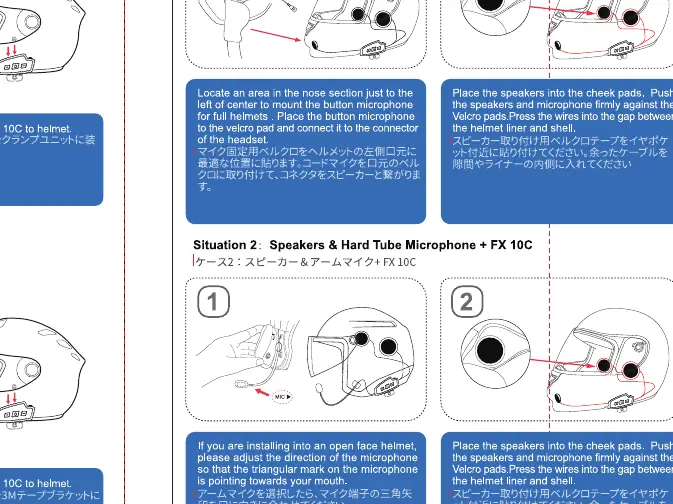
For speaker and microphone placement, ensure they are positioned inside the helmet liner, close to the ears, and firmly attached using the provided Velcro pads.
Technical Specifications
The FX 10C operates with the following specifications:
- Bluetooth: Version 5.0 (HSP, HFP, A2DP, AVRCP).
- Battery: 800mAh / 3.7V.
- Operating Temperature: -20°C to 50°C.
- Weight: 44g (unit only).
- Charging Time: Approximately 2-3 hours.
- Range: 2.4G - 2.485G frequency.
Practical help
Common problems
Device not pairing with phone
Ensure the device is in pairing mode (LED flashing) and that your phone's Bluetooth is active and searching for new devices.
Intercom connection failed
Verify that all intercom devices are set to the same Mesh channel and are within range.
Low battery during operation
Check the battery level via voice prompts. Charge the device using the provided USB-C cable.
Before use
- Charge the device fully using the USB-C cable.
- Ensure the helmet surface is clean and dry before applying 3M tape.
- Verify all intercom devices are set to the same Mesh channel.
- Install speakers and microphone firmly inside the helmet liner.
- Test the connection before riding.
Specs in practice
- Bluetooth 5.0
- Supports HFP, HSP, A2DP, AVRCP profiles for stable connectivity.
- Battery Capacity
- 800mAh / 3.7V provides reliable operation time.
- Operating Temperature
- Designed to function between -20°C and 50°C.
Images and diagrams
- Button Layout: Shows the location of Power, Volume, and Mesh buttons.
- Installation: Illustrates the Clamp Bracket and 3M Tape mounting methods.
- Speaker Placement: Demonstrates correct positioning inside the helmet liner.
Model compatibility
- Universal Pairing: Supports non-Fodsports Bluetooth headsets.
- Intercom Capacity: Supports up to 2 people for Bluetooth intercom.

Manual page author
David Miller
Documentation analyst
Organizes user manual content into clear summaries, with attention to model details, product context, and everyday usability.