Home Appliances / Small Kitchen Appliances
User Manual for Sencor SBR 0770WH Bread Maker
Quick guide and user manual for the Sencor SBR 0770WH bread maker. Includes setup, operating instructions, program overview, cleaning tips, and troubleshooting.
Table of contents
Manual images
Click an image to enlargeQuick Guide
The Sencor SBR 0770WH is a bread maker designed for home use. Before first use, ensure all packaging is removed and run the 'BAKE' program for 10 minutes while empty to burn off manufacturing residues. Always place the appliance on a stable, dry, and level surface. Do not exceed the maximum capacity of 700g of flour and 6g of yeast per batch. Ensure the ambient temperature is between 15°C and 34°C for optimal results. Never cover the appliance during operation.
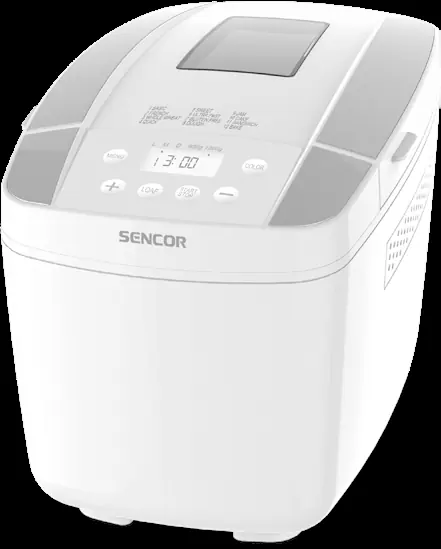
Product Overview
The bread maker consists of the following main components:
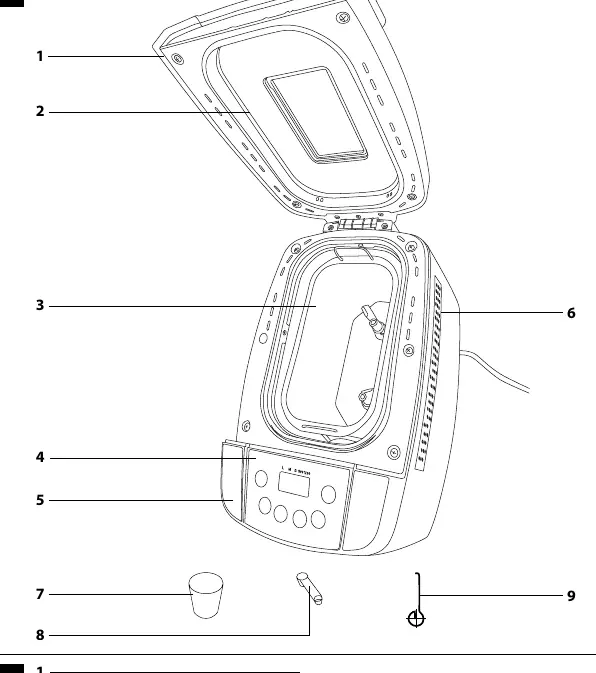
- Lid: Features a viewing window and handle.
- Baking Pan: Removable pan with kneading paddles.
- Control Panel: Interface for selecting programs and settings.
- Accessories: Includes a hook for removing paddles, a measuring cup, and a measuring spoon.
Control Panel
The control panel allows you to customize your baking:
- MENU: Selects the desired baking program.
- COLOR: Adjusts the crust browning level (Light, Medium, Dark).
- LOAF: Sets the bread weight (900g or 1200g).
- START/STOP: Starts, pauses, or cancels a program. Hold for 2 seconds to cancel.
- + / - Buttons: Used to set the delayed start timer.
Usage Instructions
Follow these steps for successful baking:
- Open the lid and place the baking pan into the unit. Attach the kneading paddles to the shafts.
- Add ingredients in the correct order: liquids first (water, milk, oil, etc.), then dry ingredients (flour, salt, sugar, spices).
- Create a small indentation in the flour and add the yeast. Ensure yeast does not touch liquids or salt before the program starts.
- Close the lid, plug in the appliance, and select your program using the MENU button.
- Set the crust color and loaf size if applicable.
- Press START/STOP to begin. The display will show the countdown.
- Once finished, the unit will beep and switch to 'Keep Warm' mode for 60 minutes.
- Use oven mitts to remove the baking pan. Let it cool for 10 minutes before removing the bread.
Programs Overview
The device features 12 programs:
- 1 - BASIC: For white and mixed bread.
- 2 - FRENCH: For lighter, crustier bread.
- 3 - WHOLE WHEAT: For whole grain recipes.
- 4 - QUICK: Faster version of the basic program.
- 5 - SWEET: For sweet doughs with sugar or fruit.
- 6 - ULTRA-FAST: Shortest cycle for quick baking.
- 7 - GLUTEN-FREE: Specifically for gluten-free recipes.
- 8 - DOUGH: Kneading and rising only (no baking).
- 9 - JAM: For making jams and marmalades.
- 10 - CAKE: For recipes using baking powder or soda.
- 11 - SANDWICH: For light bread with thin crust.
- 12 - BAKE: Baking only (adjustable time).
Cleaning and Maintenance
Always unplug the appliance and let it cool completely before cleaning. Do not immerse the main unit or power cord in water. Hand wash the baking pan and accessories with warm soapy water; do not use abrasive cleaners or dishwashers. If kneading paddles are stuck, soak the pan in warm water for 30 minutes to loosen them. Wipe the exterior and interior lid with a damp cloth.
Troubleshooting
If you encounter issues, check the following:
- HHH on display: The unit is too hot. Let it cool down.
- LLL on display: The unit is too cold. Move to a warmer room.
- EE0/EE1 on display: Contact an authorized service center.
- Smoke from vents: Ingredients may have spilled on the heating element. Clean the element after cooling.
- Bread hard to remove: Soak the pan in warm water to loosen the paddles.
Manufacturer information
Sencor
Practical help
Common problems
Smoke from vents
Ingredients may have spilled on the heating element. Clean the heating element after the unit has cooled down.
Bread hard to remove
Kneading paddles may be stuck. Soak the baking pan in warm water to loosen the paddles.
HHH error on display
The bread maker is too hot for a new cycle. Let it cool down.
LLL error on display
The bread maker is too cold. Move the appliance to a warmer room (15-34°C).
Before use
- Remove all packaging, labels, and promotional materials.
- Wash all removable parts (pan, paddles, accessories) in warm soapy water.
- Run the 'BAKE' program for 10 minutes while empty to burn off manufacturing residues.
- Place the appliance on a stable, dry, and level surface.
- Ensure the ambient temperature is between 15°C and 34°C.
Specs in practice
- Heating Element Power
- 700W
Images and diagrams
- A1: Lid handle
- A3: Baking pan with kneading paddles
- A4: Control panel
- A7: Hook for removing paddles
- A8: Measuring cup
Model compatibility
- Maximum capacity: 700g of flour and 6g of yeast per batch.
- Do not use in industrial environments or outdoors.
- Do not connect to external timers or remote-controlled sockets.

Manual page author
Michael Turner
Technical manual editor
Reviews PDF manuals for structure, safety notes, and practical product details so readers can find the right information quickly.