Home Appliances / Small Kitchen Appliances
User Manual for Sencor SWK 2090BK Variable Temperature Electric Kettle
Quick guide for the Sencor SWK 2090BK electric kettle. Learn how to operate variable temperature settings, use the keep warm mode, perform first-time setup, and maintain your kettle.
Quick answers from the manual
Quick answer
- To boil water, press button B2. To heat to a specific temperature (50, 70, 80, 90°C), press B3 to select the temperature, then press B2. p. 7
Key actions
- Boil water p. 7
- Set temperature p. 7
- Keep warm mode p. 7
First start
- Remove packaging, fill to max, boil and discard water 2-3 times. p. 7
Problems and fixes
Buttons not responding
Place the kettle on the base.
p. 8
Accidental dry boil
Wait for the heating element to cool down.
p. 8Maintenance and reset
- Remove limescale using vinegar or citric acid. p. 8
Technical specifications
| Parameter | Value | Meaning | Pages |
|---|---|---|---|
| Rated voltage range | 220–240 V | Operating voltage | p. 8 |
| Rated power input | 1850–2200 W | Power consumption | p. 8 |
| Nominal capacity | 2L | Maximum water volume | p. 8 |
Where to find it in the PDF
- Parts Diagram p. 3
- Safety Instructions p. 4, 5, 6
- Usage Instructions p. 7, 8
Table of contents
Manual images
Click an image to enlargeQuick guide from the manual
The Sencor SWK 2090BK is a variable temperature electric kettle. Before first use, remove all packaging, fill the kettle to the maximum mark, boil, and discard the water 2-3 times. Always ensure the kettle is placed on its base for the buttons to function. The kettle features a keep warm mode and multiple temperature settings for different types of beverages.
Description of the kettle
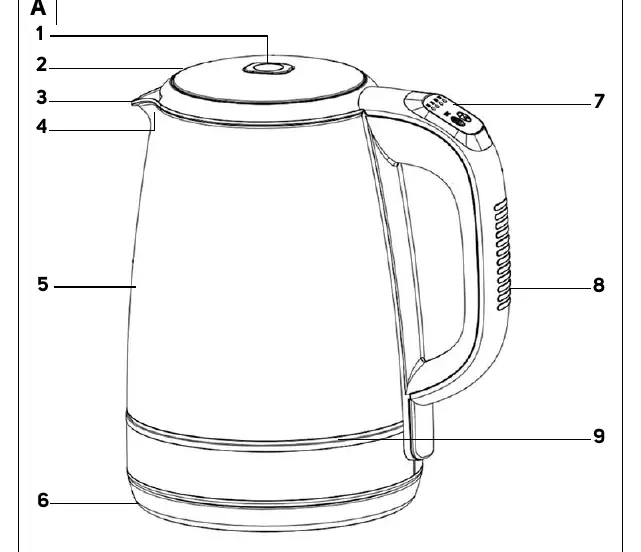
- A1: Open lid button
- A2: Lid
- A3: Spout
- A4: Filtration strainer
- A5: Water level mark
- A6: Base with central connector
- A7: Control panel
- A8: Handle
- A9: LED light for the inside
Using the kettle
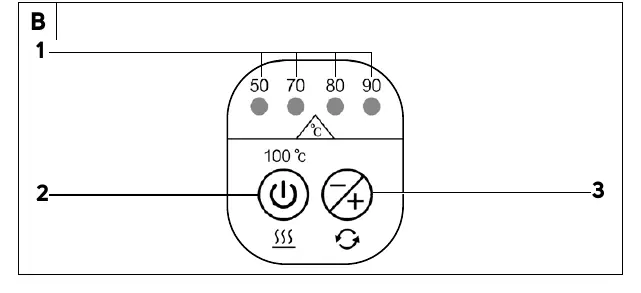
Boiling water
Press button B2. A beep confirms the action, and the kettle heats to 100°C. The LED light A9 turns red. The kettle turns off automatically when boiling is complete.
Heating to a selected temperature
Use button B3 to cycle through temperatures (50, 70, 80, 90°C). Each press is accompanied by a beep and the corresponding LED indicator B1 lights up. Press B2 to start heating. The LED light A9 changes color based on the temperature (50°C: dark green, 70°C: blue, 80°C: violet, 90°C: light green, 100°C: red).
Keep warm mode
Select the desired temperature using B3. Press and hold B2 for approximately 3 seconds. The LED indicator B1 will flash, and the kettle will maintain the set temperature for 30 minutes.
Cleaning and maintenance
Regularly remove limescale to extend the kettle's life. Depending on water hardness, clean every 1-3 months.
- Vinegar method: Fill with 1L water and 0.25L vinegar. Boil, let sit for 2 hours, then boil clean water 4-5 times.
- Citric acid method: Boil 1.5L water, add 30g citric acid, let sit for 30 minutes, then boil clean water 4-5 times.
- Outer surface: Use a dry cloth or a cloth with a weak solution of neutral kitchen detergent. Do not use abrasive cleaners or steel wool.
Safety instructions
- Never submerge the kettle or base in water.
- Do not operate the kettle when empty.
- Keep the appliance and power cord out of reach of children under 8 years.
- Do not open the lid while water is boiling.
- Use only the supplied base.
Manufacturer information
Sencor
Practical help
Common problems
Buttons on the control panel do not react.
Ensure the kettle is properly placed on the base A6. Lifting the kettle off the base cancels previous settings.
Kettle turned on without water.
The kettle will turn off automatically. Wait for the heating element to cool down; it will reset to stand-by mode automatically.
Limescale buildup.
Remove using 8% white vinegar or citric acid solution as described in the maintenance section.
Before use
- Remove all wrapping material.
- Place the base on a stable, even, and clean surface.
- Fill the kettle to the maximum mark.
- Boil and empty the kettle 2-3 times before first use.
Images and diagrams
- A1: Open lid button
- B2: On/Off button
- B3: Temperature setting button
- A9: LED light for the inside
Model compatibility
- Use only with the base supplied with the kettle.
- Not designed for use with external timers or remote control devices.

Manual page author
David Miller
Documentation analyst
Organizes user manual content into clear summaries, with attention to model details, product context, and everyday usability.