Home Appliances / Small Kitchen Appliances
User Manual for Sencor SBG 206BK Tabletop Electric Grill
Quick guide for the Sencor SBG 206BK tabletop electric grill. Learn how to operate, clean, and maintain your grill safely with this user manual summary.
Quick answers from the manual
Quick answer
- The Sencor SBG 206BK is a tabletop electric grill featuring a non-stick surface, adjustable temperature control, and a removable drip tray. It is intended for household use only. p. 6
Key actions
- Preheating the grill p. 6
- Cleaning the grill plate p. 7
First start
- Initial setup p. 6
Problems and fixes
Smoke during first use
This is normal and will disappear after a while.
p. 6Technical specifications
| Parameter | Value | Meaning | Pages |
|---|---|---|---|
| Rated voltage | 220-240 V | Operating voltage range | p. 7 |
| Rated power input | 1800 W | Power consumption | p. 7 |
Where to find it in the PDF
- Product Diagram p. 3
- Safety Instructions p. 4, 5
- Usage Instructions p. 6
- Maintenance p. 7
Table of contents
Quick guide from the manual
The Sencor SBG 206BK is a tabletop electric grill designed for household use. Before first use, clean the grill plate with a damp cloth. Always ensure the grill is placed on a stable, dry surface with sufficient air circulation. Do not use external timers or remote controls with this appliance. Always allow the grill to cool down completely before moving or storing it.
Product description
The grill consists of the following main components:
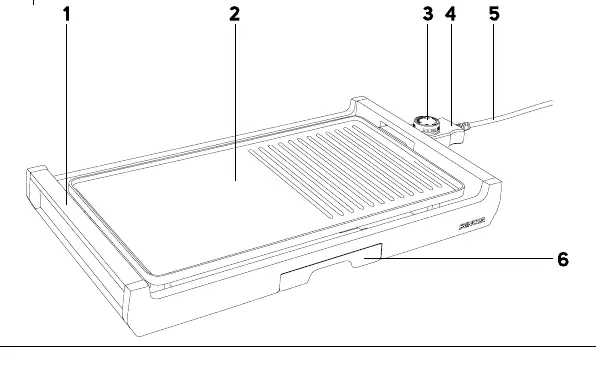
- Thermally insulated handles
- Grill plate with non-stick coating
- Temperature control unit with power cord
- Indicator light
- Removable drip tray
Using the grill
- Place the grill on a stable, dry surface.
- Slide the drip tray into the holder under the grill plate.
- Connect the temperature control unit to the grill and plug it into a power socket.
- Set the temperature control to the required level. The indicator light will turn on.
- Wait for the indicator light to turn off, which signals that the grill is preheated and ready for use.
- Place food on the grill plate.
- After cooking, turn the temperature control to the OFF position and disconnect from the power socket.
Tips for grilling
- Use fresh meat; defrosted meat will release juices.
- Do not salt meat before grilling to prevent it from becoming tough and dry.
- Use wooden or heat-resistant plastic spatulas; do not use metal utensils to avoid damaging the non-stick coating.
- If you notice smoke during the first use, this is normal and will disappear after a while.
Maintenance and cleaning
Always allow the grill to cool down completely before cleaning. Clean the grill plate after each use to prevent food residue buildup. Use a damp, soft cloth. If necessary, use a solution of water and neutral kitchen detergent. Do not use abrasive cleaning agents, caustic agents, or steel wool. The drip tray should be emptied and washed in warm water with detergent. Never submerge the temperature control unit or power cord in water.
Manufacturer information
Sencor
Practical help
Common problems
Smoke appears during first use
This is normal and will disappear after a while.
Indicator light turns on and off during operation
This is normal; it indicates the grill is maintaining the set temperature.
Before use
- Check that the voltage matches the rating label.
- Ensure the grill is on a stable, dry surface.
- Slide the drip tray into the holder.
- Connect the temperature control unit securely.
- Ensure there is sufficient air circulation around the appliance.
Specs in practice
- Rated power input
- 1800 W
- Rated voltage
- 220-240 V
- Rated frequency
- 50-60 Hz
Images and diagrams
- 1: Thermally insulated handles
- 2: Grill plate with non-stick coating
- 3: Temperature control unit
- 4: Indicator light
- 5: Power cord
Model compatibility
- Not designed for use with external timers or remote control.
- Use only with the supplied temperature control unit.

Manual page author
Emily Carter
User documentation editor
Prepares concise manual descriptions and highlights the most useful setup, operation, and maintenance information for readers.