Home Appliances / Dehumidifiers
User Manual for Sencor SDH 2028WH / SDH 3028WH Dehumidifier
Quick guide and user manual for the Sencor SDH 2028WH and SDH 3028WH smart Wi-Fi dehumidifiers. Includes setup, operation modes, maintenance, and troubleshooting.
Quick answers from the manual
Quick answer
- The Sencor SDH 2028WH/3028WH is a smart mobile dehumidifier with Wi-Fi control. It features three modes (Dehumidify, Fan, Dry Clothes), a 6L condensate tank, and uses R290 refrigerant. It is designed for indoor use in rooms between 5-32 °C. p. 1, 9, 11
Key actions
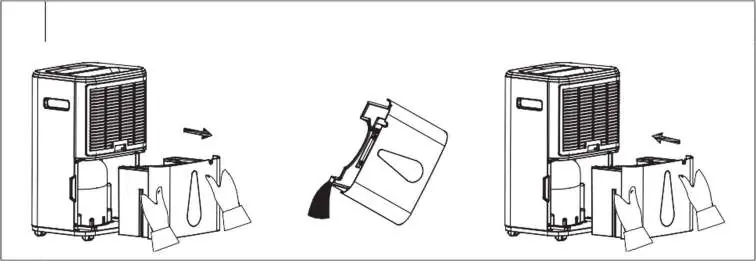
- Empty the condensate tank p. 12, 13
- Clean the air filter p. 13
- Set up continuous drainage p. 12
First start
- Unpack and stabilize p. 9
- Connect to power p. 10
Problems and fixes
Dehumidifier emits warm air
This is normal operation as air passes through a heating element.
p. 13
Device does not start
Check power connection, empty tank, or ensure tank is correctly installed.
p. 13Maintenance and reset
- Reset Wi-Fi p. 12
Technical specifications
| Parameter | Value | Meaning | Pages |
|---|---|---|---|
| Refrigerant | R290 | Flammable refrigerant gas | p. 13, 14 |
| Tank Capacity | 6 L | Condensate tank volume | p. 13, 14 |
Where to find it in the PDF
- Safety Instructions p. 6, 7, 8
- Operation p. 9, 10, 11
- Smart Features p. 12
- Maintenance p. 13
Table of contents
Manual images
Click an image to enlargeQuick guide from the manual
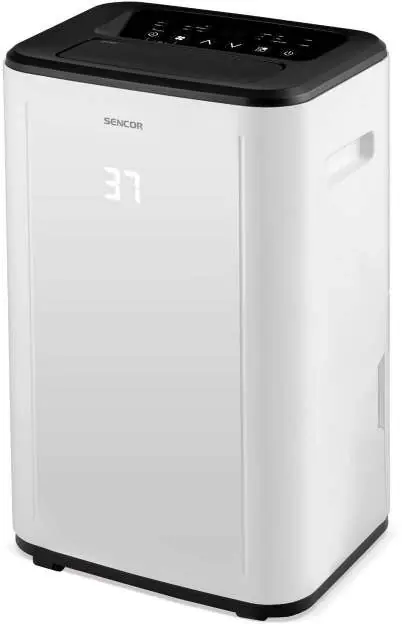
The Sencor SDH 2028WH and SDH 3028WH are smart mobile dehumidifiers designed to reduce humidity in indoor environments. Before first use, remove all packaging, ensure the condensate tank is correctly installed, and let the unit stand for 2-3 hours to allow the refrigerant to stabilize. The device operates in three modes: Dehumidify, Fan, and Dry Clothes. It features Wi-Fi connectivity for control via the Sencor HOME app.
Installation and placement
- Place the unit on a flat, dry, and stable surface.
- Maintain at least 50 cm of clearance behind the unit and 30 cm on the sides and top for proper air circulation.
- Do not use the device outdoors or in rooms where the temperature drops below 5 °C.
- Ensure the room is closed for maximum efficiency.
Operation modes
- Dehumidify: Maintains constant humidity. You can set the desired humidity level between 35% and 85%.
- Fan: Only the fan operates; no dehumidification occurs.
- Dry Clothes: The compressor runs continuously, and the fan operates at maximum speed to dry laundry.
Smart features
The device can be controlled via the Sencor HOME app. To pair, activate Bluetooth on your phone, open the app, and select add device. Alternatively, use the QR code provided in the manual. To reset Wi-Fi settings, hold the Reset button for 5 seconds while the unit is running.
Maintenance and cleaning
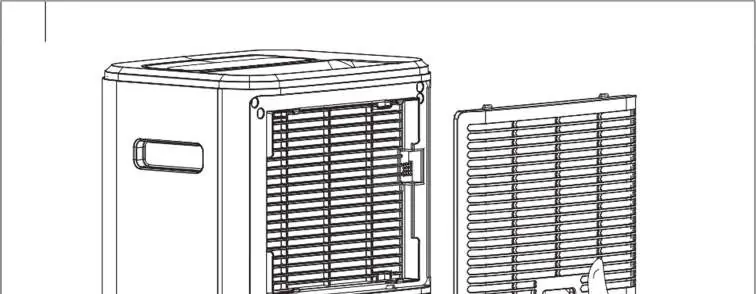
- Condensate tank: Empty after each use and clean monthly with a damp cloth and neutral detergent. Do not wash in a dishwasher.
- Filter: Clean the air intake filter at least every two weeks using a soft brush or vacuum cleaner. Ensure it is completely dry before reinstallation.
- Storage: Disconnect from power, clean the unit, and store in a dry, well-ventilated place away from children and pets.
Safety warnings
This appliance contains R290 flammable refrigerant. Do not puncture or burn the cooling circuit. Ensure the room where the device is installed is larger than 3 m². Keep the unit away from open flames or heat sources.
Manufacturer information
Sencor
Practical help
Common problems
Dehumidifier emits warm air
This is normal; the air passes through a heating element.
Device does not start
Check if the plug is connected, the tank is full, or the tank is incorrectly installed.
Not removing humidity
Check if room temperature/humidity is too low or if air intake/outlet is blocked.
Device is noisy
Ensure the unit is on a flat, stable surface and the filter is clean.
Before use
- Remove all packaging and promotional tags.
- Remove the drain hose from the condensate tank.
- Let the unit stand for 2-3 hours after unpacking to stabilize the refrigerant.
- Ensure the condensate tank is correctly installed.
- Check that the power supply matches the voltage on the rating label.
Specs in practice
- Dehumidification capacity
- 20L/24h (SDH 2028WH) or 30L/24h (SDH 3028WH) at 30°C/80% humidity.
- Operating temperature
- 5–32 °C.
- Recommended room size
- 25–60 m² (SDH 2028WH) or 30–89 m² (SDH 3028WH).
Images and diagrams
- A: Device overview (front/back parts).
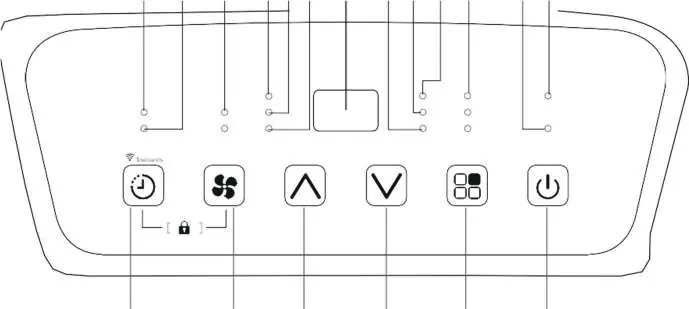
- B: Control panel buttons and indicators.
- C: Air outlet adjustment.
- D: Condensate tank removal.
- E: Continuous drainage setup.
Model compatibility
- Requires Sencor HOME app for smart features.
- Requires Wi-Fi connection for remote control.
- Not suitable for outdoor use.

Manual page author
Emily Carter
User documentation editor
Prepares concise manual descriptions and highlights the most useful setup, operation, and maintenance information for readers.