Home Appliances / Vacuum Cleaners
User Manual for Sencor SVC 190B Handheld Vacuum Cleaner
Quick guide for the Sencor SVC 190B handheld vacuum cleaner. Learn how to charge, install the wall holder, clean the filter, and operate the device for wet and dry vacuuming.
Quick answers from the manual
Quick answer
- The Sencor SVC 190B is a cordless handheld vacuum for wet and dry use. It requires a 12-hour charge before first use and features a washable filter. p. 1, 5, 7
Key actions
- Charge the vacuum for 12 hours before first use. p. 5, 7
- Clean the filter regularly using a weak soap solution. p. 6
First start
- Mount the holder, hang the vacuum, and charge for 12 hours. p. 5, 7
Problems and fixes
Product does not function
Charge the batteries or contact a service center.
p. 6
Low suction power
Clean the filter and empty the dust container.
p. 6Maintenance and reset
- Clean the filter after every use and ensure it is completely dry before reinserting. p. 6
Technical specifications
| Parameter | Value | Meaning | Pages |
|---|---|---|---|
| Battery | NiMH 1400mAh | Rechargeable battery type and capacity. | p. 7 |
| Charging time | 12 h | Time required for full charge. | p. 7 |
| Vacuuming time | 12-15 min | Runtime on a full charge. | p. 7 |
Where to find it in the PDF
- Description of the device p. 4
- Installation and Charging p. 5
- Maintenance p. 6
Table of contents
Manual images
Click an image to enlargeQuick guide from the manual
The Sencor SVC 190B is a cordless handheld vacuum cleaner designed for both dry and wet vacuuming. Before first use, the device must be charged for 12 hours. The vacuum features a washable filter that should be cleaned regularly to maintain suction power. Always ensure the filter is completely dry before reinserting it into the device.
Description of the device
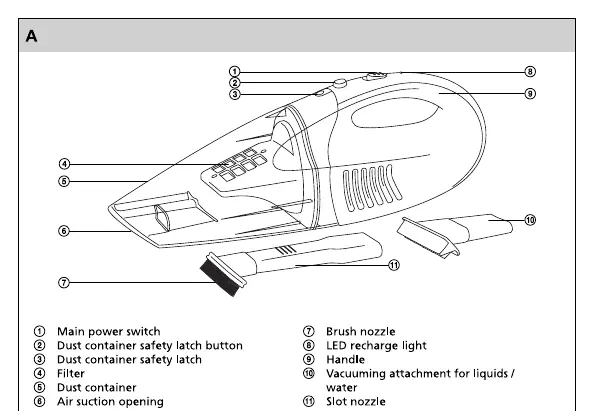
The vacuum cleaner consists of the main body with a power switch, a dust container with a safety latch, and a filter. The package includes a brush nozzle, a slot nozzle, and a specialized attachment for liquids. The device also features an LED recharge light to indicate charging status.
Installation of the holder
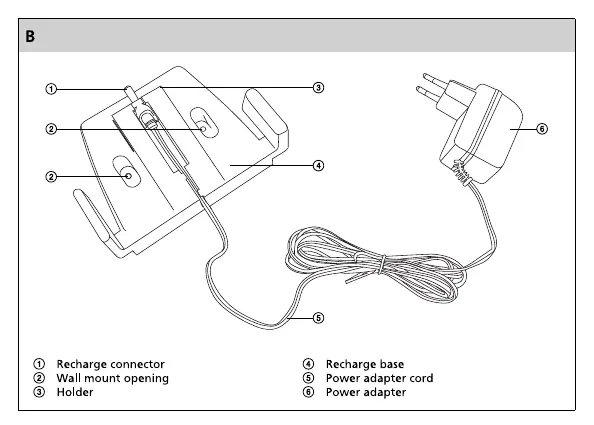
The included recharge holder can be mounted to a wall or kitchen unit using two screws. Once mounted, hang the vacuum cleaner on the holder and connect the power adapter to a power socket to begin charging.
Operation
To operate the vacuum, move the main switch to position 1. You can attach the brush nozzle or slot nozzle for hard-to-reach places. For liquid spills, use the specialized attachment. When vacuuming liquids, hold the vacuum at an approximate 45-degree angle to prevent liquid from being sucked into the filter.
Cleaning and maintenance
To clean the dust container and filter, turn off the device and disconnect it from the power source. Press the safety latch button to release the dust container. Remove the filter and empty the dirt. The filter can be washed in a weak soap solution and lukewarm water. Important: The filter must be completely dry before reinserting it into the product. Do not use abrasive cleaning agents, petrol, or solvents.
Troubleshooting
If the product does not function, ensure it has been charged. If the batteries are installed incorrectly or the device requires tuning, contact a service center. If suction power is low, check if the filter cover is full of dirt and clean it. If dirty material leaks from the product, the dust container is likely full and needs to be emptied.
Technical specifications
The device operates on a NiMH 1400mAh battery. It requires 12 hours for a full charge, providing 12-15 minutes of vacuuming time. The rated power is 45W, and the noise level is 80 dB(A).
Manufacturer information
Sencor
Practical help
Common problems
Product does not function
Charge the batteries or contact a service center if batteries are installed incorrectly.
Low suction power
Empty the dust container and clean the filter.
Dirty material leaking from the device
The dust container is full; remove and empty the dirt.
Before use
- Charge the device for 12 hours before first use.
- Ensure the filter is properly installed.
- Check that the dust container is empty.
- Verify the power adapter is connected to a power socket.
Specs in practice
- Charging time
- 12 hours for a full charge.
- Vacuuming time
- 12-15 minutes of continuous operation.
- Battery type
- NiMH 1400mAh.
Images and diagrams
- Diagram A: Identifies the main power switch, dust container, filter, and various nozzles.
- Diagram B: Shows the recharge holder installation and power adapter connection.
Model compatibility
- Designed for household use only.
- Not suitable for industrial or outdoor use.
- Do not vacuum burning cigarettes, flammable liquids, or sharp objects like glass.

Manual page author
David Miller
Documentation analyst
Organizes user manual content into clear summaries, with attention to model details, product context, and everyday usability.