Home Appliances / Vacuum Cleaners
User Manual for Sencor SVC 0625AT Cordless Vacuum Cleaner
Quick guide for the Sencor SVC 0625AT 4-in-1 cordless vacuum cleaner. Learn how to assemble, charge, use the mop attachment, clean filters, and maintain your device for optimal performance.
Table of contents
Manual images
Click an image to enlargeQuick guide from the manual
The Sencor SVC 0625AT is a 4-in-1 cordless vacuum cleaner designed for household use. Before first use, ensure the battery is charged and all filters are correctly installed. Always turn off the vacuum before cleaning or placing it in the charging base. Do not vacuum liquids, flammable materials, or sharp objects.
Assembly and disassembly
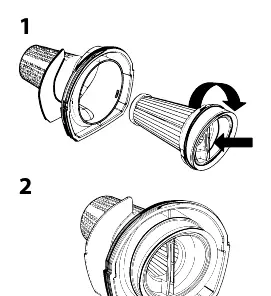
Hand vacuum cleaner: Insert the internal filter A12 into the external filter A13 and turn clockwise until joined. Insert into the dust container A11 and attach to the motor unit A18. To disassemble, press button A17.
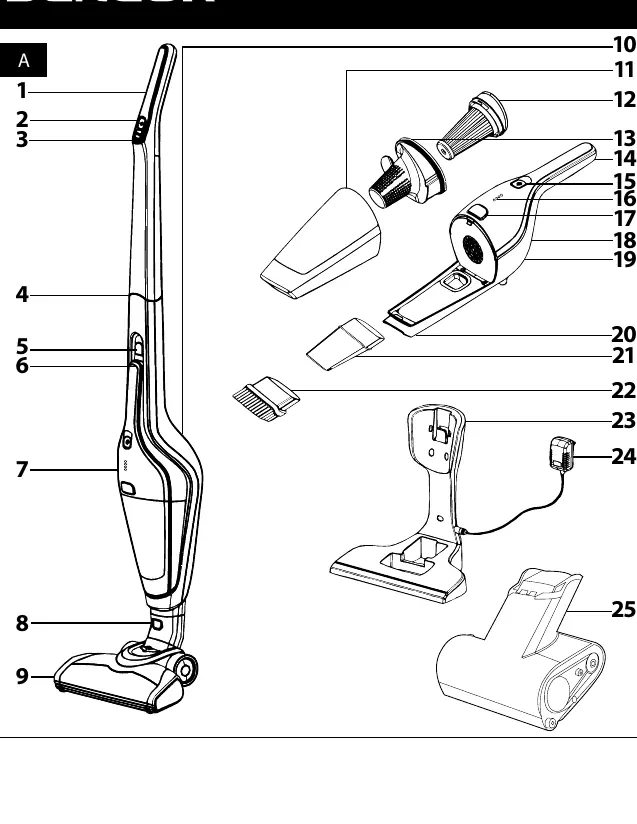
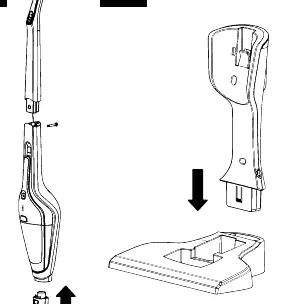
Upright vacuum cleaner: Connect the handle A1 to the body A6, ensuring the cable A4 is inside. Secure with the supplied screw. Insert the hand vacuum cleaner A7 into the body. Connect the floor nozzle A9 to the bottom of the body until the button A8 slides out.
Charging base: Assemble the base A23 by inserting the top part into the bottom. It can be wall-mounted for stability.
Charging the vacuum cleaner
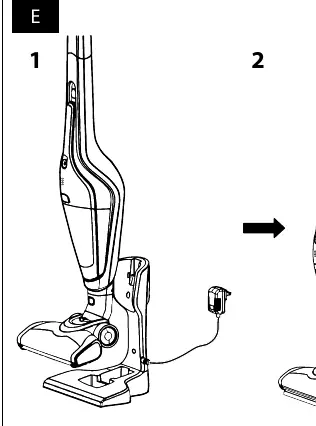
Place the assembled charging base A23 on a dry, stable surface near a power socket. Connect the power adapter A24 to the base and the wall socket. Turn off the vacuum and place it in the parking position in the base. The LED indicators A16 will signal the battery level. A full charge takes approximately 4-6 hours.
Using the vacuum cleaner
Upright vacuum: Remove from the charging base by pulling upwards. Use button A2 to start and A3 to regulate suction power and rotary brush speed.
Hand vacuum: Press button A15 to turn on. Use the slot nozzle A21 for hard-to-reach places or the brush nozzle A22 for upholstery.
Cat & Dog Mini motorised brush: Attach the A25 brush to the hand vacuum A7 for cleaning upholstery, car interiors, or removing pet hair.
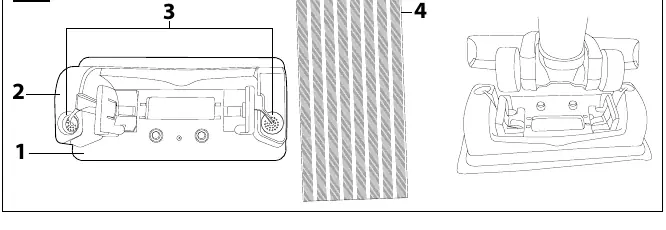
Mop attachment: Attach the mop cover G4 to the surface G5. Fill the tank G2 with water or cleaning solution. Place the vacuum over the attachment G1 until you hear a click. The wheels will activate the water release through the panel G6. To stop, simply pull the vacuum up.
Maintenance and cleaning
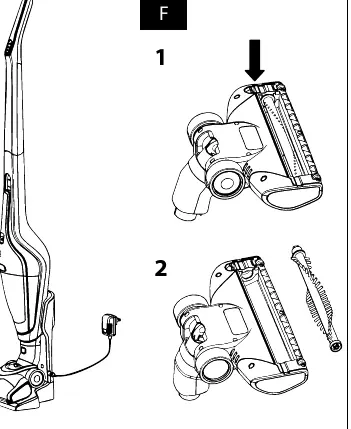
Always disconnect the power adapter before cleaning. Disassemble the hand vacuum to empty the dust container A11. Wash the external filter A13 and internal HEPA filter A12 under running water and allow them to dry completely before reassembly. Replace the HEPA filter every 6 months. Clean the rotary brush by removing it from the nozzle A9 and clearing away hair or debris.
Technical specifications
Power input: 120 W. Battery: Li-ion 25.2 V / 2000 mAh. Charging time: 4-6 hours. Operating time: Up to 22/50 minutes (high/low power). Dust container capacity: 0.5 L. Noise level: 79 dB(A).
Manufacturer information
Sencor
Practical help
Common problems
Vacuum cleaner does not start
Check if the battery is charged and if the filters are correctly installed.
Weak suction power
Check if the air outlets or suction opening are blocked. Clean the filters.
Mop attachment not releasing water
Ensure the vacuum is correctly secured to the attachment and the wheels are pressing the switches on the attachment.
Before use
- Ensure internal and external filters are properly installed.
- Check that air outlets and suction opening are not blocked.
- Verify the power adapter matches the local electrical voltage.
- Ensure the battery is charged before first use.
Specs in practice
- Charging time
- Approximately 4-6 hours for a full charge.
- Operating time
- Up to 22 minutes on high power or 50 minutes on low power.
- Dust container capacity
- 0.5 liters.
Images and diagrams
- A: Overview of all parts and accessories.
- B: Filter assembly and disassembly.
- C: Upright vacuum assembly.
- D: Charging base assembly.
- E: Charging process.
Model compatibility
- Use only the original power adapter, charging base, and accessories supplied.
- Do not use to vacuum liquids, flammable materials, or sharp objects like broken glass.

Manual page author
David Miller
Documentation analyst
Organizes user manual content into clear summaries, with attention to model details, product context, and everyday usability.