Home / Air Quality Monitors
Display Navigation Guide for Senva EMX-IP
A comprehensive guide for navigating the display and configuring settings on the Senva EMX-IP energy meter, including metering, alarms, logging, and real-time clock setup.
Table of contents
Manual images
Click an image to enlargeQuick guide from the manual
This guide assumes the EMX-IP device is installed and powered on. To navigate the display, use the buttons on the front panel. If the screensaver is active, press any button to wake the screen. If a lock icon appears, you must enter the user-set passcode to access the menu.
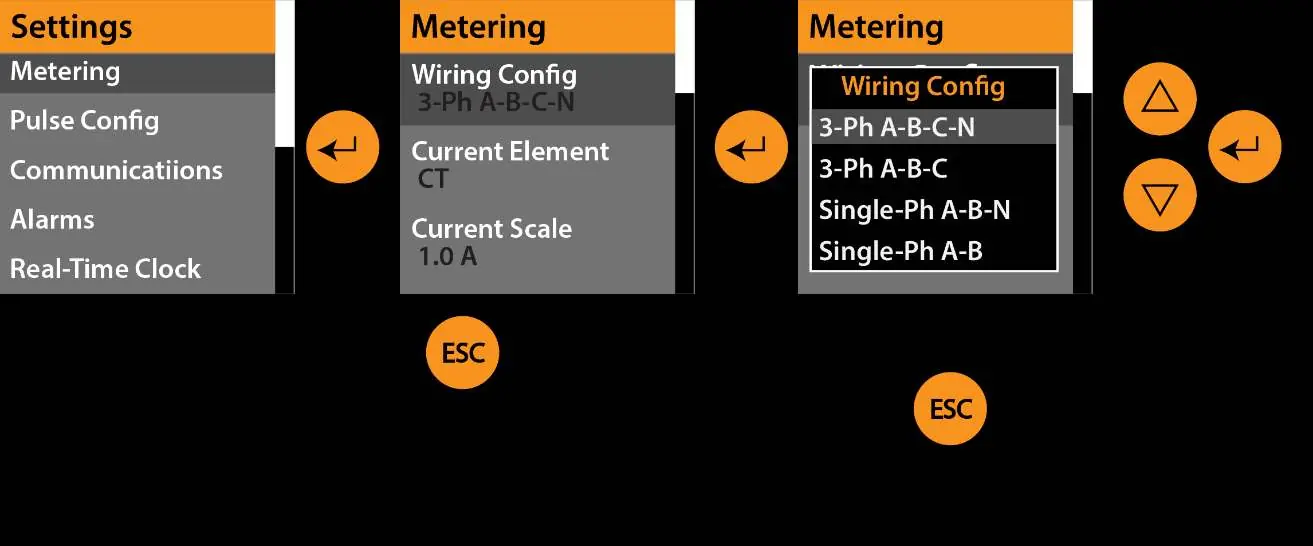
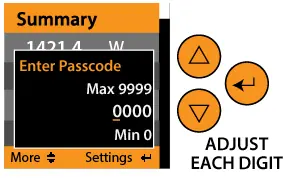
- Enter: Access the settings menu, select parameters, and store changes.
- Arrows (Up/Down): Scroll through menus, screens, or adjust numerical values.
- ESC: Return to the previous screen or abandon changes.
Display Navigation
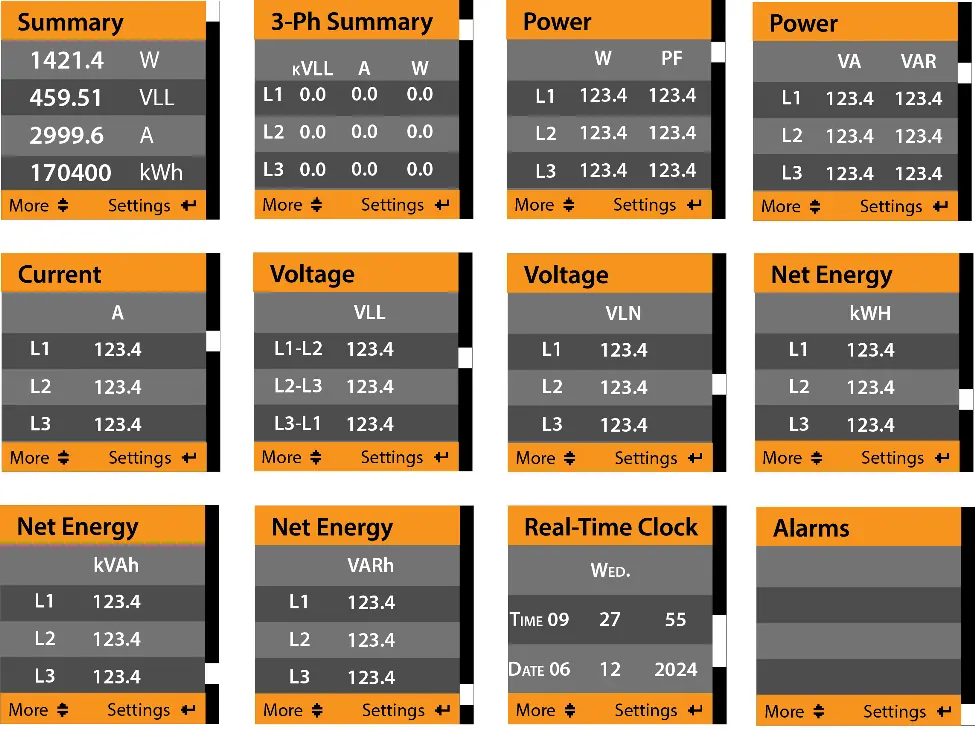
The main screen displays a summary of energy data. You can scroll through up to 12 screens (for 3-phase operation) or 5 screens (for single-phase operation) using the up and down buttons. The summary screen shows key metrics such as Power (W), Voltage (VLL), Current (A), and Energy (kWh).
Adjusting Settings
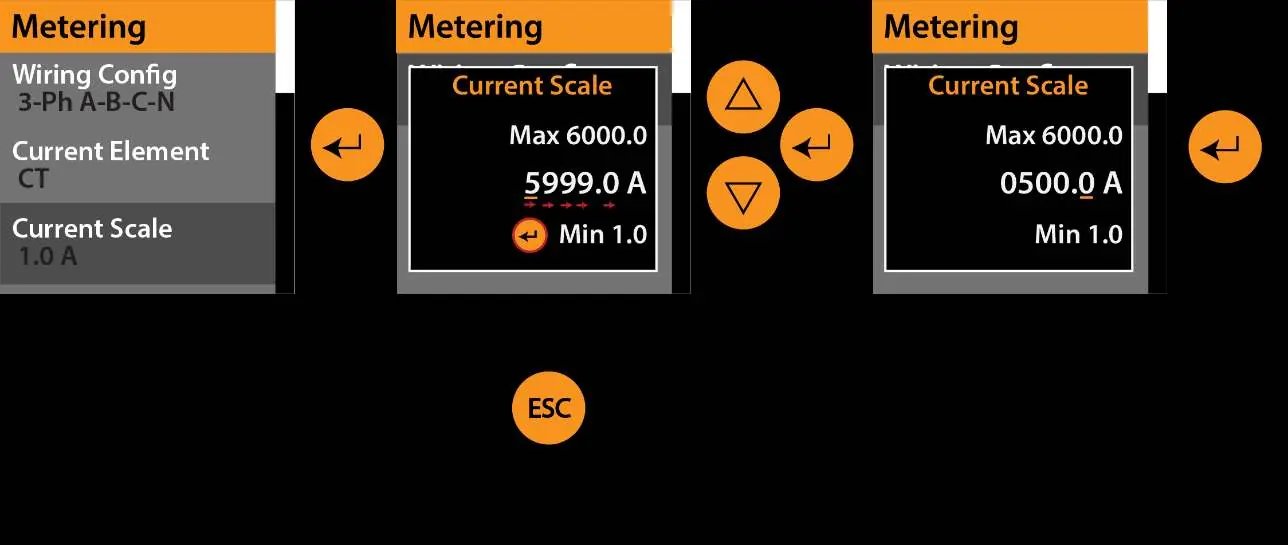
To change a setting, press the Enter button to open the settings menu. Navigate to the desired parameter and press Enter again to select it. Use the arrow buttons to scroll through options or adjust numerical values. When adjusting numerical settings, set each digit individually and press Enter to move to the next digit. Press Enter again to save the final value.
Metering Configuration
The Metering menu allows you to configure the meter based on your electrical setup:
- Wiring Config: Select the phase configuration (e.g., 3-Ph A-B-C-N, Single-Ph A-B, Split-Ph A-B-N).
- Current Element: Choose between CT (Iron Core 1/3-volt) or Rogowski Coil.
- Current Scale: Set input scaling for the CT or Rogowski coil (1-6000.0A).
- Orientation: Set the orientation for current sensors (default +++).
- Voltage Scale: Scale voltage readings (0.10-320.00V).
- Display Units: Toggle between IEC or IEEE units.
- Ph angle Comp: Adjust phase angle compensation (-768 to 768).
Alarms
The Alarms menu allows you to enable/disable specific alarms and set thresholds for:
- Voltage Range, Nominal Voltage, and Voltage Threshold.
- Current Range, Nominal Current, and Current Threshold.
- Neutral Current, Nominal Neutral Current, and Neutral Limit.
- Frequency Range, Nominal Frequency, and Frequency Threshold.
- Phase Loss and Phase Imbalance.
- Low Power Factor and Power Factor Limit.
Logging
You can configure data logging by setting the Trigger Source (Timer, Comms, Pulse Input 1, or Pulse Input 2), Trigger Interval, and Logging Mode (One Shot or Overwrite). You can also assign specific data sources to 12 different log channels, corresponding to Modbus addresses.
Real-Time Clock
The Real-Time Clock menu allows you to set the year, month, day, day of the week, 12/24-hour format, hour, minute, and second. Use the 'Commit Time' field to apply the settings.
Advanced Settings
The Advanced menu provides system maintenance functions, including:
- Reboot System: Reboot the device.
- Reset Settings: Restore factory defaults.
- Reset Energy/Load Time/Pulse Count/Logs: Clear specific counters or data.
- NFC: Enable/Disable NFC for phone app connectivity.
- Diagnostics: View firmware versions and serial number.
Practical help
Common problems
Lock icon appears on the screen
Enter the user-set passcode to access the menu.
Screen is off
Press any button to wake the screen and show the home display.
Cannot save changes
Ensure you are using the 'Enter' button to store the value after adjusting digits.
Before use
- Ensure device installation is complete.
- Verify the EMX-IP is powered on.
- Check if a passcode is required for menu access.
- Identify the wiring configuration (e.g., 3-phase or single-phase) before adjusting metering settings.
Specs in practice
- Wiring Config
- Defines the phase connection type (e.g., 3-Ph A-B-C-N, Split-Ph A-B-N).
- Current Scale
- Input scaling for the metering CT or Rogowski coil (1-6000.0A).
- Voltage Scale
- Scaling factor for voltage readings (0.10-320.00V).
- Logging Mode
- Determines if the device stops logging when memory is full (One Shot) or overwrites old data (Overwrite).
Images and diagrams
- The menu navigation uses arrows to scroll, Enter to select/store, and ESC to go back or abandon changes.
- Numerical settings are adjusted digit-by-digit using arrows and Enter.
Model compatibility
- Supports 3-phase and single-phase electrical systems.
- Compatible with 0.33V CT or Rogowski coils.

Manual page author
David Miller
Documentation analyst
Organizes user manual content into clear summaries, with attention to model details, product context, and everyday usability.