Toys / RC Models & Drones
User Guide for Sharper Image 2-in-1 Digital Laser Tape Measure
Quick guide for the Sharper Image 2-in-1 Digital Laser Tape Measure. Learn how to use laser distance measurement, area and volume calculation, unit switching, and troubleshooting error codes.
Quick answers from the manual
Quick answer
- The Sharper Image 2-in-1 Digital Laser Tape Measure is a precision tool for measuring length, height, width, area, and volume. It features a laser distance measurer and a steel tape measure. p. 1
Key actions
- Turn On/Off p. 1
- Area Measurement p. 1
First start
- Charge the device and ensure it is within the working temperature range (0°C-40°C) before use. p. 1, 2
Error codes
| Code | Meaning | Action | Pages |
|---|---|---|---|
| 303 | Exceeding temperature | Use the device under the working temperature range. | p. 2 |
| 200 | Low battery | Charge or replace battery. | p. 2 |
Technical specifications
| Parameter | Value | Meaning | Pages |
|---|---|---|---|
| Measurement Range | 0.05-40m | Operating distance range. | p. 2 |
| Protection Level | IP54 | Dust and water splash protection. | p. 2 |
Where to find it in the PDF
- Instructions and Diagram p. 1
- Technical Parameters and Error Codes p. 2
Table of contents
Manual images
Click an image to enlargeQuick guide from the manual
The Sharper Image 2-in-1 Digital Laser Tape Measure is a dual-function tool combining a laser distance measurer and a self-locking steel tape measure. Before use, ensure the device is charged. Always follow safety guidelines, including avoiding direct laser exposure to eyes and not using the device near flammable materials or on aircraft.
Device Overview
The device features the following components:
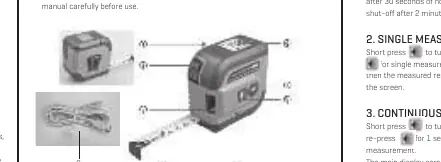
- Metal Buckle
- Self-locking Button
- Laser Emission Port
- Tape Measure
- USB Charging Port
- Screen
- Modes/Unit Switch
- On/Off/Measuring Button
Operating Instructions
Powering On/Off
To turn the device on, press the power button for 1 second while in the OFF state. To turn it off, long press for 3 seconds. The device features an auto shut-off after 2 minutes of inactivity.
Measurement Modes
- Single Measurement: Short press to turn on the laser, then press again to measure distance.
- Continuous Measurement: Short press to turn on the laser, then re-press for 1 second to start continuous measurement. Press again to exit.
- Area Measurement: Short press to enter mode. Measure the first edge (length), then the second edge (width). The device calculates the area automatically.
- Volume Measurement: Short press to enter mode. Measure the first edge (length), second edge (width), and third edge (height). The device calculates the volume automatically.
Settings and Calibration
- Unit Switching: When the device is ON, long press for 1 second to change units.
- Measurement Benchmark: When ON, simultaneously press the plus and minus buttons to switch between front and rear benchmarks.
- Advanced Settings: When OFF, press and hold for 5 seconds to enter settings. Set 1 allows switching between beeps or voice prompts. Set 2 allows calibration (adjustable range -9mm to 9mm).
Troubleshooting
If the device displays an error code, refer to the following solutions:
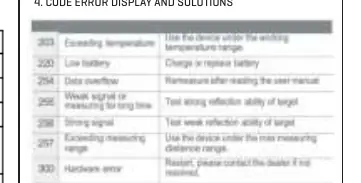
- Exceeding temperature: Use the device within the working temperature range.
- Low battery: Charge or replace the battery.
- Data overflow: Remeasure after reading the user manual.
- Weak/Strong signal: Test the reflection ability of the target.
- Hardware error: Restart the device; contact the dealer if the issue persists.
Manufacturer information
Sharper Image
Practical help
Common problems
Exceeding temperature
Use the device within the working temperature range.
Low battery
Charge or replace the battery.
Data overflow
Remeasure after reading the user manual.
Weak or strong signal
Test the reflection ability of the target.
Hardware error
Restart the device; contact the dealer if not resolved.
Before use
- Charge the device fully before first use.
- Read all safety regulations provided in the manual.
- Ensure the target surface is suitable for laser reflection.
- Check that the device is not near flammable or explosive materials.
Specs in practice
- Working Temperature
- 0°C to 40°C.
- Protection Level
- IP54 (dust and splash resistant).
Images and diagrams
- The device includes a metal buckle, self-locking button, laser emission port, and USB charging port.
- The screen displays measurement results, including Max and Min values for continuous measurement.
Model compatibility
- Do not operate near medical equipment or on aircraft due to potential electromagnetic interference.

Manual page author
Emily Carter
User documentation editor
Prepares concise manual descriptions and highlights the most useful setup, operation, and maintenance information for readers.