Furniture / TV Stands
User Manual for Shopify 1224H Digital Alarm Clock
Quick guide for the Shopify 1224H Digital Alarm Clock. Learn how to set dual alarms, adjust brightness, toggle display modes, and configure time and date settings.
Table of contents
Quick Guide
The Shopify 1224H is a digital alarm clock featuring dual alarms, temperature display, and adjustable brightness. It supports both battery and DC power operation. In battery mode, it features a voice-activated wake-up function to conserve power.
Key Functions
The device is controlled via buttons located on the top or back:
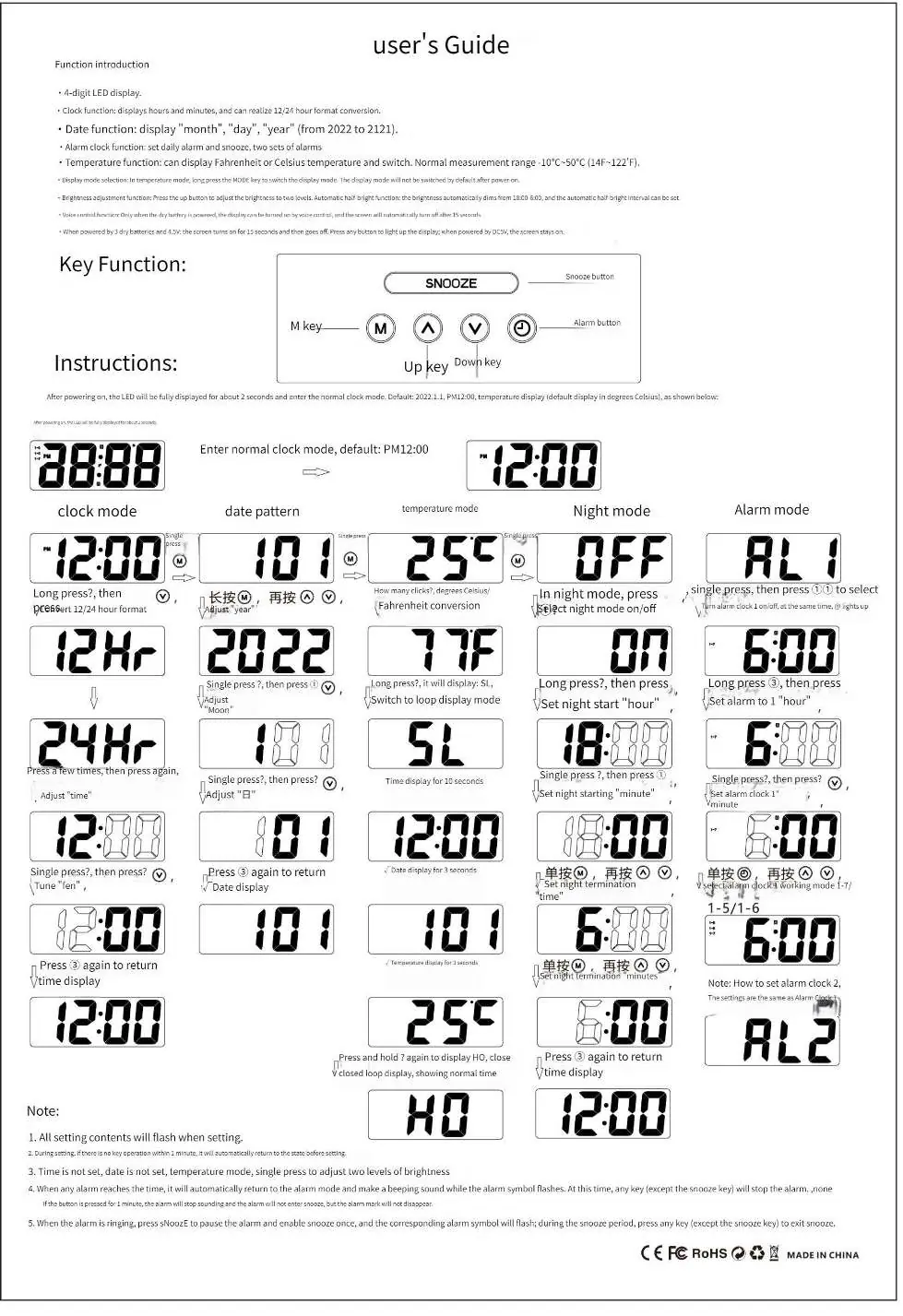
- M key: Used for mode selection and entering setting states.
- Up/Down keys: Used to adjust values (time, date, alarm) and toggle settings like 12/24H format or Celsius/Fahrenheit.
- Snooze button: Used to adjust brightness (5 levels), activate snooze, and toggle night/anti-disturb modes.
Setting Time and Date
To set the time and date, use the M key to navigate through the modes. The device supports a date range from 2022 to 2121. Use the Up/Down keys to adjust the year, month, and day. The clock automatically returns to the time display if no operation is performed for 1 minute.
Alarm Settings
The clock supports two independent alarms:
- Short press the Alarm key to view Alarm 1 or Alarm 2 status.
- Press the +/- keys to turn the alarm ON or OFF.
- Press the S key to enter the setting mode for the selected alarm.
- When the alarm rings, press any key (except Snooze) to stop it, or press and hold the Snooze button for 3 seconds to turn off the current alarm and move to the next state.
- Short press the Snooze button to activate the snooze function.
Display and Brightness
The clock offers two display modes: time only, or a cycle of time, date, and temperature. Press and hold the + button for 3 seconds to switch modes. Brightness can be adjusted in 5 levels by short-pressing the Snooze button in time state.
Night and Anti-Disturb Modes
- Night Mode: Automatically enters low brightness between 22:00 and 6:00.
- Anti-Disturb Mode: Press and hold the Snooze button for 3 seconds to enter this mode. The display turns off, voice-activated wake-up is disabled, and the screen must be manually woken by pressing a button.
Display Toggles
- 12/24H Format: Long press the S key, then use +/- to switch.
- Temperature Unit: In time state, press and hold the - key for 3 seconds to switch between Celsius and Fahrenheit.
Practical help
Common problems
Alarm does not stop ringing
Press any key (except the Snooze button) to stop the alarm.
Screen is off
If using batteries, the clock may be in voice-activated mode. Clap your hands or knock on the table to wake the screen.
Settings are not saving
Ensure you complete the setting sequence. If there is no operation for 1 minute, the device automatically returns to the previous state.
Before use
- Insert 3 AAA batteries or connect to DC power.
- Set the current year, month, and day.
- Configure the time format (12H or 24H).
- Select the preferred temperature unit (Celsius or Fahrenheit).
- Set your desired alarm times.
Specs in practice
- Voice-activated wake-up
- In battery mode, the screen turns off after 15 seconds to save power; wake it by sound.
- Temperature Range
- The device measures temperatures between -10°C and 50°C (14°F to 122°F).
Images and diagrams
- The M key is the primary button for entering setting modes.
- The Up and Down arrows are used to increment or decrement values during setup.
- The Snooze button doubles as a brightness control and a mode toggle for night settings.
Model compatibility
- Date range supported: 2022 to 2121.
- Voice-activated wake-up is only active when powered by batteries.

Manual page author
Emily Carter
User documentation editor
Prepares concise manual descriptions and highlights the most useful setup, operation, and maintenance information for readers.