Music / Guitar Accessories
User Guide for Shure Stem Hub Express Communication Center
Comprehensive user guide for the Shure Stem Hub Express. Includes installation instructions, connection diagrams, setup procedures for the Stem Ecosystem, and technical specifications.
Quick answers from the manual
Quick answer
- The Stem Hub Express is a communication center that connects multiple Stem Ecosystem audio endpoints to external speakers, USB conferencing interfaces, or SIP networks, acting as the central brain of the room. p. 2, 13
Key actions
- Mounting the device p. 3
- Connecting to network p. 4
First start
- Connect to a PoE+ network and configure via the Stem Ecosystem platform. p. 4, 5
Technical specifications
| Parameter | Value | Meaning | Pages |
|---|---|---|---|
| Frequency Response | 50Hz - 16KHz | Audio processing range | p. 7, 13 |
| Weight | 0.5 lbs (0.23 kg) | Device weight | p. 7, 13 |
Where to find it in the PDF
- Overview and Connections p. 2, 13
- Mounting Instructions p. 3
- Setup and Platform p. 4, 5
- Specifications p. 7, 13
Table of contents
Manual images
Click an image to enlargeQuick guide from the manual
The Stem Hub Express serves as the communication center for the Stem Ecosystem. It acts as the brain of the room, connecting your network of Stem Ecosystem products to external loudspeakers, USB conferencing interfaces, or SIP networks. It is required when using more than one Stem Ecosystem audio endpoint in a room.
Mounting
The device is designed to be wall-mounted. Follow these steps to mount the unit:

- Using a level, mark two points on your mounting surface exactly 2.75 inches (7 cm) apart.
- Install the provided screws at the marked positions, using the provided anchors if necessary.
- Align the keyholes on the back of the device with the screws.
- Lightly push the device in and down to lock it into place.
Setting Up
Proper setup is essential for the Stem Ecosystem to function correctly:
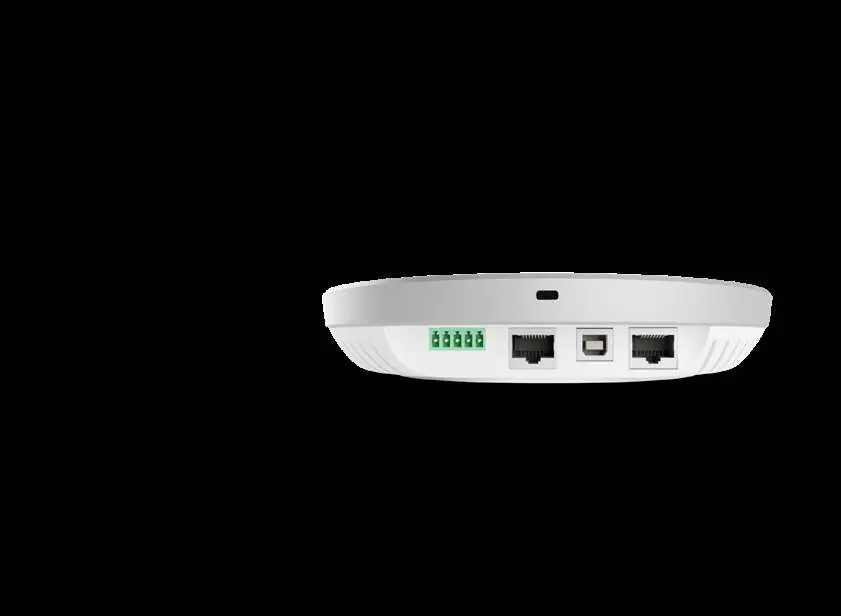
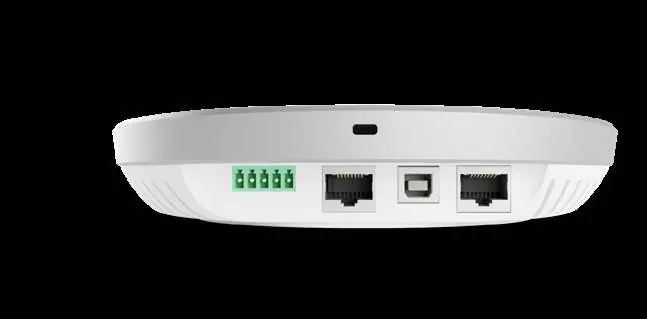
- Network Connection: Connect the Hub Express to a network that supports PoE+ (Power over Ethernet) using an Ethernet cable. This provides power, data, and IoT/SIP capabilities. If your network does not support PoE+, you must use a separate PoE+ injector or a PoE+ enabled switch.
- USB Connection: Use the USB Type B port to connect the ecosystem to a PC for video and audio conferencing.
- External Speakers: Use the female terminal block connector (unamplified) to connect external speakers or amplifiers. Use the provided male terminal block connector for this connection.
Stem Ecosystem Platform
The Stem Ecosystem platform is recommended for all installations. You can access the platform via the Stem Control device, through apps available for iOS, Windows, and Android, or by entering the product's IP address into a web browser. Use the platform to perform setup, RoomAdapt (to optimize acoustic settings), and RoomCheck (to measure room acoustics).
Technical Specifications
- Frequency Response: 50Hz - 16KHz
- Noise Cancellation: >15dB (without pumping noise)
- Power Consumption: PoE+ 802.3 at Type 2
- Dimensions: 7 x 1.5 inches (17.8 x 3.8 cm) (Diameter x Height)
- Weight: 0.5 lbs (0.23 kg)
- Operating Systems: Windows 98 and up, Linux, MacOS
What's in the box
- USB Type A to USB Type B Cable (12 ft. / 3.7 m)
- CAT 6 Ethernet Cable (15 ft. / 4.6 m)
- Terminal Block Connector (male)
- Philips Head Screws and Drywall Anchors (2)
Practical help
Common problems
Network does not support PoE+
Purchase a separate PoE+ injector or PoE+ enabled switch to provide power and data.
External speakers not performing properly
Use the Stem RoomAdapt feature within the Stem Ecosystem platform to automatically adjust and optimize device settings for your room's acoustic signature.
Before use
- Ensure your network supports PoE+ (802.3 at Type 2).
- Have an Ethernet cable ready for network connection.
- Have a USB Type B cable ready if connecting to a PC.
- Identify a mounting surface and ensure you can mark points 2.75 inches (7 cm) apart.
- Verify you have the provided male terminal block connector for external speakers.
Specs in practice
- PoE+ 802.3 at Type 2
- The required power standard for the device to operate via Ethernet.
- Frequency Response (50Hz - 16KHz)
- The range of audio frequencies the device can process.
- Terminal Block
- An analog connector used for attaching external speakers or amplifiers.
Images and diagrams
- The back panel includes a Kensington lock slot, a 5-pin terminal block for speakers, an RJ45 Ethernet port, and a USB Type B port.
Model compatibility
- Compatible with Windows 98 and up, Linux, and MacOS.
- Requires PoE+ network support for operation.

Manual page author
Emily Carter
User documentation editor
Prepares concise manual descriptions and highlights the most useful setup, operation, and maintenance information for readers.