Electronics / Collaboration Devices
User Manual for WyreStorm Essentials 1080p Video Conference Kit EXP-VC-KIT
Quick guide for the WyreStorm Essentials 1080p Video Conference Kit (EXP-VC-KIT). Includes installation wiring diagrams, IP settings, troubleshooting for camera and speakerphone, and technical specifications.
Table of contents
Manual images
Click an image to enlargeQuick guide from the manual
This document provides essential setup and configuration information for the WyreStorm Essentials 1080p Video Conference Kit (EXP-VC-KIT). Before beginning installation, it is recommended to read the full wiring guidelines and download the latest firmware and configuration tools from the official WyreStorm product page.
In the Box
- 1x EXP-VC-KIT-C 1080p Camera
- 1x EXP-VC-KIT-H Hub
- 1x EXP-VC-KIT-A Speakerphone
- 2x 5m 6-Pin DIN Data Cables
- 1x 12v DC 1.5A Power Supply
- 1x IR Remote
- 1x 3m USB 2.0 Cable
- 1x Quickstart Guide
Installation and Wiring
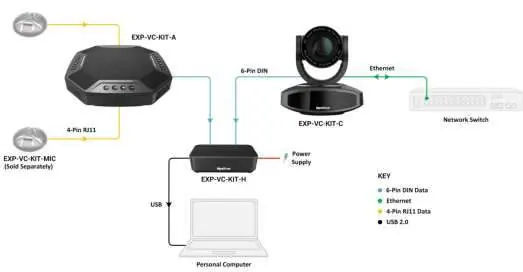
The system requires specific connections between the camera, hub, speakerphone, and your PC. Ensure all cables are connected according to the wiring diagram. The hub connects to the PC via USB, while the camera and speakerphone connect to the hub using the provided 6-Pin DIN cables. The camera also requires a network connection for streaming.
IP and Communication Settings
The camera features a web UI for configuration. Access it by connecting to a network and entering the default IP address. It is recommended to change the default IP address after the first login.
- Default IP Address: 192.168.11.143
- Web UI Port: 80
- VISCA Port: 1259
The camera supports the VISCA control protocol for 3rd-party control systems.
Speakerphone Presets
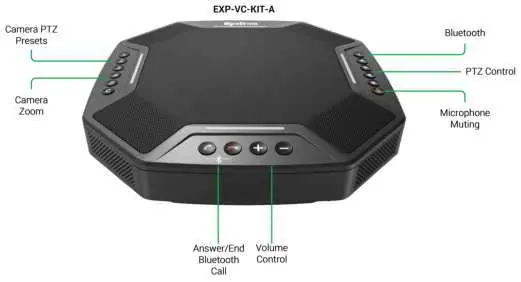
The speakerphone includes 3 custom preset buttons for PTZ (Pan-Tilt-Zoom) settings. To save a preset: adjust the camera manually to the desired position, then hold any of the 3 preset buttons for a minimum of 5 seconds.
Troubleshooting
If you encounter issues, check the following:
- No Hub Connection to PC: Verify the hub has power and is switched on. Avoid using USB 3.0 ports on your PC; use a USB 2.0 port if possible.
- Camera Not Streaming: Ensure the camera and decoding software are on the same network. If using RTP Multicast, verify the network switch is configured for Multicast traffic.
- Answer/End Buttons Not Working: These buttons are designed for Bluetooth mobile connections and are not compatible with PC conference software due to varying command protocols.
Specifications
Camera (EXP-VC-KIT-C): 1/2.8 inch HD CMOS sensor, 5x optical zoom, 10x digital zoom, 83.7-degree viewing angle. Supports resolutions up to 1920x1080.
Speakerphone (EXP-VC-KIT-A): Features Acoustic Echo Cancellation (AEC), bidirectional noise compression, and Bluetooth 4.0. Sound pick-up diameter is 6 meters (expandable to 10 meters with optional mic).
Hub (EXP-VC-KIT-H): Connects via Mini USB to PC. Compatible with Windows, MacOS, and Linux.
Practical help
Common problems
No Hub connection to PC
Verify the hub is powered on. Avoid using USB 3.0 ports on the PC; switch to a USB 2.0 port.
Camera not streaming video on the network
Ensure the camera and decoding software are on the same network. If using RTP Multicast, ensure the network switch is configured for Multicast traffic.
Answer/End call buttons not working
These buttons are designed for Bluetooth mobile connections, not for PC conference software.
Before use
- Verify all components (Camera, Hub, Speakerphone, Cables) are present.
- Read the Wiring and Connections section before creating or choosing cables.
- Download the latest firmware and configuration tools from the WyreStorm product page.
- Ensure the camera and PC are on the same network for streaming.
Specs in practice
- OS Compatibility
- Compatible with Windows, MacOS, and Linux.
Images and diagrams
- The wiring diagram illustrates the connection path: Camera to Hub (6-Pin DIN), Speakerphone to Hub (6-Pin DIN), and Hub to PC (USB).
- The diagram also shows the network connection for the camera via Ethernet.
Model compatibility
- Speakerphone sound pick-up is 6 meters, expandable to 10 meters with the optional EXP-VC-KIT-MIC.
- The system supports RTP Multicast, RTSP, RTMP, and HTTP protocols.

Manual page author
David Miller
Documentation analyst
Organizes user manual content into clear summaries, with attention to model details, product context, and everyday usability.