Power / USB Chargers
SIIG 200W GaN PD Charger User Guide
Quick start guide for the SIIG 200W GaN PD Charger. Learn about port layout, power distribution rules, safety precautions, and technical specifications for your multi-port charging station.
Quick answers from the manual
Quick answer
- The SIIG 200W GaN PD Charger provides a total of 200W output across 5 ports (3 USB-C, 2 USB-A). Power distribution varies based on the number of devices connected. p. 1
Key actions
- Connect the AC power cable to the charger and a wall outlet. p. 1
Problems and fixes
Charger case damage or internal access
Do not open the case; doing so can cause electrical hazards and void the warranty.
p. 2Show 3 more answers Show less
Maintenance and reset
- Unplug the charger from the power source when not in use. p. 2
Technical specifications
| Parameter | Value | Meaning | Pages |
|---|---|---|---|
| Total Output | 200W | Maximum combined power | p. 1 |
Where to find it in the PDF
- Features, Layout, and Charging Rules p. 1
- Safety Notes and Support p. 2
Table of contents
Quick guide from the manual
The SIIG 200W GaN PD Charger is a high-performance charging station utilizing Gallium Nitride (GaN) semiconductor technology. It features 4 ports with a total maximum output of 200W and an integrated LCD display to monitor real-time charging data. This device supports AC input from 100-240V, making it suitable for various power environments.
Device Layout
The charger is equipped with 5 physical ports, though the total output is shared across them:
- USB-C PD Output 1, 2, 3: Each supports up to 100W max (5V/3A, 9V/3A, 12V/3A, 15V/3A, 20V/5A).
- USB-A QC3.0 Output 1, 2: Each supports up to 22.5W max (5V/4.5A, 9V/2A, 12V/1.5A).
- AC Input: 100-240V 50/60Hz, 3A max.
Multiport Charging Rules
The charger dynamically adjusts power output based on the number of devices connected. To avoid overloading, please note the following distribution logic:
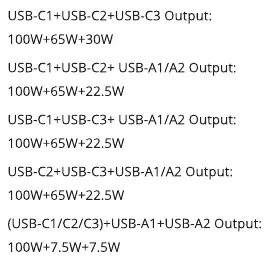
- Single port used: USB-C ports provide up to 100W; USB-A ports provide up to 22.5W.
- Dual ports used: Various combinations (e.g., USB-C1 + USB-C2) can provide 100W + 100W.
- Triple/Quad/Full ports used: The total power is distributed across all active ports. For example, using all ports simultaneously results in a split such as 100W + 65W + 20W + 7.5W + 7.5W.
Safety Instructions
- Always unplug the charger from the power source when not in use.
- Do not place the charger on heated surfaces or near other heat sources.
- Do not attempt to replace any parts or open the case, as this can cause electrical hazards and void the manufacturer warranty.
- Do not expose the charger to liquids or excessive heat.
- Do not use corrosive cleaning substances.
- Keep out of the reach of children.
Technical Specifications
For optimal charging speed, it is recommended to use the device's original equipment USB charging cable. The internal power consumption when not loading is approximately 300mW.
Manufacturer information
SIIG, Inc.
Practical help
Common problems
Device not charging at full speed
Ensure you are using the device's original equipment USB charging cable.
Charger overheating
Do not place the charger on heated surfaces or near other heat sources.
Before use
- Ensure the AC power cable is securely connected to the charger and the wall outlet.
- Verify the devices being charged are compatible with USB-C PD or USB-A QC3.0 standards.
- Check that the total power demand of connected devices does not exceed the charger's capacity.
- Use original charging cables for best performance.
Show more Show less
Specs in practice
- USB-C PD Output
- Power Delivery port capable of up to 100W for fast charging laptops and tablets.
- USB-A QC3.0 Output
- Quick Charge port capable of up to 22.5W for mobile devices.
- Total Output
- The maximum combined power output of 200W available across all ports.
Images and diagrams
- The layout diagram identifies the 5 ports: 3 USB-C ports and 2 USB-A ports, plus the AC input connector.
Model compatibility
- Supports AC input 100-240V, 50/60Hz, 3A.

Manual page author
Michael Turner
Technical manual editor