Electronics / Video Transmission
User Guide for SIIG 1x4 HDMI 2.0a Splitter
Quick start guide for the SIIG 1x4 HDMI 2.0a Splitter. Learn how to configure EDID settings, use audio extraction, enable 4K to 1080p downscaling, and set up AVR mode for your home theater system.
Quick answers from the manual
Quick answer
- The SIIG 1x4 HDMI 2.0a Splitter distributes one HDMI source to four displays. It supports 4K@60Hz, HDR, audio extraction, and features user-adjustable EDID and downscaling settings. p. 1, 2
Key actions
- Learn EDID from output 1 p. 1
- Enable HDR to SDR conversion p. 1
First start
- Connect power and HDMI source, then configure dip switches as needed. p. 1
Problems and fixes
4K@60Hz input on 30Hz monitor
Output is limited to 1080p@60Hz.
p. 2Technical specifications
| Parameter | Value | Meaning | Pages |
|---|---|---|---|
| Resolution | 4K@60 4:4:4 8bits | Maximum supported resolution | p. 1 |
| Power | DC 5V/2A | Power requirement | p. 1 |
Where to find it in the PDF
- Features and Layout p. 1
- AVR Mode and Downscaling p. 2
Table of contents
Manual images
Click an image to enlargeQuick guide from the manual
This document provides instructions for the SIIG 1x4 HDMI 2.0a Splitter. The device supports 4K@60Hz 4:4:4, HDR, and audio extraction. Key features include user-adjustable EDID management, 4K to 1080p downscaling, and an AVR mode for expanded audio format support.
Device Layout
The device features 12 numbered indicators and ports:
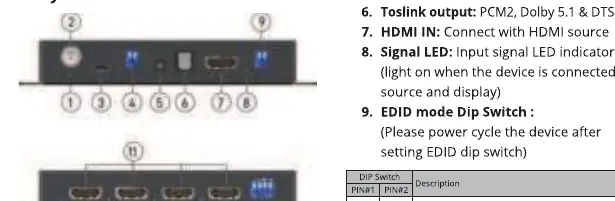
- 1. Power LED: Indicates the device is ready.
- 2. Power Jack: Connect to DC 5V/2A power.
- 3. Micro-USB Port: For firmware updates.
- 4. Dip Switch: For firmware updates and HDR to SDR conversion.
- 5. Stereo 3.5mm output: PCM 2.
- 6. Toslink output: PCM2, Dolby 5.1, DTS 5.1.
- 7. HDMI IN: Connect to HDMI source.
- 8. Signal LED: Indicates input signal status.
- 9. EDID mode Dip Switch: Configure EDID settings.
- 10. Signal LED: Output 1-4 signal status.
- 11. HDMI OUT 1-4: HDMI outputs to displays.
- 12. Downscale Dip Switch: Configure downscaling per output.
EDID Management
To learn EDID from output 1:
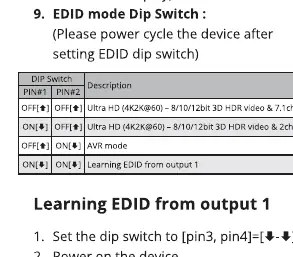
- Set the EDID dip switch (pin 3 and 4) to the down position.
- Power on the device.
- The device will learn EDID from output 1.
Note: Always power cycle the device after changing EDID dip switch settings.
Downscaling and HDR to SDR
The splitter supports 4K to 1080p downscaling. You can configure this per output using the Downscale Dip Switches. Note that 720p and 480p monitors are not supported. If the input source is 4K@60Hz, it will only output 1080p@60Hz for 30Hz monitors.
The HDR to SDR conversion function is available on Output 4 only. It activates automatically when the source signal has HDR content, but the connected display does not support HDR.
AVR Mode
AVR mode supports additional audio formats, including Dolby Atmos, Dolby Digital Plus, Dolby TrueHD, DTS-HD Master, One Bit Audio, DVD-Audio, and LPCM. Note that only EDID learning mode can support Dolby Vision and Atmos simultaneously.
Manufacturer information
SIIG, Inc.
Practical help
Common problems
4K@60Hz input connected to 30Hz monitor
The device will only output 1080p@60Hz.
HDR to SDR conversion not working
Ensure the display is connected to Output 4 and the source signal contains HDR content.
Unsupported resolution
720p and 480p monitors are not supported by this device.
Before use
- Connect the DC 5V/2A power adapter.
- Connect your HDMI source to the HDMI IN port.
- Verify EDID dip switch settings match your display configuration.
- Power cycle the device after adjusting any dip switches.
Specs in practice
- Video Bandwidth
- 18Gbps
- HDMI Audio Format
- Supports PCM2, 5.1/7.1, Dolby 5.1/7.1, DTS 5.1/7.1
Images and diagrams
- The rear panel contains the power input, micro-USB port, firmware/HDR dip switches, and HDMI input.
- The front panel contains the HDMI outputs, audio outputs (Toslink/3.5mm), and EDID dip switches.
Model compatibility
- Supports HDCP 2.2 & 1.4.
- Supports Dolby Vision via EDID learning.
- AVR mode supports Dolby Atmos and other high-res audio formats.

Manual page author
David Miller
Documentation analyst
Organizes user manual content into clear summaries, with attention to model details, product context, and everyday usability.