Electronics / Video Transmission
SIIG 1x8 HDMI Extender Quick Start Guide
Quick start guide for the SIIG 1x8 HDMI Extender (CE-H25G11-S1). Learn how to connect the transmitter and receivers, set up standard or cascaded configurations, and understand the port layout.
Quick answers from the manual
Quick answer
- The SIIG 1x8 HDMI Extender allows you to extend an HDMI signal up to 120 meters (393ft) over CAT6 cable, supporting 1080p@60Hz resolution and IR pass-back. p. 1
Key actions
- Connect the HDMI source to the Transmitter and use CAT6 cables to link the Transmitter to the Receivers. p. 2
Technical specifications
| Parameter | Value | Meaning | Pages |
|---|---|---|---|
| Max Distance | 120m (393ft) | Maximum cable length for signal transmission. | p. 1 |
| Resolution | 1080p@60Hz | Maximum supported video quality. | p. 1 |
Where to find it in the PDF
- Features and Layout p. 1
- Application and Support p. 2
Table of contents
Manual images
Click an image to enlargeQuick guide from the manual
The SIIG 1x8 HDMI Extender is designed to extend HDMI signals up to 120 meters (393ft) using CAT6 Ethernet cabling. It supports 1080p resolution at 60Hz and includes IR pass-back functionality. The system consists of one transmitter unit and eight receiver units, which can be connected directly or cascaded via a LAN switch for expanded distribution.
Package contents
- 1x Transmitter unit
- 8x Receiver units
- 1x Power adapter (DC 12V/3A)
- 8x Power adapters (DC 5V/1A)
- 1x IR blaster extension cable
- 8x IR receiver extension cables
- Quick Start Guide
Device layout
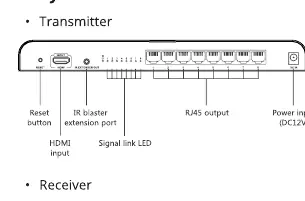
Transmitter
The transmitter features a Reset button, HDMI input, IR blaster extension port, RJ45 outputs, and a DC 12V power input. It also includes a signal link LED to indicate status.
Receiver
Each receiver includes a Reset button, HDMI signal output, IR signal input (for the IR receiver extension cable), DC 5V power input, HDBitT signal input, and status LEDs for power, data transmission, and network link.
Installation and application
Standard Connection: Connect the HDMI source to the Transmitter's HDMI input. Connect the Transmitter's RJ45 outputs to the Receivers' HDBitT inputs using CAT6 cables. Connect the Receivers' HDMI outputs to your displays.
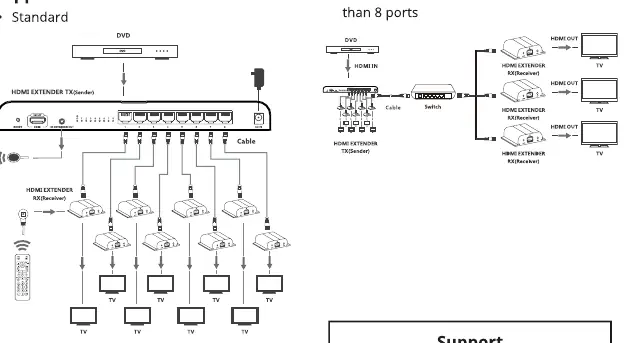
Cascaded Connection: For setups requiring more than 8 ports, you can connect the Transmitter to a LAN switch, which then distributes the signal to multiple receivers, allowing for a larger network of displays.
Technical specifications
- Signal Extension: Up to 393ft (120m) via CAT6 cable
- Resolution: Up to 1080p@60Hz
- Standards: HDMI 1.3 and HDCP 1.2
- IR Pass Back: Frequency 20-60KHz
Support
For additional information or technical support, visit the official website at http://www.siig.com/support
Official resources from the manual
Manufacturer information
SIIG, Inc.
Practical help
Common problems
Signal not reaching display
Ensure the CAT6 cable is securely connected and within the 120m range limit. Verify that the correct power adapters are used (12V for Transmitter, 5V for Receivers).
IR remote not working
Ensure the IR blaster extension cable is connected to the Transmitter and the IR receiver extension cable is connected to the Receiver.
Before use
- Verify all 9 power adapters are present (1x 12V/3A, 8x 5V/1A).
- Ensure you have high-quality CAT6 Ethernet cables for the connection.
- Check that the HDMI source supports 1080p resolution.
- Confirm the LAN switch (if using) supports the required bandwidth for cascaded setups.
Images and diagrams
- Standard: Direct connection from Transmitter to Receivers via CAT6.
- Cascaded: Transmitter connects to a LAN switch, which then connects to multiple Receivers.
Model compatibility
- Requires CAT6 Ethernet cable for optimal performance.
- Supports HDMI 1.3 standard.

Manual page author
David Miller
Documentation analyst
Organizes user manual content into clear summaries, with attention to model details, product context, and everyday usability.