Lighting / Outdoor Lighting
Installation Guide for SOLTECH FOCUS Sign Lights
A comprehensive installation and operation guide for the SOLTECH FOCUS 10W and 20W solar sign lights. Includes mounting instructions for concrete and soil, technical specifications, adjustment procedures, and maintenance tips.
Quick answers from the manual
Quick answer
- The SOLTECH FOCUS is a solar-powered sign light. It requires 8-9 hours of initial charging in full sunlight. It operates automatically, turning on at night and off during the day. p. 2
Key actions
- Charge the battery p. 2, 5
- Install on soil p. 4
First start
- Charge for 8-9 hours in full sunlight before first use. p. 2
Problems and fixes
Reduced runtime during bad weather
The battery is not fully charged. Turn the unit off and charge for 8 hours in full sunlight.
p. 2Maintenance and reset
- To reset or restore battery after poor weather, turn the unit off and charge for 8 hours in full sunlight. p. 2
Technical specifications
| Parameter | Value | Meaning | Pages |
|---|---|---|---|
| Charging Time | 8-10 hours | Time required for full charge in 1000W/m2 sunlight | p. 3 |
| Operating Temperature | -4 °F to 149 °F | Allowed ambient temperature range | p. 3 |
Where to find it in the PDF
- Introduction and Features p. 2
- Specifications p. 3
- Installation p. 4
- Adjustment p. 5
Table of contents
Manual images
Click an image to enlargeQuick Guide from the Manual
The SOLTECH FOCUS is a solar-powered sign light designed for outdoor use. Before initial use, the solar panel must be charged in full sunlight for 8 to 9 hours to ensure optimal performance. The light features an automatic on/off function, IP65 water and dust resistance, and an intelligent power-saving mode.
Product Overview
The FOCUS series is available in 10W and 20W models. Key features include:
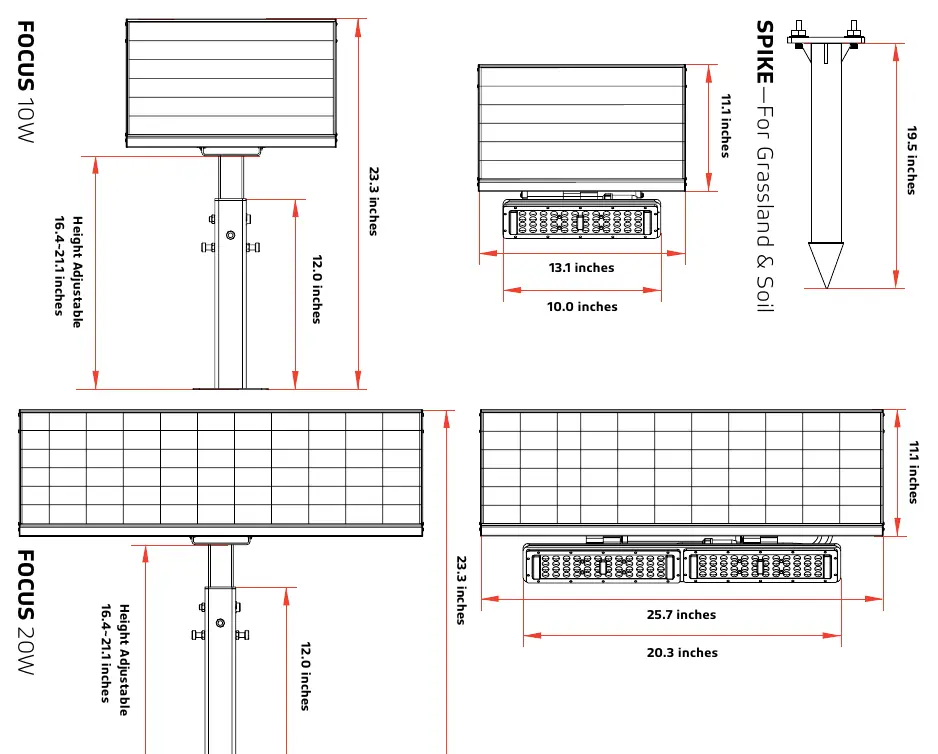
- Integrated design with no electrical wiring required.
- Automatic operation: turns on at night and off during the day.
- Built-in battery supporting 5–6 nights of operation with cloudy days.
- Intelligent power-saving mode that increases light duration by 1.5 times.
- IP65 water and dust resistance.
Installation
The FOCUS light can be installed using two primary methods depending on the surface:
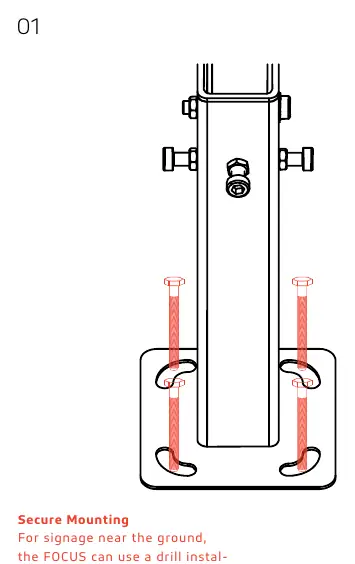
Ground Mount (Concrete)
For signage near the ground, the unit can be drill-installed into concrete to create a secure, tightly bolted fixture. Ensure all screws and bolts are tightened firmly.
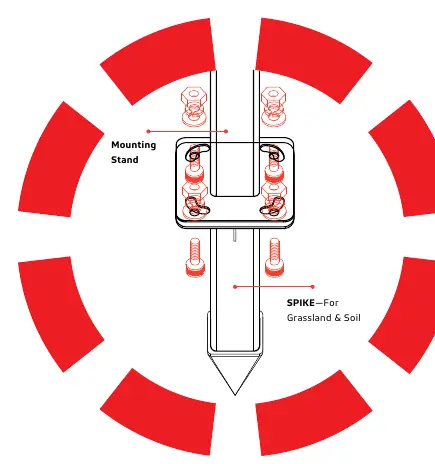
Ground Mount (Grassland & Soil)
If installing on grassland or soil, you must use the SPIKE accessory (sold separately). Attach the SPIKE to the mounting stand using four screws, then press the assembly into the ground.
Adjustment
The FOCUS light allows for flexible positioning to optimize solar efficiency and lighting angle:
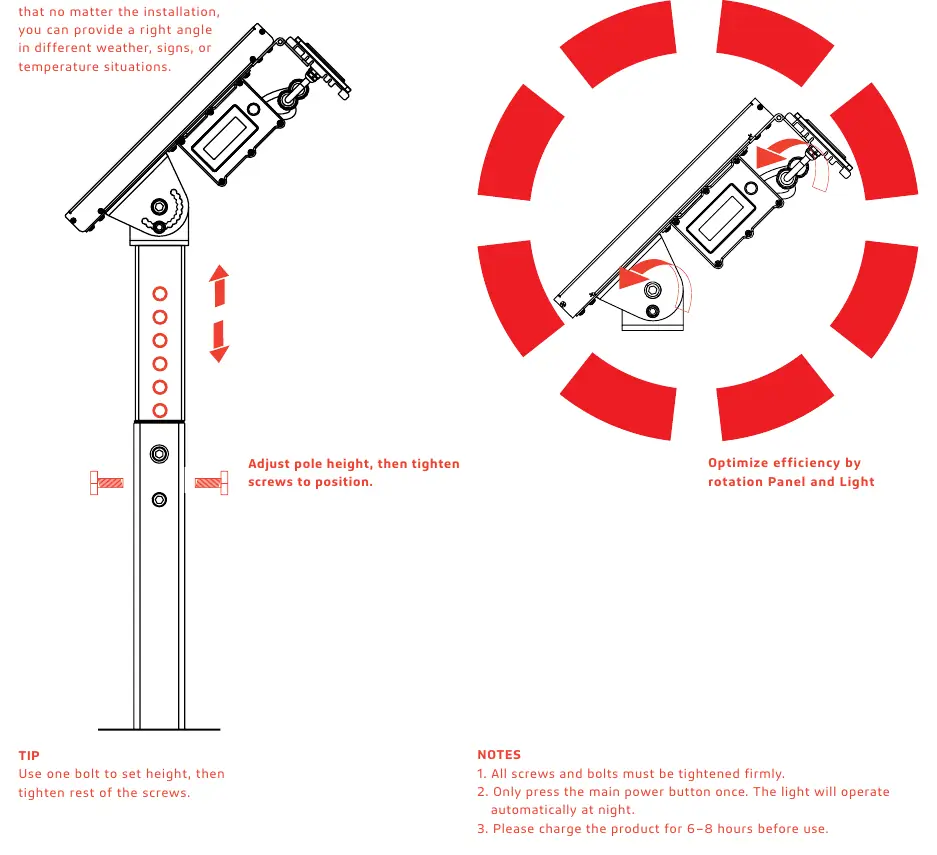
- Height Adjustment: Use the bolts on the pole to set the desired height, then tighten all screws securely.
- Angle Adjustment: You can rotate the panel and the light independently to ensure the correct angle for your specific signage or environmental conditions.
Maintenance and Troubleshooting
To ensure longevity and performance:
- Charging: If the light has not been used for an extended period or after poor weather, turn the unit off and charge the battery for 8 hours in full sunlight.
- Testing: To test the light during daylight hours, fully cover the solar panel and press the main power button.
- Weather Impact: During continuous rainy or cloudy days, runtime may be reduced as the battery will not be fully charged. The light will return to normal function once the sun returns.
Practical help
Common problems
Light does not turn on or has reduced runtime
The battery may not be fully charged due to continuous rainy or cloudy weather. Turn the unit off and charge for 8 hours in full sunlight.
Need to test the light during the day
Fully cover the solar panel to simulate darkness and press the main power button.
Before use
- Charge the solar panel in full sunlight for 8 to 9 hours.
- Ensure all screws and bolts are tightened firmly.
- If installing on soil, ensure you have the SPIKE accessory.
- Press the main power button once to activate the system.
Specs in practice
- Operation Mode
- The light operates at 100% brightness for the first 4 hours, then 25% brightness until dawn.
- Charging Time
- Requires 8-10 hours of direct sunlight (1000W/m2) for a full charge.
Images and diagrams
- The manual provides diagrams for both concrete ground mounting and soil mounting using the spike accessory.
- Adjustment diagrams show how to modify the pole height and rotate the light/panel for optimal angle.
Model compatibility
- The SPIKE accessory is required for grassland and soil installation and is not included in the standard packaging.

Manual page author
David Miller
Documentation analyst
Organizes user manual content into clear summaries, with attention to model details, product context, and everyday usability.