Lighting / Outdoor Lighting
Installation Guide for SOLTECH Victoria 15W Solar Post Top Light
Complete installation and operation guide for the SOLTECH Victoria 15W Solar Post Top Light. Learn how to mount the light, select operating modes, and understand lighting behaviors.
Table of contents
Manual images
Click an image to enlargeQuick Guide from the Manual
The SOLTECH Victoria 15W is a solar-powered LED light designed for outdoor use. For optimal performance, ensure the light is installed in an area with at least 3.5 hours of direct sunlight per day and keep it away from shadows. During installation, always cover the solar panel with an opaque material (such as cardboard or cloth) to prevent electrical shock, as the panel generates voltage when exposed to light.
Product Overview
The unit consists of the following key components:
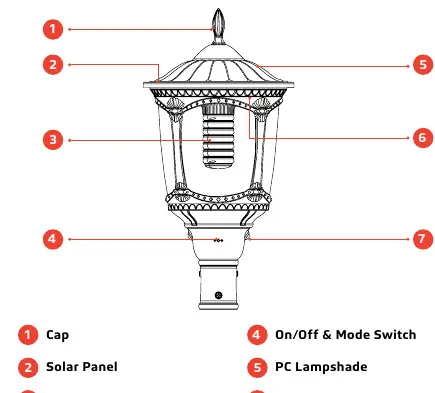
- Cap: The top cover of the light.
- Solar Panel: Converts sunlight into electricity.
- Lamp: The LED light source.
- On/Off & Mode Switch: Used to power the unit and cycle through lighting modes.
- PC Lampshade: Protects the internal components.
- Indicator: Shows the currently selected lighting mode.
- PIR Sensor: Detects motion for specific lighting modes.
Installation
The light is designed to be mounted on top of a pole. Follow these steps for installation:
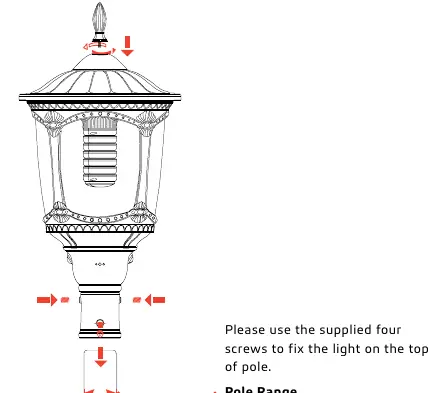
- Ensure the pole diameter is between 2.5 inches and 3.25 inches.
- Place the light on top of the pole.
- Secure the light using the four supplied screws.
- Ensure the solar panel is positioned to receive maximum sunlight.
Operation and Lighting Modes
To turn the lamp on or off, press and hold the button for 3 seconds. To switch between lighting modes, press the button quickly.
The indicator light changes color based on the selected mode:
- Mode 1 (Red Light): Constant 15% brightness from dusk to dawn. Increases to 100% brightness for 30 seconds when motion is detected.
- Mode 2 (Green Light): Constant 30% brightness for the first 5 hours, then dims to 15% until dawn. Increases to 100% brightness for 30 seconds when motion is detected.
- Mode 3 (Orange Light): Constant 35% brightness from dusk to dawn.
Precautions
Do not attempt to open or repair the product yourself, as this may cause serious damage and void the warranty. Always cover the solar panel during installation to avoid shock hazards. If you have questions regarding installation, contact your local distributor or reach out to SOLTECH via email at [email protected] or by phone at (510) 891-1056.
Practical help
Common problems
Light does not turn on
Ensure the solar panel is not covered and is receiving at least 3.5 hours of direct sunlight daily. Check if the unit is switched on.
Shock hazard during installation
Cover the solar panel with an opaque material (cardboard or cloth) while working to prevent the panel from generating electricity.
Before use
- Verify the mounting pole diameter is between 2.5 and 3.25 inches.
- Ensure the installation site receives at least 3.5 hours of direct sunlight per day.
- Keep the light away from shadows.
- Have the four supplied screws ready for mounting.
- Cover the solar panel before starting installation.
Specs in practice
- Lighting Modes
- Three distinct modes (Red, Green, Orange) offering different brightness and motion-sensing behaviors.
Images and diagrams
- The installation diagram shows the light being secured to the top of a pole using four screws.
- The component diagram identifies the PIR sensor, solar panel, and mode switch locations.
- The indicator light diagram shows the color-coded feedback for the three operating modes.
Model compatibility
- Designed for outdoor use.
- Requires sufficient sunlight; not suitable for heavily shaded areas.

Manual page author
Emily Carter
User documentation editor
Prepares concise manual descriptions and highlights the most useful setup, operation, and maintenance information for readers.