Electronics / Security Cameras
Speco Technologies Intensifier T Series HD-TVI Bullet Camera User Manual
Quick guide for the Speco Technologies Intensifier T Series HD-TVI 1080p 2MP Bullet Camera. Learn about OSD menu settings, installation, dimensions, and technical specifications for models HTi70TM and HTi702TM.
Table of contents
Manual images
Click an image to enlargeQuick guide from the manual
This manual provides instructions for the Speco Technologies Intensifier T Series HD-TVI Bullet Camera (models HTi70TM and HTi702TM). These cameras feature motorized zoom, dual voltage operation (12VDC/24VAC), and full OSD control via UTC (Up the Coax). Ensure you verify your power source and cable quality before installation.
Dimensions
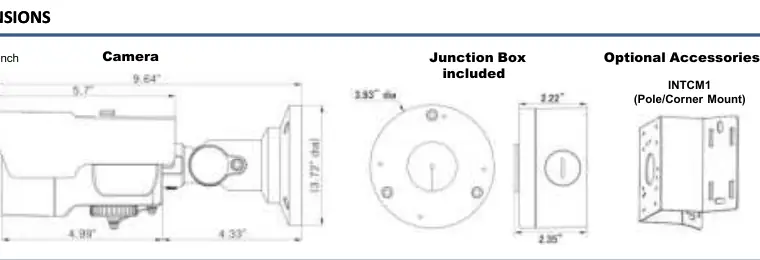
The camera is designed for wall or ceiling mounting. The unit dimensions are 9.64 inches in length and 3.72 inches in diameter. A junction box is included for installation.
OSD Control
The camera features an OSD (On-Screen Display) menu for configuration. You can navigate the menu using the OSD Joystick. The joystick functions are as follows:
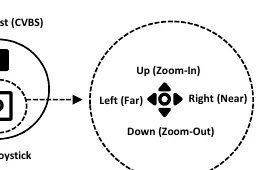
- Up: Zoom-In
- Down: Zoom-Out
- Left: Far Focus
- Right: Near Focus
OSD Menu Details
The OSD menu allows for fine-tuning of the camera performance:
- Exposure: Adjust brightness, shutter speed, and AGC levels.
- Backlight: Configure WDR (Wide Dynamic Range), BLC (Backlight Compensation), and HLC (Highlight Compensation). Note: WDR is not available when using CVBS output.
- Day/Night: Switch between Color, B/W, or Auto modes.
- Image: Adjust sharpness, gamma, mirror/flip, and use Defog or Privacy masking.
- System: Configure output settings (TVI/Analog), frame rate (1080p 30 / 720p 60), and reset to factory defaults.
Technical Specifications
- Image Sensor: 1/2.9” Progressive Scan CMOS, 2MP
- Resolution: 1920x1080 @ 30fps
- Power: 12VDC / 24VAC (Dual voltage)
- Operating Temperature: -40° F – 140° F
- Weather Resistance: IP67 compliant
- Signal Distance: Up to 1600 feet (depending on coax quality)
Practical help
Common problems
WDR settings are not adjustable
WDR cannot be adjusted when using CVBS output.
Image is foggy
Activate the DEFOG mode in the IMAGE menu.
Image is too dark or bright
Adjust the BRIGHTNESS setting or configure WDR/BLC in the OSD menu.
Before use
- Verify power supply is 12VDC or 24VAC.
- Ensure coaxial cable quality is sufficient for the required distance (up to 1600ft).
- Confirm if you are using TVI or CVBS output.
- Check that the camera is mounted securely using the 3-axis mount.
Images and diagrams
- OSD Joystick: Use the joystick to navigate the menu. Up/Down controls Zoom, Left/Right controls Focus.
- Dimensions: Shows camera body and junction box measurements in inches.
Model compatibility
- Compatible with HD-TVI and CVBS systems.
- Requires UTC-compatible DVR or controller for full OSD functionality.

Manual page author
David Miller
Documentation analyst
Organizes user manual content into clear summaries, with attention to model details, product context, and everyday usability.