Electronics / Security Cameras
Installation Guide for GE Cync Outdoor Battery Smart Camera
A comprehensive installation and setup guide for the GE Cync Outdoor Battery Smart Camera. Includes step-by-step instructions for mounting, battery charging, app configuration, and safety warnings.
Table of contents
Manual images
Click an image to enlargeQuick guide from the manual
This guide provides the necessary steps to install and configure your GE Cync Outdoor Battery Smart Camera. Before beginning, ensure your system is up-to-date and update the firmware when prompted in the Cync App for the best experience. For in-depth instructional videos, visit cyncsupport.gelighting.com or call 1-844-302-2943.
Included items and tools
Ensure you have all the necessary components before starting the installation:

- Included: Camera, mounting bracket, anchors (if applicable), Phillips mounting screws, and battery pack with charging cord.
- Tools needed: Phillips screwdriver, 1/8" drill bit (use 1/4" drill bit with optional anchors), and a ladder.
Choosing a location
Proper placement is critical for performance. Follow these guidelines:
- Avoid direct sunlight.
- Ensure the location is within your home's Wi-Fi range.
- Do not obstruct the camera view.
- Tip: Hold the camera in your desired location and check the view in the Cync App to verify it is unobstructed and within Wi-Fi range.
Installation

- Charge the camera: Remove the battery and plug the USB charging cord into the battery USB port.
- App setup: Download the Cync App, powered by Savant, on your smartphone and add your Outdoor Smart Camera to the app.
- Mount the base: Choose your location and verify Wi-Fi signal strength. Place the bracket where you wish to install the camera, mark the holes, drill them using a 1/8" drill bit, and screw in the mounting plate. Attention: Install with the arrow on the bracket facing UP.
- Attach the camera: Align the red notch on the base of your camera with the red notch on the mounting plate. Slide the base of the camera onto the mounting plate. Adjust the camera to your desired angle using the live view in the app, then turn the neck of the camera clockwise to tighten the ball joint and lock it in place.
Battery maintenance
To recharge or replace the battery:
- Gently pull the camera off the magnetic mounting bracket.
- Squeeze the buttons on both sides of the camera to release the camera face.
- Slide the battery pack up to remove it from the camera.
- Plug the charging cord directly into the USB port on the battery.
- Once charged, place the battery inside the camera, attach the camera face, and reinstall the camera onto the mounting bracket.
Safety warnings
Observe the following precautions:
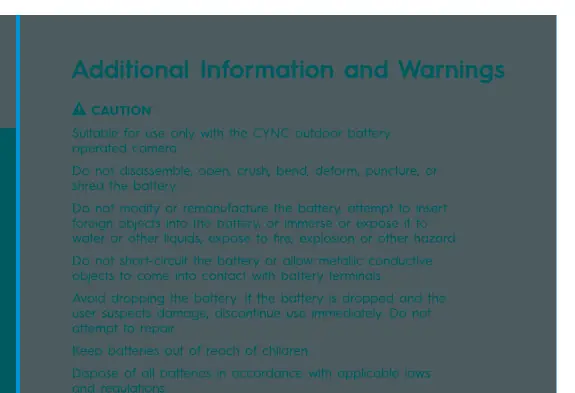
- Suitable for use only with the CYNC outdoor battery operated camera.
- Do not disassemble, open, crush, bend, deform, puncture, or shred the battery.
- Do not modify or remanufacture the battery, attempt to insert foreign objects, or immerse/expose it to water or other liquids, fire, or explosion.
- Do not short-circuit the battery or allow metallic conductive objects to contact battery terminals.
- If the battery is dropped and damage is suspected, discontinue use immediately and do not attempt to repair.
- Keep batteries out of reach of children.
- Dispose of all batteries in accordance with applicable laws and regulations.
Official resources from the manual
Practical help
Common problems
Camera not connecting to Wi-Fi
Check the signal strength in the Cync App settings at the chosen location before mounting the bracket.
Battery needs charging
Remove the camera from the magnetic bracket, squeeze the side buttons to release the face, slide the battery out, and charge via the USB port.
Before use
- Charge the battery fully before initial setup.
- Download the Cync App on your smartphone.
- Verify Wi-Fi signal strength at the installation site using the app.
- Ensure you have a Phillips screwdriver, 1/8" drill bit, and a ladder.
Images and diagrams
- Mounting Bracket: The bracket features an arrow that must face UP during installation.
- Camera Attachment: Align the red notch on the camera base with the red notch on the mounting plate to ensure proper fit.
Model compatibility
- Suitable for use only with the CYNC outdoor battery operated camera.

Manual page author
David Miller
Documentation analyst
Organizes user manual content into clear summaries, with attention to model details, product context, and everyday usability.