Home Appliances / Small Kitchen Appliances
Star Wars 15W Wireless Charging Pad User Manual
Quick guide for the Star Wars 15W Wireless Charging Pad. Learn how to set up your charger, understand LED indicator statuses, and follow safety guidelines for optimal performance.
Table of contents
Quick guide from the manual
To begin using your Star Wars 15W Wireless Charging Pad, connect the base to a power outlet using a 15W or higher rated power adapter. Place your mobile device centrally on the charging surface to initiate charging. The LED indicator will confirm the connection status.
Device Description
The charging pad consists of the following components:
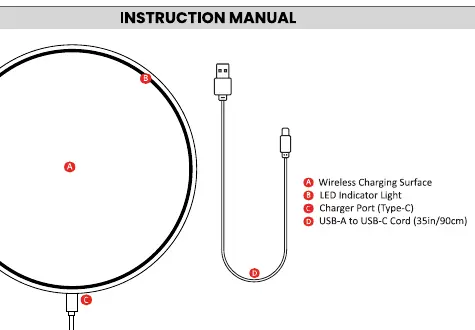
- Wireless Charging Surface: The area where the mobile device is placed.
- LED Indicator Light: Displays the current charging status.
- Charger Port (Type-C): The input port for the power cable.
- USB-A to USB-C Cable: Included cable for connecting the base to a power adapter.
Setting Up
Follow these steps to set up the device:
- Connect the wireless base to a power outlet using a 15W or higher rated power adapter. Using an adapter with a lower wattage may result in slow or inefficient charging.
- Plug the included USB cable into the charging port on the base.
- Place your mobile device centrally on the charging base. Charging will begin automatically.
Indicator Status
The LED indicator provides feedback on the charging process:
- Flashing Red: The mobile device is currently charging.
- Solid Yellow: The charge is complete or the device is idle.
Specifications
- Input Requirement: 12V/2A, 9V/2A, 5V/2A
- Output: 15W / 10W / 7.5W / 5W
Important Safety Instructions
Please adhere to the following safety guidelines to prevent fire, electric shock, or injury:
- Use only a certified 15W or higher rated power adapter.
- Do not use the charging base if the power adapter or cord is damaged.
- Do not place any metal objects (e.g., coins, keys, jewelry) or magnetic stripe cards on the charging base.
- If the device or charging base becomes excessively hot, immediately disconnect the power adapter and allow it to cool down.
- Do not charge your device if it is covered by any material that could trap heat, such as a phone case.
- Keep the charging base away from water or other liquids. Do not use in humid environments like bathrooms or near sinks.
- Do not attempt to disassemble or repair the charging base yourself.
- Keep the charging base out of reach of children and pets.
- Do not place the charging base near heat sources or in direct sunlight.
Manufacturer information
Star Wars
Practical help
Common problems
Device is charging slowly or inefficiently
Ensure you are using a 15W or higher rated power adapter. Lower wattage adapters will not provide optimal charging.
Charging base becomes excessively hot
Immediately disconnect the power adapter and allow the base to cool down before resuming charging.
Charging not starting
Ensure the mobile device is placed centrally on the charging base and that the USB-C cable is securely connected.
Before use
- Verify you have a 15W or higher rated power adapter.
- Inspect the USB-C cable for any signs of damage.
- Ensure the charging area is free of metal objects or magnetic cards.
- Place the device centrally on the charging surface.
Specs in practice
- Input Requirement
- The power adapter must support 12V/2A, 9V/2A, or 5V/2A for proper operation.
Images and diagrams
- A: Wireless Charging Surface - Place device here.
- B: LED Indicator Light - Shows charging status.
- C: Charger Port (Type-C) - Connect power cable here.
- D: USB-A to USB-C Cable - Connects base to power adapter.
Model compatibility
- Requires a 15W or higher rated power adapter for optimal performance.
- Do not charge devices covered by materials that trap heat (e.g., thick phone cases).

Manual page author
Michael Turner
Technical manual editor
Reviews PDF manuals for structure, safety notes, and practical product details so readers can find the right information quickly.