Home Appliances / Vacuum Cleaners
User Manual for Stirling 2000W Bagless Vacuum Cleaner VC-001
Comprehensive user guide for the Stirling 2000W Bagless Vacuum Cleaner (VC-001). Includes assembly instructions, operation, filter maintenance, and troubleshooting steps.
Quick answers from the manual
Quick answer
- The Stirling VC-001 is a 2000W bagless vacuum cleaner. This manual provides instructions for assembly, operation, filter maintenance, and troubleshooting. p. 1
Key actions
- Emptying the dust tank p. 13
- Cleaning filters p. 14, 15
First start
- Insert flexible hose into socket until it locks. Attach telescopic tube to handle. Fit cleaning accessory to tube. p. 10
Problems and fixes
Vacuum stops suddenly
Overheating protection triggered. Unplug, check for blockages, clean filters. Resets in ~20 mins.
p. 16Maintenance and reset
- Overheating protection resets automatically after approximately 20 minutes. p. 16
Technical specifications
| Parameter | Value | Meaning | Pages |
|---|---|---|---|
| Wattage | 2000W | Maximum power consumption | p. 17 |
| Dust tank capacity | 3.5L | Volume of dust container | p. 17 |
Where to find it in the PDF
- Product Overview p. 8, 9
Table of contents
Manual images
Click an image to enlargeQuick guide from the manual
This vacuum cleaner is designed for domestic indoor use on dry surfaces. Before first use, ensure all packaging is removed and the appliance is inspected for damage. Always unplug the unit before performing any maintenance, such as emptying the dust tank or cleaning filters. If the unit stops suddenly, it may be due to the overheating protection device; unplug it, check for blockages, and allow it to cool for approximately 20 minutes.
Product Overview
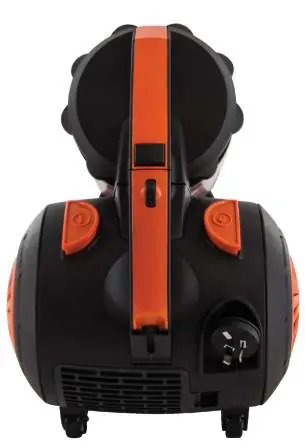
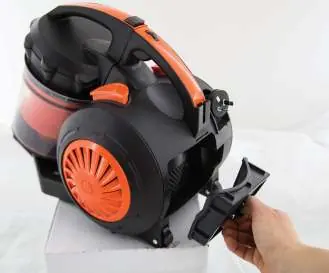
The vacuum cleaner consists of the main unit, a flexible hose, a chrome telescopic tube, and a dual-function floor brush. Key controls include an On/Off pedal, a speed control knob, and a cord retraction pedal located on the back of the unit. The dust tank contains the HEPA filter and in-tank filter, while the exhaust filter is located at the back of the cylinder.
Getting Started
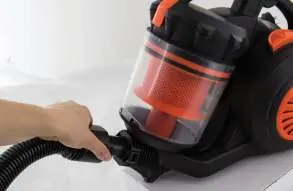
Ensure the vacuum is unplugged before assembly. Insert the flexible hose into the socket at the front until it locks. Attach the telescopic tube to the handle and fit the desired cleaning accessory to the end of the tube. The tube length can be adjusted by pressing the button at the centre joint.
Operation
To use the vacuum, pull the power cord out (do not exceed the red mark) and plug it into a power point. Press the On/Off pedal to start. Use the speed control knob to adjust suction power. For temporary suction reduction, use the suction control valve on the curved handle. When finished, switch off, unplug, and press the cord retraction pedal to wind the cord back in.
Cleaning and Maintenance
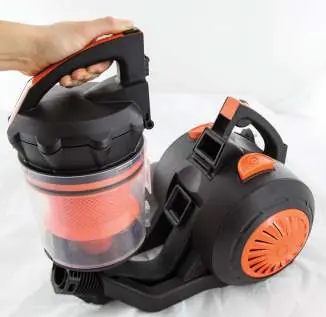
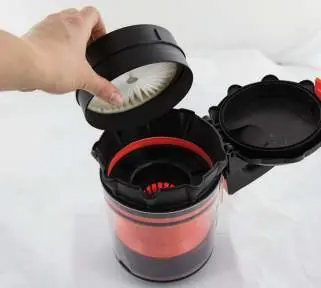
For consistent performance, empty the dust tank and clean the filters regularly. To empty the tank, press the release button, pull the tank out, and unclip the latch over a bin. The HEPA filter and in-tank filter can be washed under running water; ensure they are completely dry before reinstallation. The exhaust filter housing can be removed to wash the foam filter. Never use the vacuum without all filters correctly installed.
Troubleshooting
If the vacuum does not work, check the power connection, fuse, or circuit breaker. If there is a loss of suction, check for a full dust tank or clogged filters. If dust escapes, ensure the tank is installed correctly and filters are properly seated. For any other issues, contact the after-sales support line.
Technical Specifications
The vacuum operates on 220–240V, 50/60Hz with a maximum wattage of 2000W. It features a 3.5L dust tank capacity and a 5m retractable cord. The unit weighs 6.8kg and includes a dual-function floor brush and a crevice tool with a fold-out brush.
Practical help
Common problems
Vacuum will not work
Check if it is plugged in securely, check the fuse or circuit breaker, or ensure the On/Off pedal is pressed.
Loss of suction
Empty the dust tank, remove any obstructions, or clean the filters.
Dust is escaping
Empty the dust tank, ensure it is installed correctly, and check that filters are properly seated.
Tools will not pick up properly
Check that the tools and flexible hose are attached correctly.
Before use
- Unpack and keep original packaging for storage.
- Inspect the power cord for damage.
- Ensure all filters are in place.
- Check that local voltage matches the appliance rating.
- Read the safety instructions thoroughly.
Specs in practice
- Dust tank capacity
- 3.5L
Images and diagrams
- Fig 1: Hose attachment and removal.
- Fig 2: Telescopic tube assembly and length adjustment.
- Fig 3: Control panel (On/Off, speed, cord retraction).
- Fig 9-10: Dust tank removal and emptying.
- Fig 11-12: HEPA filter access and removal.
Model compatibility
- Domestic use only.
- Not suitable for commercial or industrial use.
- Do not use on wet surfaces.
- Do not use to pick up liquids, flammable fluids, or sharp objects.

Manual page author
Emily Carter
User documentation editor
Prepares concise manual descriptions and highlights the most useful setup, operation, and maintenance information for readers.