HVAC / Water Heaters
Instruction Manual for Streamline Heatwave Thermo 2-D Hot Water System
Comprehensive user guide for the Streamline Heatwave Thermo 2-D hot water system. Includes instructions for the SFC6 controller, heater operation, anti-frost mode, dead-end detection calibration, and troubleshooting error codes.
Table of contents
Manual images
Click an image to enlargeQuick Guide
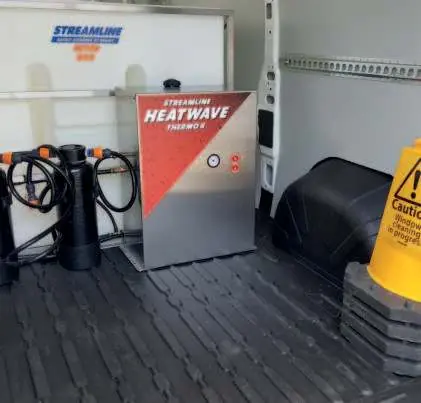
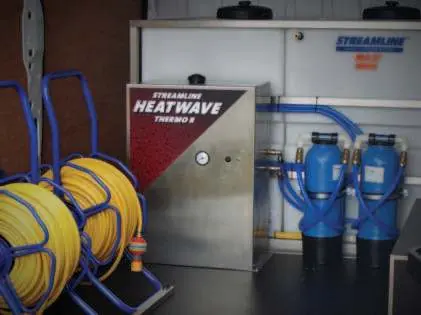
The Streamline Heatwave Thermo 2-D is a hot water system designed for window cleaning. It utilizes diesel fuel and a 12V power source. The system is controlled via the SFC6 Red Thermo Controller. Key operational steps include ensuring the controller is switched on, activating the heater, and monitoring the system for error messages.
Operating the System
To operate the Thermo 2-D, ensure the SFC6 Red Thermo Controller is switched on and the Heater Setting is enabled:
- Activate Heater: Press the up and down arrows together for 2 seconds. When 'HTR' appears on the screen, press the up arrow to switch it on and the left arrow to set.
- Start-up: With the vehicle engine running, turn the Thermo 2-D on using the left-hand switch on the front cover. Allow the heater to warm up for approximately 10 minutes.
- Water Pumps: Switch on the pure water pumps using the arrow on the controller.
- Cold Weather Use: If operating in temperatures below 10°C, it is advised to run the system on a colder setting to prevent damage to glass. This is activated by the right-hand Red Toggle switch on the front cover.
Anti-Frost Mode
The system includes an anti-frost mode to prevent freezing:
- Press the up and down arrows together for 2 seconds to enter the menu.
- Scroll using the left arrow until 'FST' appears.
- Press the up arrow to switch it on and the left arrow to set.
- Set the pump speed (normally between 10-20) and press the left arrow to set.
- If the water temperature drops below 2°C, the pump and heater will automatically activate for 13 minutes. Ensure the hose is attached to the tank return for this to function.
Dead-End Detection
This feature prevents pressure build-up and hose damage by shutting down the pump when flow is stopped (e.g., kinked hose or removed pole).
- Calibration: Press and hold the up and down arrows simultaneously until 'Cal' displays.
- Adjustment: While 'Cal' is displayed, use the up arrow to decrease sensitivity (turns off at higher pressures) or the down arrow to increase sensitivity (turns off at lower pressures).
- Save: Press the Enter button to save the setting.
Troubleshooting Messages
The controller displays specific codes to indicate system status:
- dE: Dead-end detected; pump turned off automatically.
- PS: Pressure switch activated; reduce pressure to restart.
- Bat (Pump working): Battery voltage below 11.5V; recharge as soon as possible.
- Bat (Pump stopped): Battery voltage below 11.0V; pump stopped to protect battery. Recharge immediately or start the engine if a split charge relay is fitted.
Practical help
Common problems
System displays 'dE'
A dead-end has been detected (e.g., kinked hose). The pump has shut down automatically.
System displays 'PS'
Pressure switch has activated. Reduce pressure in the system to allow the pump to restart.
System displays 'Bat' (flashing)
Battery voltage is below 11.0V. The pump has stopped to prevent battery damage. Recharge battery or start engine.
Water not rinsing properly
Ensure the water is creating a sheet on the glass. If it refuses to sheet, rinsing is more difficult. Meticulous rinsing is required on warm days to prevent spotting.
Before use
- Ensure the SFC6 Red Thermo Controller is switched on.
- Verify the vehicle engine is running before turning on the Thermo 2-D.
- Check that the heater setting is enabled in the controller.
- Ensure the hose is attached to the tank return for anti-frost mode.
- Allow the heater to warm up for approximately 10 minutes before use.
Specs in practice
- 12V Power Source
- The electrical requirement for the system operation.
- Anti-Frost Threshold
- The system activates automatically when water temperature drops below 2°C.
Images and diagrams
- The inside diagram identifies the Header tank supply hose, Cold water feed hose, Heater exchanger supply hose, Heater exchanger returns hose, Hot water feed hose, and the Heater Unit.
Model compatibility
- The system is designed for use with the SFC6 Red Thermo Controller.
- If using in temperatures below 10°C, use the colder setting to protect glass.

Manual page author
David Miller
Documentation analyst
Organizes user manual content into clear summaries, with attention to model details, product context, and everyday usability.