Power / Solar Chargers
User Manual for Streetwize 12/24V Car Bluetooth FM Transmitter
Quick guide for the Streetwize 12/24V Car Bluetooth FM Transmitter. Learn how to pair your phone, adjust FM frequencies, use hands-free calling, and charge devices via USB.
Table of contents
Quick guide from the manual
The Streetwize 12/24V Car Bluetooth FM Transmitter allows you to stream music and make hands-free calls through your vehicle's audio system. To begin, plug the device into your vehicle's 12V/24V power socket. Ensure your car radio is tuned to an empty FM frequency, then match the transmitter to the same frequency. Pair your phone via Bluetooth by searching for 'BC-06/Car kit' in your phone's settings.
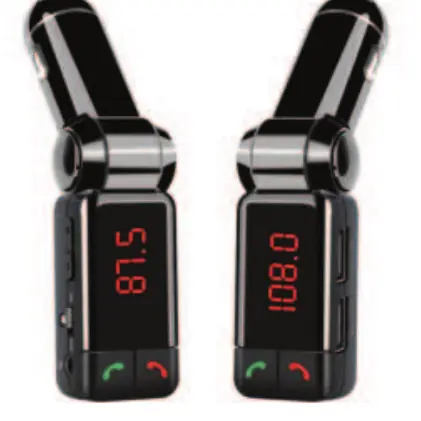
Device Overview
The device features a main control panel with the following components:
- Volume/Frequency Control: Adjusts volume or FM frequency.
- Bluetooth Power Switch: Turns Bluetooth functionality on or off.
- Audio Input: 3.5mm socket for wired connections.
- Answer/Play/Pause Button: Central button for call management and music playback.
- Hang up/Reject/FM Mode: Dedicated button for ending calls or switching to FM mode.
- USB Output: Dual USB ports providing 5V/2.1A total output for charging devices.
Bluetooth Pairing and Operation
- Plug the transmitter into the vehicle's power socket.
- Enable Bluetooth on your mobile phone.
- Search for the device named 'BC-06/Car kit' and select it to pair.
- A prompt sound will confirm successful pairing.
Hands-free Calling
- Answering a call: Press the Answer/Play/Pause button when a call comes in.
- Switching audio: During a call, press the Answer button to toggle between the phone microphone and the transmitter microphone.
- Ending a call: Press the Hang up button.
- Rejecting a call: Press the Hang up button when the call is incoming.
- Callback: Press the Answer/Play/Pause button twice to redial the last number.
Music Playback
Bluetooth Mode: Once paired, music plays automatically through your car audio system. Use the Answer/Play/Pause button to control playback.
Audio Input Mode: If Bluetooth is not available, connect your device using the provided AUX/Line cable. Connect the cable to the external device first, then insert it into the transmitter's audio input socket.
FM Frequency Adjustment
To change the frequency, press and hold the Hang up/Reject button to enter frequency selection mode. The LED display will flash. Use the '+' and '-' keys to adjust the frequency between 87.8MHz and 102.8MHz.
Technical Specifications
- FM Frequency Range: 87.8-102.8MHz
- Working Voltage: DC 9-26V
- USB Output: 5V/2.1A (Total)
- Bluetooth Version: V2.1+EDR
- Effective Distance: 10M
- Working Temperature: -10 to 70 degrees Celsius
Important Usage Notes
- Keep the transmitter volume at 28 or below to avoid sound distortion; adjust the volume primarily through your car audio system.
- For best results, always tune the transmitter to an FM frequency where no radio station is broadcasting.
- The device features power-off memory, which saves your last FM frequency and Bluetooth connection settings.
Practical help
Common problems
Sound distortion or low quality
Keep the transmitter volume at 28 or below. Adjust the volume level using your car's radio volume control instead.
Cannot play music via AUX cable
Ensure the cable is connected to the external audio device first, then plug it into the transmitter's audio input socket.
Interference during FM transmission
Ensure the transmitter is tuned to an FM frequency where no local radio station is broadcasting.
Before use
- Plug the device into the vehicle's 12V/24V power socket.
- Ensure the car radio is tuned to an empty FM frequency.
- Enable Bluetooth on your smartphone.
- Search for 'BC-06/Car kit' in your Bluetooth settings.
- Verify the AUX cable is connected correctly if using wired mode.
Specs in practice
- FM Frequency Range
- 87.8-102.8MHz (The range available for tuning to your car radio).
- Working Voltage
- DC 9-26V (Compatible with standard car power sockets).
Images and diagrams
- The schematic diagram identifies the volume/frequency controls, power switch, audio input, and USB charging ports.
- The LED display window shows the current FM frequency.
Model compatibility
- Compatible with more than 95% of phones on the market.
- Supports A2DP Bluetooth profile for music streaming.
- Bluetooth operation may vary depending on the make and model of the phone.

Manual page author
Michael Turner
Technical manual editor
Reviews PDF manuals for structure, safety notes, and practical product details so readers can find the right information quickly.