Home Appliances / Small Kitchen Appliances
Tchibo Rechargeable Coffee Grinder 115261AB1X1XII
Quick guide for the Tchibo Rechargeable Coffee Grinder 115261AB1X1XII. Learn how to charge, adjust grind settings, operate, clean, and troubleshoot your device.
Table of contents
Manual images
Click an image to enlargeQuick Guide from the Manual
This rechargeable coffee grinder is designed for grinding roasted coffee beans for household use. Key operational points include:
- Charging: Charge fully before first use (max 2 hours).
- Grinding: Max capacity is approx. 22g of beans.
- Maintenance: The motor unit must not come into contact with water.
- Safety: Do not operate if the container is removed. Allow the unit to cool for 60 minutes after 15 minutes of continuous operation.
Product Overview
The device consists of the following main components:
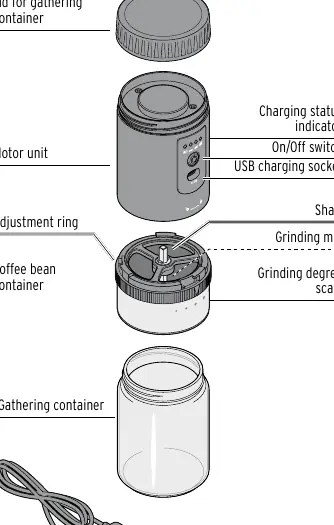
- Lid for gathering container
- Motor unit (with On/Off switch, USB charging socket, and charging status indicator)
- Coffee bean container (with adjustment ring and grinding degree scale)
- Gathering container
- USB charging cable
Charging the Battery
Charge the battery fully before each use if possible.
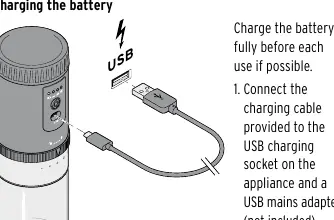
- Connect the provided USB charging cable to the USB charging socket on the appliance.
- Connect the other end to a suitable USB mains adapter (not included).
- The charging status indicator displays the status: LED flashing means charging, LED glowing continuously means fully charged.
- Charging takes a maximum of 2 hours.
Adjusting Grind Settings
The grinder features 5 adjustable settings to suit different brewing methods:
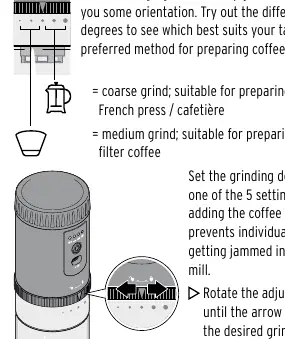
- Coarse grind: Suitable for French press / cafetière.
- Medium grind: Suitable for household filter coffee.
Note: Set the grinding degree before adding coffee beans to prevent jamming. Rotate the adjustment ring until the arrow aligns with the desired setting.
Grinding Coffee Beans
- Turn the motor unit to unlock and remove it from the coffee bean container.
- Add coffee beans (max. 22g).
- Place the motor unit back onto the container, ensuring the lock symbol is positioned above the middle point of the grinding degree scale, then turn to lock.
- Press the On/Off switch to start grinding.
- Press the On/Off switch again to stop the process.
Cleaning and Maintenance
Important: The motor unit must not come into contact with water.
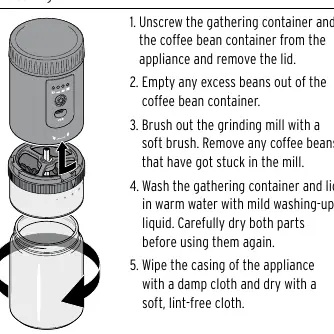
- Unscrew the gathering container and coffee bean container from the appliance.
- Empty any excess beans.
- Brush out the grinding mill with a soft brush.
- Wash the gathering container and lid in warm water with mild washing-up liquid. Dry thoroughly.
- Wipe the casing of the appliance with a damp cloth and dry with a soft, lint-free cloth.
Troubleshooting
- Not working: Check if the battery is empty.
- Grinding process won't start: Ensure the coffee bean container is correctly fitted and locked, and that it is not empty or blocked by foreign bodies.
- Stops unexpectedly: Check for blockages or overheating. If overheated, allow to cool for approx. 1 hour.
- Cannot turn container: Ensure it is fitted correctly and not blocked by beans or foreign bodies.
Technical Specifications
- Model: 612 639
- Battery: Lithium ion, 7.4 V DC, 2x 800 mAh
- Charging time: Approx. 120 minutes
- Operating time: Approx. 30 minutes at medium grind
- Capacity: Approx. 22g of coffee beans
- Ambient temperature: +10 to +40 °C
Manufacturer information
Tchibo GmbH
Practical help
Common problems
Appliance not working
Check if the battery is empty and requires charging.
Grinding process will not start
Ensure the coffee bean container is correctly fitted and locked. Check if the container is empty or if foreign bodies are blocking the mill.
Appliance stops unexpectedly
Check for blockages in the mill. If the unit has overheated from prolonged use, allow it to cool for approximately 1 hour.
Cannot turn the coffee bean container
Verify the container is fitted correctly. Check for coffee beans or foreign bodies blocking the grinding mechanism.
Before use
- Charge the battery fully before the first use.
- Clean the grinder to remove any production residues.
- Check the coffee bean container for foreign bodies before every use.
- Ensure you have a compatible USB mains adapter (DC 5V 1.0A).
Specs in practice
- Charging time
- Maximum 2 hours for a full charge.
- Operating time
- Approximately 30 minutes at a medium grind setting.
- Grind settings
- 5 adjustable levels available for different brewing methods.
Images and diagrams
- The motor unit must be turned to the lock symbol to operate.
- The grinding degree scale is located on the coffee bean container.
Model compatibility
- Only grind roasted coffee beans.
- Use a USB mains adapter that complies with the technical specifications (DC 5V 1.0A, protection class II).

Manual page author
Michael Turner
Technical manual editor
Reviews PDF manuals for structure, safety notes, and practical product details so readers can find the right information quickly.