Lighting / Outdoor Lighting
User Manual for Tecnolite 1SOLLED29DC LED Solar Floor Lamp
Quick guide for the Tecnolite 1SOLLED29DC LED Solar Floor Lamp. Includes installation steps, remote control usage, charging requirements, and maintenance tips.
Quick answers from the manual
Quick answer
- The 1SOLLED29DC is a solar floor lamp. It requires a 24-hour initial charge before use and must be installed in a hole at least 170mm deep with proper drainage. p. 1
Key actions
- Charge for 24 hours before first use. p. 1
- Install in a hole with a minimum diameter of 170mm. p. 1
First start
- Charge the unit for 24 hours in direct sunlight before the first use. p. 1
Maintenance and reset
- Clean the lamp and internal parts periodically with a clean rag. p. 1
Technical specifications
| Parameter | Value | Meaning | Pages |
|---|---|---|---|
| Charging Time | 6-8 hours | Continuous sunlight required | p. 1 |
| Discharge Time (High) | 6 hours | Battery life at high intensity | p. 1 |
| Discharge Time (Low) | 10 hours | Battery life at low intensity | p. 1 |
Where to find it in the PDF
- Installation and Operation p. 1
- Warranty Information p. 2
Table of contents
Quick guide from the manual
The Tecnolite 1SOLLED29DC is a solar-powered floor lamp designed for outdoor use. Important: You must charge the unit completely for 24 hours before its first use to ensure optimal battery performance. The lamp requires direct sunlight for charging and should be installed in a location free from obstructions like trees or buildings.
Installation
Proper installation is required to ensure the longevity of the product:
- Dig a hole with a minimum diameter of 170mm.
- Place filter material at the base of the hole to ensure proper drainage.
- Insert the lamp into the hole.
- Ensure the top of the lamp is level with the ground surface (soil or garden).
- Do not install in areas where water may pool.
Operation
The lamp is controlled via the included remote control with an operating range of 3-5 meters. Available settings include:
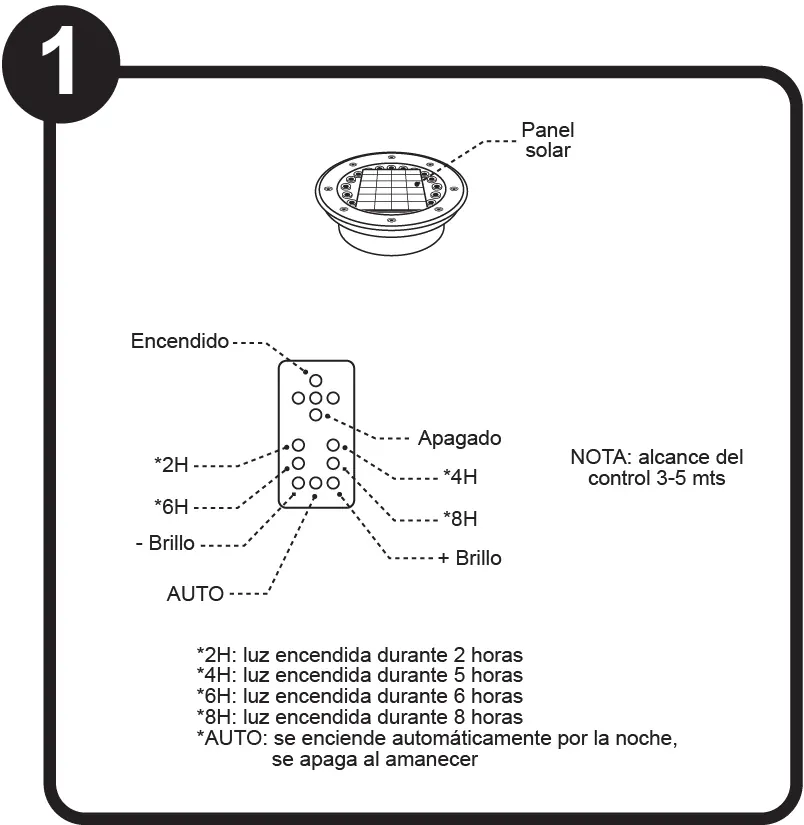
- Timer modes: 2H, 4H, 6H, 8H (light stays on for the selected duration).
- Brightness control: Increase (+) or decrease (-) brightness.
- AUTO mode: The light turns on automatically at dusk and turns off at dawn.
- On/Off: Manual power control.
Charging
The solar panel requires 6-8 hours of continuous sunlight to achieve a full charge. Discharge times depend on the intensity setting:
- High intensity: Approximately 6 hours.
- Low intensity: Approximately 10 hours.
Maintenance
To maintain the performance of your solar lamp:
- Clean the lamp and its internal parts periodically using a clean rag.
- Ensure the solar panel remains free of dirt and debris.
- Handle the lamp with care to avoid burns if the unit has been exposed to direct sunlight for extended periods.
Safety
- Keep a minimum distance of 0.50m from any combustible material.
- Disconnect the power source before performing any maintenance work.
- This appliance is not intended for use by individuals (including children) with reduced physical, sensory, or mental capabilities unless supervised.
- Do not allow children to use the lamp as a toy.
Manufacturer information
Tecnolite
Practical help
Common problems
Light does not turn on at night
Ensure the unit was charged for 24 hours before first use and that the solar panel is not shaded by trees or structures.
Remote control not responding
Ensure you are within the 3-5 meter operating range of the lamp.
Before use
- Charge the unit for 24 hours before first use.
- Ensure the installation site has a minimum 170mm hole.
- Prepare filter material for the base of the hole.
- Verify the top of the lamp is level with the ground.
- Check that the area is free from combustible materials (min 0.50m distance).
Specs in practice
- Charging time
- 6-8 hours of continuous sunlight required for full charge.
Images and diagrams
- Remote control functions including timer settings and brightness control.
- Installation hole dimensions and base preparation.
- Charging requirements and sunlight exposure.
Model compatibility
- Designed for outdoor use.
- Requires direct sunlight for charging.

Manual page author
Emily Carter
User documentation editor
Prepares concise manual descriptions and highlights the most useful setup, operation, and maintenance information for readers.