Lighting / Fixtures
User Manual for Tecnolite 10SOLLED34VCD65N Solar LED Lamp
Quick guide for the Tecnolite 10SOLLED34VCD65N Solar LED Lamp. Learn how to install, charge, operate, and maintain your solar light with this easy-to-follow manual.
Table of contents
Quick Guide
Before using your Tecnolite 10SOLLED34VCD65N for the first time, it is essential to charge the unit completely for 24 hours. Ensure the solar panel is placed in an area with clear access to sunlight, avoiding obstructions like trees or buildings. The recommended installation height is a maximum of 5 meters.
Installation
The device can be mounted on a wall using the provided hardware. Follow these steps:
- Drill two holes in the desired location.
- Insert the provided anchors (A-02).
- Secure the lamp or solar panel using the screws (A-01) and washers (A-03).
- Ensure the unit is securely fastened to the wall.
Operation
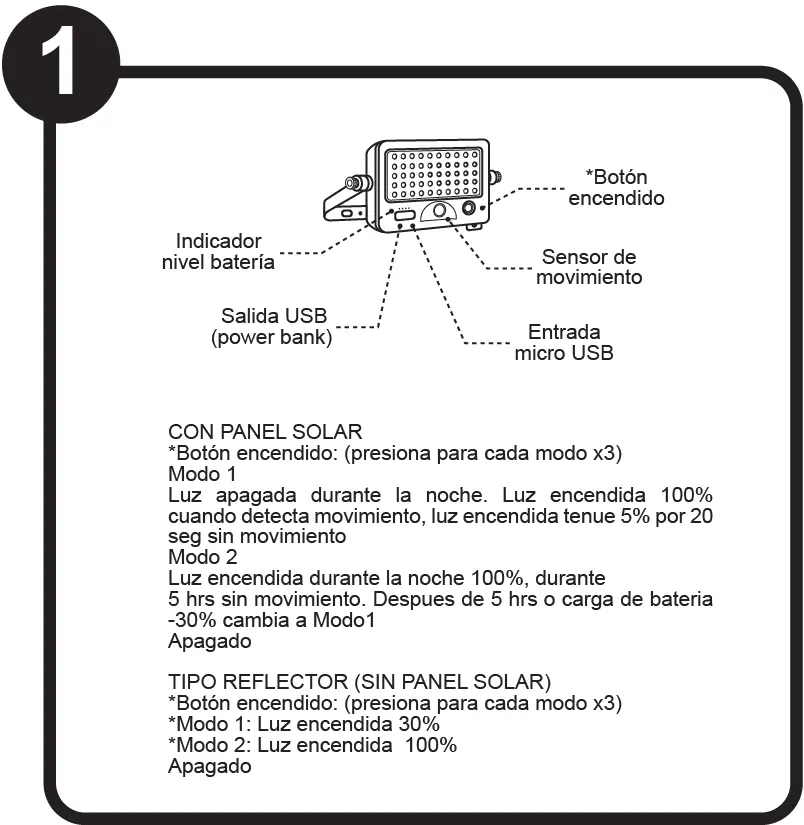
The device features different operating modes depending on the configuration:
With Solar Panel
- Mode 1: Light is off at night. It turns on at 100% brightness when motion is detected, and dims to 5% after 20 seconds without motion.
- Mode 2: Light stays on at 100% brightness during the night for 5 hours without motion. After 5 hours or when the battery drops below 30%, it switches to Mode 1.
Reflector Type (No Solar Panel)
- Mode 1: Light on at 30% brightness.
- Mode 2: Light on at 100% brightness.
Charging
The device can be charged via the solar panel or via USB. For USB charging, use a 5V adapter (not included). Connect the cable to the micro USB input on the device. Always ensure the device is fully charged for 24 hours before the first use.
Maintenance
To ensure optimal performance, keep the solar panel clean and free of debris. Disconnect the power source before performing any maintenance. Clean the luminaire and its internal parts with a dry rag. Do not use harsh chemicals or abrasive materials.
Technical Specifications
- Power: 10W LED
- Protection: IP65 (Dust tight and protected against water jets), IK06 (Protection against external mechanical impacts)
- Battery: Rechargeable Lithium-Ion
- Cable Length (Solar): 3 meters
Manufacturer information
Tecnolite
Practical help
Common problems
Light does not turn on
Ensure the battery is fully charged (requires 24 hours of initial charging) and that the solar panel is not obstructed.
Motion sensor not triggering
Verify the installation height does not exceed 5 meters and that the sensor path is clear.
Before use
- Charge the unit completely for 24 hours before first use.
- Ensure the installation surface is suitable for drilling.
- Verify the solar panel has clear access to sunlight.
- Check that you have all parts: screws (A-01), anchors (A-02), and washers (A-03).
Images and diagrams
- Step 1: Overview of the device buttons, sensor, and ports.
- Step 2: Mounting instructions showing the use of anchors and screws.
- Step 3: Connecting the solar panel to the lamp.
- Step 4: Charging and placement advice, including height and angle limits.
- Step 5: USB charging instructions.
Model compatibility
- Requires a 5V adapter (not included) if charging via USB.
- Solar panel cable length is 3 meters.

Manual page author
Michael Turner
Technical manual editor
Reviews PDF manuals for structure, safety notes, and practical product details so readers can find the right information quickly.