Lighting / Fixtures
User Manual for Tecnolite 10SOLLED32VCD65N Outdoor Solar LED Wall Lamp
Quick guide for the Tecnolite 10SOLLED32VCD65N outdoor solar LED wall lamp. Includes installation steps, operating modes, maintenance, and safety instructions.
Table of contents
Quick Guide
Before using the lamp for the first time, it must be charged for 24 hours. The recommended installation height is a maximum of 4 meters. Ensure the solar panel is placed where it can receive direct sunlight, avoiding obstructions like trees or structures that may block the light.
Installation
The package includes the lamp, two screws (A-01), two wall plugs (A-02), and a tool (A-03). Use a drill to create holes, insert the wall plugs, and secure the lamp using the provided screws. Ensure the unit is installed at a minimum distance of 0.50 meters from combustible materials.
Operating Modes
The lamp features a button to cycle through three operating modes:
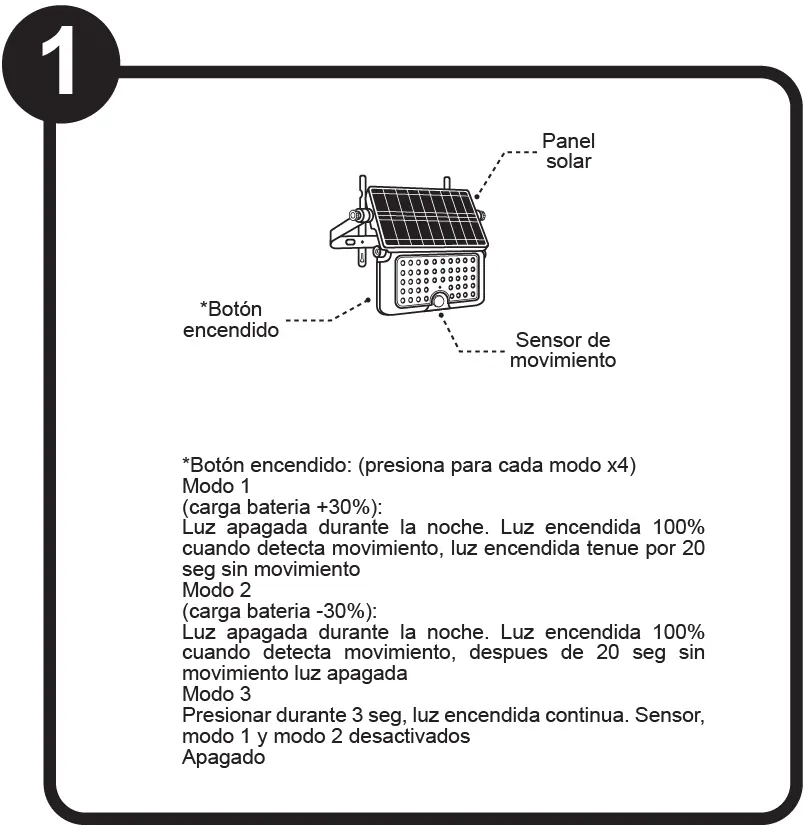
- Mode 1: Light is off at night. Turns on at 100% brightness when motion is detected, then dims after 20 seconds without motion.
- Mode 2: Light is off at night. Turns on at 100% brightness when motion is detected, then turns off completely after 20 seconds without motion.
- Mode 3: Press the button for 3 seconds to activate constant light mode. The motion sensor is deactivated in this mode.
To turn the unit off, cycle through the modes until the light is deactivated.
Maintenance and Safety
Disconnect the power source before performing any maintenance. Clean the lamp and its internal parts with a dry cloth. Do not use the appliance if you lack experience or knowledge unless supervised. Keep out of reach of children. The device is rated IP65 (dust tight and protected against water jets) and IK06 (protected against 1 Joule impact).
Manufacturer information
Tecnolite
Practical help
Common problems
Light does not turn on
Ensure the unit was charged for 24 hours before first use and is not obstructed by trees or shadows.
Light turns off too quickly
Check the selected mode; Mode 1 and 2 rely on motion detection and will turn off or dim after 20 seconds of inactivity.
Before use
- Charge the unit for 24 hours before first use
- Ensure installation height is maximum 4 meters
- Verify the solar panel is not obstructed by trees or structures
- Wear protective gear (gloves, glasses) during installation
- Ensure a minimum distance of 0.50 meters from combustible materials
Images and diagrams
- Step 1: Solar panel and motion sensor identification
- Step 2: Drilling and mounting using provided anchors and screws
- Step 3: Adjusting the angle of the lamp
- Step 4: Charging and placement guidelines
Model compatibility
- Designed for outdoor use
- Not intended for use by persons with reduced physical, sensory, or mental capabilities without supervision

Manual page author
Emily Carter
User documentation editor
Prepares concise manual descriptions and highlights the most useful setup, operation, and maintenance information for readers.