Lighting / LED Lamps
Tecnolite 1S14LEDF27DC360 LED Filament Bulb User Manual
Quick guide for the Tecnolite 1S14LEDF27DC360 LED filament bulb. Includes installation steps, technical specifications, safety warnings, and maintenance tips.
Quick answers from the manual
Quick answer
- The Tecnolite 1S14LEDF27DC360 is a 12V, 1W LED filament bulb. Installation requires disconnecting the power supply and using gloves or a clean rag to handle the bulb. Ensure a minimum distance of 0.50m from flammable materials. p. 1
Key actions
- Install the bulb p. 1
- Clean the bulb p. 1
First start
- Disconnect power, use protective gloves/rag, and screw in the bulb. p. 1
Maintenance and reset
- Clean the lamp and its parts with a dry rag and check connections periodically. p. 1
Technical specifications
| Parameter | Value | Meaning | Pages |
|---|---|---|---|
| Voltage | 12V | Requires 12V power supply | p. 1 |
| Power | 1W | Power consumption | p. 1 |
Where to find it in the PDF
- Installation and Specifications p. 1
- Warranty Information p. 2
Table of contents
Quick guide from the manual
This document provides essential instructions for the installation and maintenance of the Tecnolite 1S14LEDF27DC360 LED filament bulb. Please ensure you follow all safety precautions, particularly regarding the power supply and handling of the bulb.
Installation
Before beginning installation, ensure the power supply is disconnected. Use gloves or a clean rag to handle the bulb to prevent burns or damage. The bulb must be installed at a minimum distance of 0.50m from any flammable material.
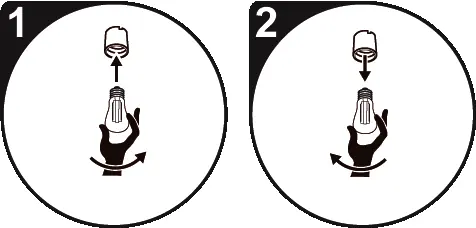
- Disconnect the power supply.
- Screw the bulb into the socket carefully using a clean rag or gloves.
Safety Warnings
- Power Supply: Always disconnect the power source before installation or maintenance.
- Handling: The bulb and other parts may become hot during operation. Use gloves or a clean rag to handle the bulb.
- Flammable Materials: Maintain a minimum distance of 0.50m from flammable materials.
- Usage: This product is not intended for use by individuals (including children) with reduced physical, sensory, or mental capabilities, or lack of experience and knowledge, unless supervised. Children should not use the appliance as a toy.
Maintenance
To maintain the bulb, disconnect the power source and clean the bulb and its parts with a dry rag. Check the connections periodically.
Technical Specifications
- Voltage: 12V (Requires a 12V power supply, not included).
- Power: 1W.
Manufacturer information
Tecnolite
Practical help
Common problems
Bulb does not light up
Ensure the power supply is connected and the bulb is properly screwed into the socket.
Risk of burns
Always use gloves or a clean rag when handling the bulb, as it may be hot.
Before use
- Disconnect the power supply before starting installation.
- Ensure you have a 12V power supply (not included).
- Prepare gloves or a clean rag for handling the bulb.
- Verify the installation area is at least 0.50m away from flammable materials.
Images and diagrams
- Step 1: Shows the bulb being screwed into the socket while using a protective cloth/glove.
- Step 2: Shows the bulb being removed or adjusted, again emphasizing the use of protection.
Model compatibility
- Requires a 12V power supply (not included).

Manual page author
David Miller
Documentation analyst
Organizes user manual content into clear summaries, with attention to model details, product context, and everyday usability.