Industrial / Data Loggers
User Manual for Testo 104-IR Infrared and Penetration Thermometer
Quick guide for the Testo 104-IR thermometer. Learn how to use IR and contact measurement modes, change settings, replace batteries, and maintain your device.
Table of contents
Manual images
Click an image to enlargeQuick Start Guide
The Testo 104-IR is a dual-purpose thermometer designed for food safety applications. It features both an infrared (IR) sensor for non-contact surface temperature measurement and a fold-out probe for core temperature (contact) measurement. To begin, insert two AAA batteries into the compartment on the back. Folding out the probe automatically switches the device on in contact mode. Pressing the ON button switches it on in IR mode.
Product Description
The device consists of an infrared sensor, a 2-point laser for targeting, a display, and control keys. The fold-out probe is located at the bottom. Control keys include ON, OFF, IR measurement trigger, contact measurement switch, and a HOLD/MIN/MAX button for managing readings.
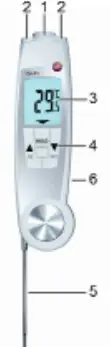
Commissioning
To install or replace batteries: use a slotted screwdriver to loosen the screw on the battery compartment on the back of the device. Open the compartment, insert two AAA batteries observing correct polarity, close the compartment, and tighten the screw.
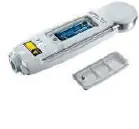
Operation
Switching On/Off: Fold out the probe to switch on in contact mode. Press the ON button to switch on in IR mode. Press and hold the OFF button to switch off. The device has an auto-off feature: 10 minutes when the probe is folded out, or 1 minute when folded up.
IR Measurement: Ensure the device is in IR mode. Press and hold the IR button to start. Use the laser points to target the object. Release the button to end the measurement. The last value and min/max values are held on the display.
Contact Measurement: Ensure the device is in contact mode. Position the probe in the measurement object and press the contact measurement button. Press HOLD/MIN/MAX to end the measurement.
Settings
To enter settings mode, ensure the device is switched off. Press and hold the up and down arrow buttons until AutoHold or Hold flashes. You can toggle the AutoHold function, change the temperature unit (Celsius, Fahrenheit, Réaumur), and switch the laser on or off using the arrow keys.
Maintenance
Clean the housing and probe using weak, neutral household cleaning agents. Do not use aggressive solvents. The housing and probe are suitable for alcohol-based spray disinfection. Clean the lens carefully with a cotton bud dipped in water or medical alcohol.
Troubleshooting
If the battery icon lights up, replace the batteries. If the display shows '---' during IR or contact measurement, the measured value is outside the permissible range. If the device switches off automatically, it is a normal power-saving feature; simply switch it on again.
Measurement Tips
IR Measurement: This is an optical surface measurement. Keep the lens clean and free of fog. Ensure the measuring path is free of dust, steam, or gases. For vacuum-packed food, avoid measuring air pockets. If values are critical, verify with the contact probe.
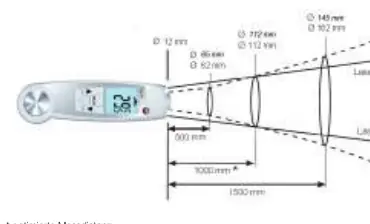
Contact Measurement: Always observe the minimum penetration depth, which is 10 times the probe diameter. Avoid using the probe in aggressive acids or alkalis.
Manufacturer information
Testo SE & Co. KGaA
Practical help
Common problems
Battery icon lights up
Batteries are low; replace them.
IR measurement shows '---'
The measured value is outside the permissible measuring range.
Contact measurement shows '---'
The measured value is outside the permissible measuring range.
Instrument switches off automatically
This is normal behavior: 10 minutes in contact mode or 1 minute in IR mode after switching on.
Before use
- Insert 2x AAA batteries.
- Ensure the lens is clean and free of fog for IR measurements.
- Verify the probe is clean before contact measurement.
- Check the emission level setting (default is 0.95, suitable for food).
Specs in practice
- Protection class
- IP65 (dust-tight and water-resistant).
- Response time t99
- 10 seconds in moving liquid.
Images and diagrams
- Folding out the probe automatically switches the instrument on.
- Laser points mark the edges of the IR measuring range.
Model compatibility
- Not for use in potentially explosive areas.
- Not for medical diagnostic measurements.

Manual page author
Emily Carter
User documentation editor
Prepares concise manual descriptions and highlights the most useful setup, operation, and maintenance information for readers.