Home / Weather Stations & Thermometers
User Manual for Acurite 00887 Digital Thermometer
Quick guide for the Acurite 00887 Digital Thermometer. Learn how to install batteries, set the clock, toggle temperature units, and monitor min/max temperature and humidity.
Table of contents
Quick Guide
The Acurite 00887 Digital Thermometer is designed to monitor indoor and outdoor temperatures along with humidity. This guide provides essential instructions for setup, operation, and maintenance to ensure accurate readings.
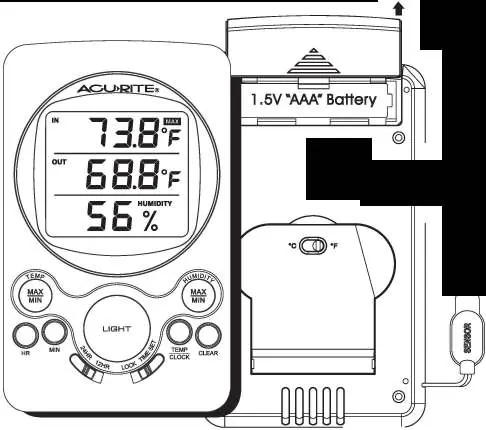
Battery Installation
To power the device, follow these steps:
- Slide the battery door open on the back of the unit.
- Insert one "AAA" size alkaline battery.
- Ensure the battery polarity (+/-) matches the diagram inside the compartment.
- Slide the battery door closed.
Setting the Clock
To set the correct time:
- Slide the "TIME SET LOCK" switch on the front of the unit to the "TIME SET" position.
- Press the "HR" button to set the correct hour.
- Press the "MIN" button to set the correct minute.
- Slide the switch back to the "LOCK" position.
Display Settings
Temperature/Clock Display: Press the "TEMP/CLOCK" button to toggle the main display between the clock and the indoor thermometer.
Fahrenheit/Celsius: Use the slide switch labeled "°F/°C" on the back of the unit to select your preferred temperature scale.
Back-Light: Press the "LIGHT" button to illuminate the display. Note that frequent use of the back-light will shorten battery life.
Monitoring Temperature and Humidity
The device tracks minimum and maximum values for both temperature and humidity.
- Temperature Min/Max: Press the "TEMP MIN/MAX" button once to view indoor min/max. Press it twice to view outdoor min/max.
- Humidity Min/Max: Press the "HUMIDITY MIN/MAX" button once to view maximum humidity. Press it twice to view minimum humidity.
- Resetting Values: Press the "CLEAR" button while the desired min/max value is displayed to reset the recorded data.
Specifications
The device operates within the following ranges:
- Indoor Temperature: -4°F to 122°F (-20°C to 50°C)
- Outdoor Temperature: -58°F to 158°F (-50°C to 70°C)
- Humidity: 20% to 90%
If the temperature or humidity exceeds these ranges, the display will show "LO" or "HI".
Safety and Battery Disposal
Follow these safety guidelines:
- Dispose of old or defective batteries in an environmentally safe way and in accordance with local laws.
- Do not incinerate batteries, as they may explode or leak.
- Do not mix old and new batteries or different types (alkaline/standard).
- Do not use rechargeable batteries.
- Promptly remove dead batteries from the device.
Manufacturer information
AcuRite
Practical help
Common problems
Display shows 'LO' or 'HI'
The temperature or humidity has reached a level outside the measurable range of the device.
Back-light is not working or dim
Frequent use of the back-light shortens battery life; replace the battery with a fresh AAA alkaline battery.
Before use
- Insert one AAA alkaline battery.
- Verify battery polarity (+/-) matches the compartment diagram.
- Set the 'TIME SET LOCK' switch to 'TIME SET' to adjust the clock.
- Ensure the 'TIME SET LOCK' switch is returned to 'LOCK' after setting the time.
Specs in practice
- Indoor Temperature Range
- -4°F to 122°F (-20°C to 50°C)
- Outdoor Temperature Range
- -58°F to 158°F (-50°C to 70°C)
- Humidity Range
- 20% to 90%
Images and diagrams
- The front panel contains the display, 'TEMP/CLOCK' toggle, 'TEMP MIN/MAX' button, 'HUMIDITY MIN/MAX' button, 'LIGHT' button, 'HR' and 'MIN' buttons, and the 'TIME SET LOCK' switch.
- The rear panel contains the battery compartment and the '°F/°C' selection switch.
Model compatibility
- Use only AAA alkaline batteries.
- Do not use rechargeable batteries.

Manual page author
Michael Turner
Technical manual editor
Reviews PDF manuals for structure, safety notes, and practical product details so readers can find the right information quickly.