General / Other Manuals
Thrustmaster T248R Racing Wheel and Pedal Set User Guide
Quick start guide for the Thrustmaster T248R racing wheel. Learn how to connect to PS5, PS4, and PC, select compatibility modes, install drivers, and understand self-calibration.
Table of contents
Quick guide from the manual
The Thrustmaster T248R is a racing wheel compatible with PlayStation 5, PlayStation 4, and PC (Windows 10/11). The device requires specific connection steps and compatibility mode selection to function correctly. Upon startup, the wheel performs an automatic self-calibration; ensure the wheel is not obstructed during this process.
Device Setup and Connection
Follow these steps to connect your racing wheel:
- Power Connection: Connect the power cable to a suitable wall outlet.
- Pedal Connection: Connect the pedal set cable to the designated port on the racing wheel base.
- Console/PC Connection: Connect the USB cable from the racing wheel to your PlayStation console or PC.
- Startup: Power on your console or PC. The wheel will automatically perform a self-calibration sequence.
Compatibility Modes
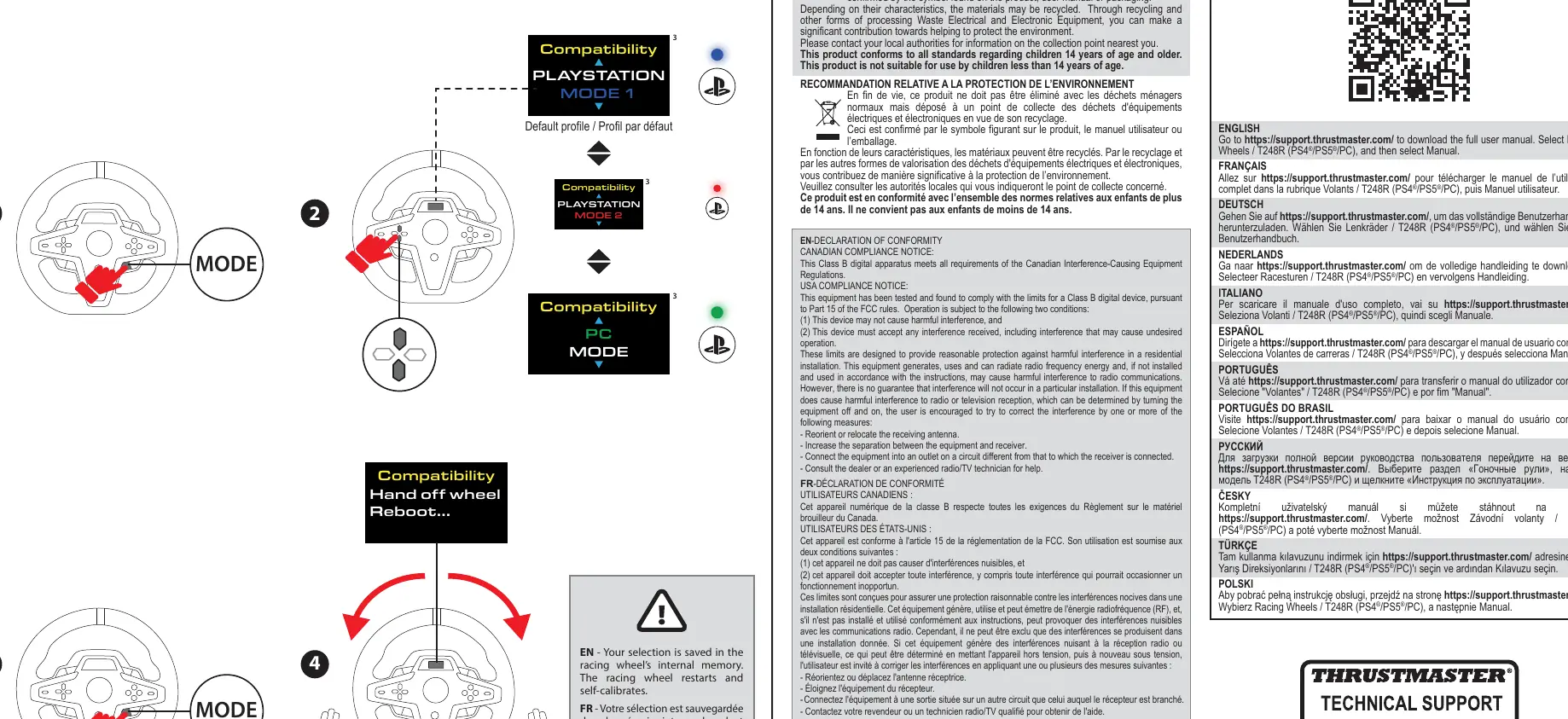
The T248R features different compatibility modes to ensure proper operation with your platform. You must select the correct mode using the MODE button on the wheel:
- PlayStation 5 / PlayStation 4: Ensure the wheel is set to the appropriate PlayStation mode.
- PC: Select the PC compatibility mode.
- Switching Modes: If you need to change the mode, use the MODE button. The wheel will restart and perform a self-calibration after the selection is saved in the internal memory.
PC Driver Installation
For PC users, it is essential to install the necessary software to ensure full functionality:
- Visit the official support website at https://support.thrustmaster.com/product/T248r.
- Download and install the My Thrustmaster Panel software.
- This software allows you to manage drivers and settings for the T248R.
Safety and Environmental Information
Please observe the following safety guidelines:
- Age Restriction: This product is not suitable for children under 14 years of age.
- Chemical Warning: This product can expose you to chemicals including Bisphenol A (BPA), which is known to the State of California to cause birth defects or other reproductive harm.
- Disposal: Do not dispose of this product with standard household waste. Use a designated collection point for Waste Electrical and Electronic Equipment (WEEE) for recycling.
Official resources from the manual
Practical help
Common problems
Wheel not detected or not functioning correctly on PC
Ensure the correct PC compatibility mode is selected and that the latest drivers are installed via 'My Thrustmaster Panel'.
Wheel feels unresponsive or behaves strangely during startup
The wheel performs a self-calibration on startup. Do not touch the wheel during this process to avoid calibration errors.
Before use
- Connect the power cable to a wall outlet.
- Connect the pedal set to the racing wheel base.
- Connect the USB cable to your console or PC.
- Select the correct compatibility mode (PS5, PS4, or PC) using the MODE button.
- Download and install drivers from the official support website for PC usage.
Specs in practice
- Compatibility
- Supports PlayStation 5, PlayStation 4, and PC (Windows 10/11).
- Self-calibration
- Automatic process upon startup; the wheel rotates to define its center point.
Images and diagrams
- The connection diagram illustrates the correct order: Power cable to wall, pedal cable to base, and USB cable to the console/PC.
- The mode selection diagram shows how to toggle between PlayStation and PC modes using the MODE button.
Model compatibility
- PC compatibility is not tested nor endorsed by Sony Interactive Entertainment.
- The plug type may vary depending on the country of use.

Manual page author
David Miller
Documentation analyst
Organizes user manual content into clear summaries, with attention to model details, product context, and everyday usability.