Wearables / Watches
Timex 11D Digital Watch User Manual
Quick guide for the Timex 11D digital watch. Learn how to set the time and date, adjust the bracelet, and understand water resistance ratings.
Table of contents
Manual images
Click an image to enlargeQuick Guide from the Manual
This manual provides instructions for the Timex 11D digital watch. The watch features time, date, and seconds display. Please read the following instructions carefully to ensure proper operation and maintenance.
Watch Operation
The watch is operated using the MODE (A) button:
- Press MODE (A) to switch from Time to Date.
- Press MODE (A) again to switch from Date to Seconds.
- Press MODE (A) again to return from Seconds to Time.
Setting Time and Date
To set the watch, use the RESET (B) and MODE (A) buttons:
- Press RESET (B) twice to enter setting mode. The month will be displayed.
- Press MODE (A) to advance to the correct month.
- Press RESET (B) to display the day of the month.
- Press MODE (A) to advance to the correct day.
- Press RESET (B) to display the hour.
- Press MODE (A) to advance to the correct hour (Note: A=AM, P=PM).
- Press RESET (B) to display the minutes.
- Press MODE (A) to advance to the correct minutes.
- Press RESET (B) to exit the setting mode.
Water and Shock Resistance
Warning: To maintain water resistance, do not press any buttons while underwater.
- The watch is water-resistant only if the crystal, crown, and case remain intact.
- The watch is not designed for diving.
- Rinse the watch with fresh water after exposure to salt water.
- Shock resistance is indicated on the watch face or caseback. Avoid damaging the crystal.
Bracelet Adjustment
Sliding Clasp Bracelet
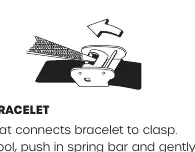
- Open the locking plate.
- Move the clasp to the desired length.
- Exert pressure while holding the locking plate and slide the clasp back and forth until it engages in the grooves on the underside of the bracelet.
- Press the locking plate down until it snaps closed.
Foldover Clasp Bracelet
- Locate the spring bar connecting the bracelet to the clasp.
- Use a pointed tool to push in the spring bar and gently twist the bracelet to disengage.
- Determine wrist size and insert the spring bar into the correct bottom hole.
- Push down on the spring bar, align with the top hole, and release to lock.
Bracelet Link Removal
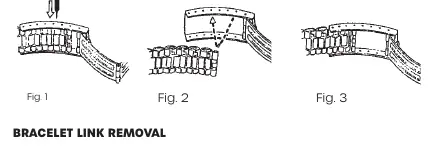
- Place the bracelet upright and insert a pointed tool into the link opening.
- Push the pin forcefully in the direction of the arrow until the link detaches.
- Repeat until the desired number of links are removed.
- To re-assemble, rejoin parts, push the pin back in the opposite direction of the arrow, and press until flush.
Manufacturer information
Timex Group USA, Inc.
Practical help
Common problems
Watch is not water-resistant
Ensure the crystal, crown, and case are intact. Do not press any buttons while the watch is underwater.
Bracelet is too loose
Adjust the sliding clasp or remove links using a pointed tool as described in the bracelet adjustment section.
Before use
- Check if the watch is water-resistant (marked on caseback)
- Ensure the crystal and case are not damaged
- Adjust the bracelet to fit your wrist size before wearing
- Rinse with fresh water after salt water exposure
Images and diagrams
- Bracelet link removal requires pushing the pin in the direction of the arrow using a pointed tool.
- Sliding clasp adjustment involves engaging the clasp into the grooves on the underside of the bracelet.
Model compatibility
- Not a diver watch; do not use for diving.
- Bracelet adjustment instructions apply to all watch models with these clasp types.

Manual page author
Michael Turner
Technical manual editor
Reviews PDF manuals for structure, safety notes, and practical product details so readers can find the right information quickly.