Power / Batteries Chargers
User Guide for Timex Ironman Transit+ Watch
Quick start guide for the Timex Ironman Transit+ watch, covering button functions, heart rate measurement, workout modes, activity tracking, and settings.
Table of contents
Quick guide from the manual
The Timex Ironman Transit+ watch is designed for fitness tracking, including heart rate monitoring, workout recording, and daily activity tracking. If the watch is in Sleep Mode upon arrival, press and hold any button for 2-3 seconds to wake it up. The watch uses a 3V CR2032 battery.
Key Functions
The watch features four side buttons (A, B, C, D) and a dedicated metal button (E) at the 6 o'clock position for heart rate measurement.
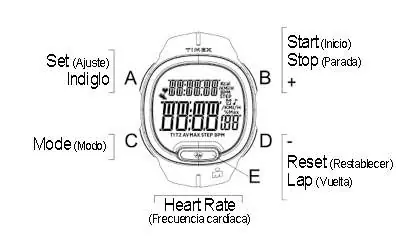
- Button A: Set / Indiglo backlight.
- Button B: Start / Stop / Increase setting digits / Recall data.
- Button C: Mode selection / Next setting field.
- Button D: Reset / Lap / Decrease setting digits / Recall data.
- Button E: Heart rate measurement.
Press button C to cycle through modes: Time, Workout, Workout Data, Chrono, Timer, and Alarm.
Heart Rate Measurement
To measure heart rate, wear the watch snugly on your wrist. In any mode (except setting mode), press and hold button E for 8-10 seconds. The heart rate icon will flash during measurement. Ensure the case back is in good contact with your skin. Do not measure heart rate underwater.
Workout and Activity Tracking
The watch tracks steps, distance, and calories. In Time mode, press button B to view daily activity data. Press button D to recall data from the previous 7 days. In Workout mode, use button B to start and stop measurements. Workout data can be reviewed in the Workout Data mode.
Timer and Alarm
The watch includes a Loop Timer (up to 6 segments) and two daily alarms. In Timer mode, press button C to enter settings to configure segments and countdown times. In Alarm mode, use button D to select Alarm-1, Alarm-2, or the hourly chime, and button B to toggle them on or off.
Maintenance
Clean the back of the watch periodically with a few drops of water and wipe dry to remove oils. Avoid prolonged exposure to salt water and direct sunlight to prevent discoloration. Replace the battery only with a 3V CR2032 battery.
Manufacturer information
Timex Group USA, Inc.
Practical help
Common problems
Watch does not respond
The watch may be in Sleep Mode. Press and hold any button for 2-3 seconds to wake it up.
Heart rate measurement fails or is inaccurate
Ensure the watch is worn tightly, the case back is in contact with skin, and the sensor (button E) is pressed directly. Moistening the skin or cleaning the case back may help.
Display is hard to read in the dark
Press button A in any mode to activate the INDIGLO backlight for 3 seconds.
Before use
- Wake the watch from Sleep Mode by holding any button for 2-3 seconds.
- Ensure the watch is worn snugly on the wrist for accurate heart rate readings.
- Check that the battery is a 3V CR2032.
- Set the time and personal data (age, weight, etc.) in the Setting mode.
Images and diagrams
- Buttons A, B, C, D are located on the sides of the watch case.
- Button E is a metal button located at the 6 o'clock position, used exclusively for heart rate measurement.
Model compatibility
- Heart rate measurement may not work correctly if you have an irregular heartbeat.
- Extended warranty is available in the U.S. only.

Manual page author
Emily Carter
User documentation editor
Prepares concise manual descriptions and highlights the most useful setup, operation, and maintenance information for readers.