Wearables / Watches
User Manual for Timex Digital Ana-Digi 03X Watch
Quick guide for the Timex Digital Ana-Digi 03X watch. Learn how to set the time, use the stopwatch, alarm, dual time, and understand water resistance and battery maintenance.
Table of contents
Quick guide from the manual
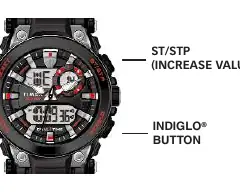
This guide covers the operation of the Timex Digital Ana-Digi 03X watch. The watch features an analog display controlled by a crown and a digital display controlled by four buttons: RESET, ST/STP, MODE, and INDIGLO.
Setting Time and Date
To set the time and date:
- Analog Time: Remove the plastic guard from under the crown. Pull the crown out fully, turn to the correct time, and push it back in.
- Digital Time/Date: In Time of Day mode, press and hold RESET until the watch beeps and seconds flash.
- Use ST/STP to set seconds to zero.
- Press MODE to cycle through settings (Hours, Minutes, Year, Month, Date).
- Use ST/STP to advance the selected value. Press and hold for rapid increment.
- Press RESET to exit the setting mode.
- Press RESET in Time mode to toggle between 12-hour (A/P) and 24-hour formats.
Alarm Settings
- Press MODE until "AL" appears.
- Press ST/STP to toggle the Alarm (s) and Hourly Chime ( ) on or off.
- Press RESET to enter alarm setting mode. The hour digit will flash.
- Use ST/STP to adjust the hour.
- Press MODE to switch to minutes and use ST/STP to adjust.
- Press RESET to save and exit.
- When the alarm sounds, press any button to silence it.
Stopwatch
- Press MODE until "SP" appears.
- Press ST/STP to start timing.
- Press RESET to record a split time while the stopwatch continues running in the background.
- Press RESET again to release the display and show the current running time.
- Press ST/STP to pause, and RESET to reset to zero.
Dual Time
- Press MODE until "T2" appears.
- Press RESET to begin setting.
- Use ST/STP to adjust the hours.
- Press MODE to adjust minutes. You can set the same minutes as T1 or a 30-minute offset.
- Press RESET to exit.
INDIGLO Night-Light
Press the INDIGLO button to illuminate the watch display for 2-3 seconds. This uses electroluminescent technology for low-light visibility.
Water and Shock Resistance
Warning: To maintain water resistance, do not press any buttons while the watch is underwater.
- The watch is water-resistant only as long as the lens, buttons, and case remain intact.
- This is not a diver watch; do not use it for diving.
- Rinse with fresh water after exposure to salt water.
- Shock resistance is indicated on the watch face or caseback. Avoid damaging the crystal/lens.
Battery
Timex recommends having the battery replaced by a retailer or jeweler. The battery type is indicated on the caseback. Do not dispose of the battery in fire, do not recharge, and keep away from children.
Manufacturer information
Timex Group USA, Inc.
Practical help
Common problems
Watch analog hands not moving
Remove the plastic guard from under the crown and push the crown in against the case.
Alarm not sounding
Ensure the alarm is toggled ON (s icon visible) in the Alarm mode.
Water resistance compromised
Do not press any buttons while the watch is underwater.
Before use
- Remove plastic guard from under the crown
- Push crown in to start analog movement
- Set digital time and date
- Verify alarm settings if needed
Specs in practice
- Water Resistance
- Depth rating (30m/50m/100m) indicates pressure resistance; do not press buttons underwater.
- Dual Time (T2)
- Allows tracking a second time zone.
Images and diagrams
- The watch features four buttons: RESET, ST/STP, MODE, and INDIGLO.
- The crown controls the analog time setting.
Model compatibility
- Not a diver watch; do not use for diving.
- Rinse with fresh water after salt water exposure.

Manual page author
David Miller
Documentation analyst
Organizes user manual content into clear summaries, with attention to model details, product context, and everyday usability.