Wearables / Watches
User Manual for Timex Expedition World Time Digital Watch
Quick guide for the Timex Expedition World Time Digital watch. Learn how to set time, date, world time, alarms, use the chronograph, countdown timer, and INDIGLO night-light.
Table of contents
Manual images
Click an image to enlargeQuick Guide from the Manual
This guide provides essential instructions for operating your Timex Expedition World Time Digital watch. Please note that your specific model may not include all features described here.
Basic Operation
The watch uses four buttons to navigate functions and settings:
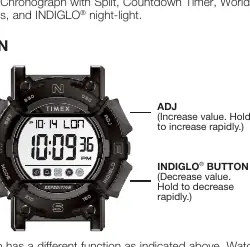
- SET: Save changes and exit setting mode.
- MODE: Proceed to the next step.
- ADJ: Increase value (hold to increase rapidly).
- INDIGLO: Decrease value (hold to decrease rapidly) and activate the night-light.
The watch face will indicate when a button's function changes during setting.
Setting Time, Date, and World Time City
- From Time of Day mode, press and hold SET. The world time City Code will flash.
- Press ADJ to advance or INDIGLO to reverse the setting.
- Press MODE to select DST (Daylight Saving Time) for the city code. Press ADJ to toggle DST on/off.
- Press MODE to cycle through setting Seconds, Hours, Minutes, Year, Month, Date, and Time Format (12HR/24HR).
- Use ADJ or INDIGLO to adjust values.
- Press SET to exit Time Set.
Chronograph
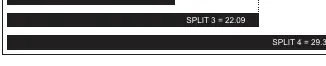
- Press MODE until “SP” appears.
- Press ADJ to start timing.
- Press SET to record a Split time while the stopwatch runs in the background.
- Press SET to release the display and show the current running time.
- Press ADJ to pause timing.
- Press ADJ to resume or SET to reset to zero.
Countdown Timer
- Press MODE until “TMR” appears.
- Press and hold SET to enter setting mode.
- Use MODE to select Hours, Minutes, and Seconds. Use ADJ or INDIGLO to adjust values.
- Press SET to exit setting.
- Press ADJ to start the timer. Press ADJ to pause.
- When the timer is paused, press SET to reset to the original duration.
Alarms
The watch features two daily alarms.
- Press MODE until “AL1” or “AL2” appears.
- Press and hold SET. The Hour digit flashes and the Alarm icon lights up.
- Use ADJ or INDIGLO to adjust the hour.
- Press MODE to set minutes. Use ADJ or INDIGLO to adjust.
- Press SET to exit.
- To turn the alarm or hourly chime on/off, navigate to the alarm mode and press ADJ repeatedly to cycle through options.
INDIGLO Night-Light
Press the INDIGLO button to illuminate the watch display for 2-3 seconds. Pressing any button while the light is on will keep it illuminated.
Water and Shock Resistance
If your watch is water-resistant, the depth rating is indicated on the caseback or watch face.
- Warning: To maintain water resistance, do not press any buttons while underwater.
- The watch is not a diver watch and should not be used for diving.
- Rinse with fresh water after exposure to salt water.
- Watches are designed to pass ISO tests for shock resistance, but avoid damaging the crystal/lens.
Battery
Timex recommends having a retailer or jeweler replace the battery. The battery type is indicated on the caseback. Do not dispose of the battery in fire, do not recharge, and keep away from children.
Manufacturer information
Timex Group USA, Inc.
Practical help
Common problems
Watch is not water-resistant
Ensure the lens, push buttons, and case remain intact. Do not press buttons while underwater.
Alarm not sounding
Ensure the alarm is turned on. Navigate to the alarm mode and use the ADJ button to toggle the alarm icon on.
Battery replacement
Timex strongly recommends having a retailer or jeweler replace the battery. If applicable, press the reset button when replacing.
Before use
- Verify the watch model number.
- Check the water resistance rating on the caseback.
- Understand the function of the four buttons: SET, MODE, ADJ, and INDIGLO.
- Set the correct time, date, and world time city.
Images and diagrams
- The watch features four buttons: SET (save changes), MODE (next step), ADJ (increase value), and INDIGLO (decrease value/light).
Model compatibility
- Not a diver watch; do not use for diving.
- Water resistance is only maintained if the case, lens, and buttons remain intact.

Manual page author
Michael Turner
Technical manual editor
Reviews PDF manuals for structure, safety notes, and practical product details so readers can find the right information quickly.