Electronics / Monitors
User Guide for Timex 11W Small Digital Watch
Quick start guide for the Timex 11W digital watch, covering time and date settings, chronograph operation, alarm configuration, and Indiglo night-light usage.
Table of contents
Quick guide from the manual
This document provides instructions for operating the Timex 11W digital watch. Key functions include time and date display, a 1/100 second chronograph, alarm, hourly chime, 12/24-hour format, and Indiglo night-light.
Time and Date Setting
From the main time screen, press the MODE (C) button three times until the seconds flash.
- Press START (A) to reset seconds to zero.
- Press RESET (D) to advance to minutes, hours, day of the month, month, and day of the week.
- Use START (A) to adjust the selected value.
- When setting hours, cycling through AM/PM will eventually display 'H', indicating 24-hour format.
- Press MODE (C) to exit setting mode.
Chronograph Operation
From the time screen, press MODE (C) once to enter chronograph mode.
- Basic Function: Press START (A) to start/stop. Press RESET (D) to reset to zero.
- Lap Function: Press START (A) to start. Press RESET (D) to view lap time, press again to return to chronograph time. Press START (A) to stop, then RESET (D) to reset.
Alarm Setting
From the time screen, press MODE (C) twice until the alarm hour flashes.
- Use START (A) to set the desired hour.
- Press RESET (D) to advance to minutes.
- Use START (A) to set the minutes.
- Press MODE (C) to exit.
- Arming/Disarming: In time mode, hold RESET (D) and press START (A) to toggle the alarm icon on/off.
- Snooze/Silence: When the alarm sounds, press START (A) for a 5-minute snooze, or RESET (D) to silence.
Additional Features
- Hourly Chime: In time mode, hold RESET (D) and press MODE (C) to toggle the chime on or off.
- Indiglo Night-Light: Press the LIGHT (B) button to activate the backlight. It remains on for approximately 3 seconds after release.
Manufacturer information
Timex Group USA, Inc.
Practical help
Common problems
Alarm is not sounding
Ensure the alarm icon is visible on the display. Hold RESET (D) and press START (A) in time mode to toggle it on.
Watch is in 24-hour format instead of 12-hour
Enter time setting mode (press MODE (C) 3 times), advance through hours until you cycle past AM/PM to the 'H' setting, then continue to return to standard 12-hour format.
Before use
- Verify the watch is in the correct mode (Time, Chronograph, or Alarm).
- Check if the alarm icon is enabled if you intend to use the alarm.
- Test the Indiglo light by pressing button (B).
Specs in practice
- 1/100 second
- The resolution/precision of the chronograph function.
Images and diagrams
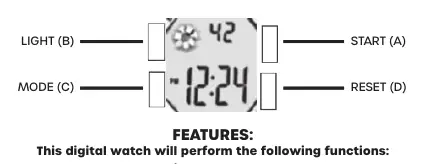
- Button (A) START: Used for starting functions and adjusting values.
- Button (B) LIGHT: Activates the Indiglo backlight.
- Button (C) MODE: Cycles through time, alarm, and chronograph modes.
- Button (D) RESET: Used for resetting functions and advancing through setting fields.
Model compatibility
- This manual applies to the Timex 11W model series.

Manual page author
Michael Turner
Technical manual editor
Reviews PDF manuals for structure, safety notes, and practical product details so readers can find the right information quickly.