Lighting / Fixtures
User Manual for TRIO Inga LED Ceiling Light 6200104XX
Quick guide for the TRIO Inga LED ceiling light (6200104XX). Learn how to operate the light using the wall switch or remote control, pair the remote, and understand light modes.
Quick answers from the manual
Quick answer
- The TRIO Inga LED ceiling light can be controlled via a wall switch or the included remote. The wall switch cycles through light modes, while the remote allows for precise dimming, color temperature adjustment, and mode selection. p. 5, 6, 7, 8
Key actions
- Pairing the remote control p. 5, 6, 7, 8
First start
- Initial setup and memory function p. 5, 6, 7, 8
Problems and fixes
Remote control not responding
Re-pair the remote by following the pairing procedure.
p. 5, 6, 7, 8Technical specifications
| Parameter | Value | Meaning | Pages |
|---|---|---|---|
| Power | LED/60W | Light power consumption | p. 2 |
| Remote Battery | 2 x AAA 1.5V | Required batteries for remote | p. 2 |
Where to find it in the PDF
- Safety Instructions p. 1
- Installation and Technical Specs p. 2
- Remote Control Operation p. 4, 5, 6, 7
Table of contents
Manual images
Click an image to enlargeQuick guide from the manual
The TRIO Inga LED ceiling light (6200104XX) can be operated via a standard wall switch or the included remote control. The light features a memory function that saves the last used setting. To ensure the memory function works correctly, wait at least 5 seconds between turning the light off and on again.
Operation without remote control
You can cycle through the following light modes using your wall switch by turning the light off and on quickly:
- 100% cold white illumination (6500K)
- 100% warm white illumination (3000K)
- 100% brightness (4000K)
- Night light
Operation with remote control
The remote control provides more precise control over the light settings:
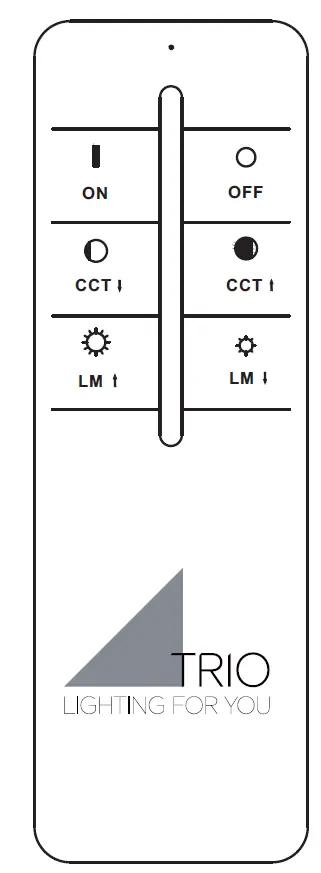
- On/Off: Dedicated buttons for turning the light on and off.
- Brightness (LM): Adjust brightness in stages. Press briefly to change levels, or hold to reach maximum or minimum brightness.
- Color Temperature (CCT): Adjust color temperature in stages. Press briefly to change levels, or hold to reach the warmest or coldest setting.
- Mode: Cycles through the available light modes (Cold white, Warm white, 4000K, Night light).
- Night light: Dedicated button for night light mode.
Remote control pairing
If the remote control is not responding, follow these steps to pair it:
- Disconnect the light from the power supply for 10 seconds.
- Switch the light on using the wall switch.
- Immediately press the "ON" button on the remote control.
- The light will flash several times after about 4 seconds to confirm successful programming.
To unpair the remote, follow the same procedure but press the "OFF" button instead of the "ON" button.
Technical specifications
- Frequency: 2.4GHz
- Remote Power:< 1 Watt
- Batteries: 2 x AAA 1.5V
- Voltage: 230V~50Hz
- Power: LED/60W
Practical help
Common problems
Remote control not responding
Re-pair the remote by disconnecting the power for 10 seconds, then turning it on and pressing the 'ON' button immediately.
Light settings reset unexpectedly
Ensure the interval between turning the light off and on is at least 5 seconds to allow the memory function to save the state.
Before use
- Ensure the light is disconnected from the mains for 10 seconds before starting the pairing process.
- Check that the remote control has 2x AAA 1.5V batteries installed.
- Verify the wall switch is functional.
- Ensure the light is properly installed according to the wiring diagram.
Images and diagrams
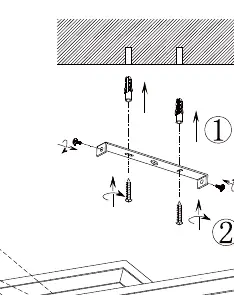
- The wiring diagram shows the connection to the mains (L and N) and the mounting bracket installation.
- The remote control diagram illustrates the buttons for On/Off, Brightness (LM), Color Temperature (CCT), and Mode selection.
Model compatibility
- Synchronous control of multiple lights is not supported.
- The light is designed for 230V~50Hz power supply.

Manual page author
Michael Turner
Technical manual editor
Reviews PDF manuals for structure, safety notes, and practical product details so readers can find the right information quickly.